Protect Research: GreenCube, an Offline Elicit Alternative (€9.99)

If you need an offline alternative that reads local PDFs and images without touching the cloud, GreenCube fits the brief. It runs local inference on your Windows PC, supports PDF and image analysis through its the bigger model, and costs a one-time €9.99 / $9.99 with a 15-day refund. You still download a model once and sign in briefly to verify your license, but your chats and documents stay on the machine.
TL;DR:
- GreenCube offers a fully local PDF and image analysis tool that runs inference on Windows PCs with no cloud data transfer, ensuring sensitive information remains on-device.
- Local AI solutions like RAGStack and LocalRAG demonstrate that offline retrieval architectures can handle moderate document sets with low latency and proper accuracy, ideal for confidential work.
- A vision-capable, all-rounder model requires at least 8GB of RAM and a 4GB model download, with performance affected by document complexity and hardware, especially for image processing.
- Setting up GreenCube involves a simple purchase, model download, OCR for scanned documents, and local indexing, with most friction coming from initial model installation.
- Cloud AI is still preferable for large-scale or high-performance tasks, but offline tools excel when data privacy, governance, and offline operation are priorities.
Table of Contents
- Why a Fully Local Desktop AI Matters for Sensitive Documents
- How Do You Choose a Local AI for PDFs and Images?
- What Hardware Do You Need for Offline Document AI on Windows?
- How Do You Set Up a Local AI Tool Step by Step?
- GreenCube: Built for This Exact Job
- Publisher Perspective: When Offline Actually Wins
- Sources
- FAQ
Why a Fully Local Desktop AI Matters for Sensitive Documents
Cloud AI providers routinely reserve the right to retain and reuse whatever you feed them for model training. That is not a rare edge case buried in a terms-of-service page. Institutional guidance on cloud AI and research data warns that unpublished research, patient notes, or client files can end up inside a company's training pipeline the moment they are uploaded. Universities have taken notice: many now explicitly advise against using commercial AI platforms as primary repositories for primary research materials, and guidance from the University of Göttingen recommends locally hosted models whenever institutional control matters.
The good news: local isn't a compromise anymore. A project called RAGStack demonstrates a fully local retrieval architecture that runs FAISS search and LLM inference entirely offline, with practical latency on ordinary CPU hardware. A related system, LocalRAG, pairs OCR and hybrid retrieval to answer questions across PDF sets without ever calling an external API.
Running everything locally brings governance benefits that cloud tools can't match:
- Auditability: every document that goes into the index stays traceable, since nothing leaves the device.
- Data residency: sensitive files never cross a jurisdictional boundary you didn't choose.
- Predictable behavior: the model doesn't change behavior mid-project the way a cloud API can after a silent update.
Pro Tip: Check institutional data policies before uploading any unpublished thesis chapter or client file to a cloud AI, even a "trusted" one. Local tools sidestep that question entirely.
Cloud still wins for tasks local hardware can't handle: massive corpora, frontier-model reasoning, or workloads that need far more compute than a laptop can offer.
How Do You Choose a Local AI for PDFs and Images?
Eliciting the right alternative starts with a short checklist, not a feature race. Here's the order that actually matters:
- Confirm inference is local. Ask exactly what the app does at first launch: does it call an external server for chat, or only for licensing? A vendor's privacy policy should spell out what leaves the device and when.
- Match document type to capability. Born-digital PDFs are easy for any tool. Scanned PDFs need OCR, and photographs or diagrams need a vision-capable model. Confirm both before you buy.
- Weigh model trade-offs. Text-only "quick" models are fast and light but can't read images. Vision-capable models are slower and heavier but unlock document scans and photos.
- Check the ingestion workflow. Does the app show citations back to the source page, or just paraphrase without grounding? Export formats matter too if you need to hand off study guides or notes.
- Read the licensing terms. A one-time fee with a clear refund window beats a subscription with vague renewal language. Factor in the one-time model download too. It can run into several gigabytes.
Trust signals separate serious tools from vaporware: does the vendor name its actual model (not just "advanced AI"), state its size, and publish a real RAM minimum? Vague marketing copy is the biggest red flag in this category. Methods like OnPrem.LLM show what a properly documented local toolkit looks like: named backends, disclosed pipelines, and no hidden API calls.
What Hardware Do You Need for Offline Document AI on Windows?
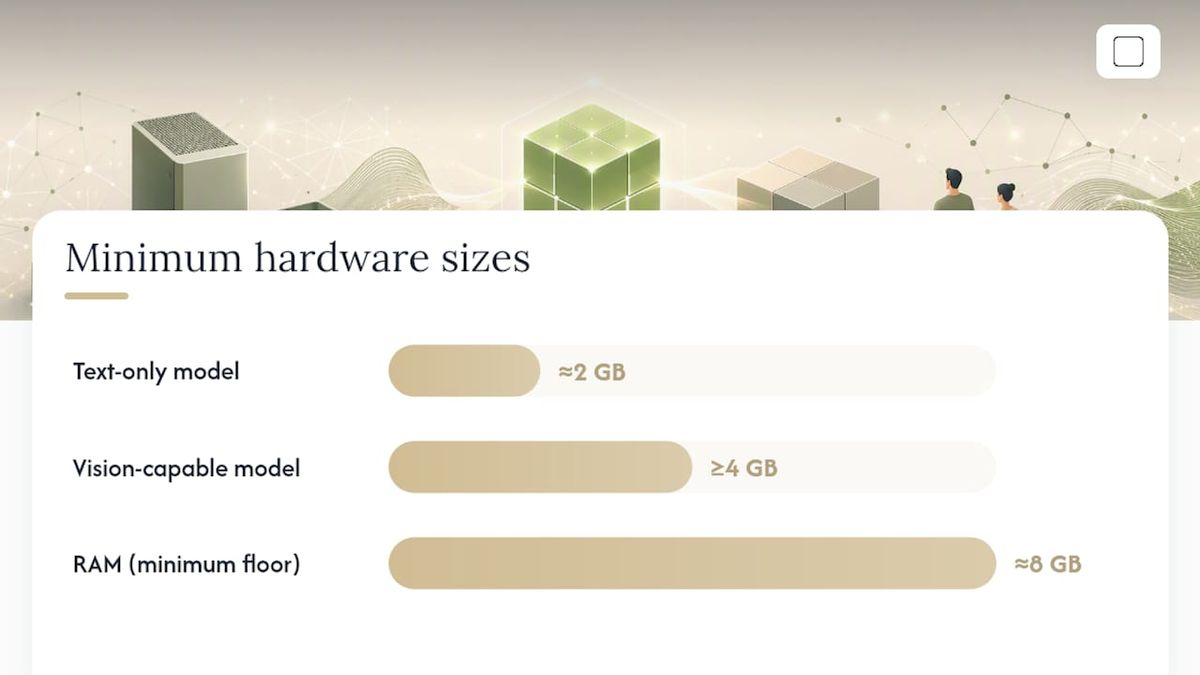
Every local AI setup starts with a model download, and that download size dictates everything downstream. Expect roughly 2GB for a compact text-only model and 4GB or more for a vision-capable model that can read scanned pages and photos. There's no way around this step. Offline operation always begins with pulling weights onto your disk once.
RAM sets the real ceiling on performance:
- Small text-only models run acceptably on modest systems with basic RAM.
- Vision-capable, multi-purpose models need roughly 8GB of RAM as an absolute floor, and that floor can still feel tight on laptops with limited memory bandwidth.
- Local indices and embeddings add extra disk use beyond the model itself, often several gigabytes for a large document set.
CPU-only setups handle small to moderate PDF collections fine. LocalRAG's benchmarks show CPU-based offline retrieval delivering low-latency answers for moderate corpora without needing a GPU. Larger collections or frequent reindexing benefit from GPU acceleration, though it's not a requirement to get started.
Under the hood, local retrieval typically pairs a vector index like FAISS with a local embedding model. Latency comes mostly from three factors: document chunk size, how many chunks you retrieve per query, and whether the CPU or GPU handles the embedding step. A step-by-step local RAG walkthrough confirms the biggest bottleneck isn't runtime performance. It's the initial model download.
How Do You Set Up a Local AI Tool Step by Step?
Setting up an offline document AI follows a predictable sequence, and knowing it ahead of time avoids most first-run confusion.
- Pre-check your system. Confirm Windows 10 or 11, free disk space for the model and index, and back up any sensitive documents before ingestion.
- Complete purchase and license verification. Checkout is a one-time transaction; signing in with Google or Microsoft afterward verifies your license only. Your chat history and documents are never part of that verification step.
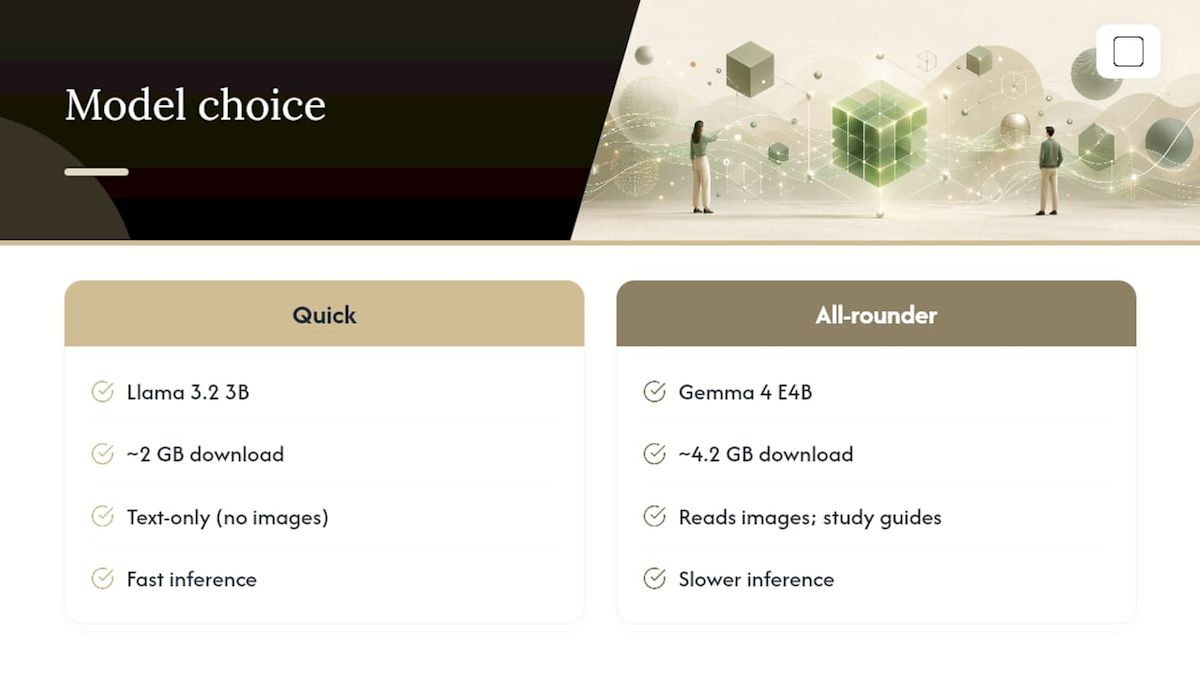
- Pick your model. Choose a fast, text-only model if you're working with typed PDFs, or a slower, vision-capable model if you need to parse scanned pages or images.
- Let the download finish. This happens once per model choice, not per session.
- Ingest your files. Run OCR on scanned documents, let the app build its local index, then run a first test query and check that answers cite the right source pages.
- Tune performance if needed. Smaller chunk sizes improve precision on dense technical PDFs; a higher Top-K setting retrieves more context per query at the cost of speed. Reindex whenever you add a large batch of new files.
Pro Tip: Run one test query against a document you already know the answer to. If the citation points to the wrong page, adjust chunk size before you trust it on real work.
Most friction shows up in step 4, not step 5. Once the model is on disk, everything downstream runs at a predictable, offline pace.
GreenCube: Built for This Exact Job
GreenCube is a Windows desktop app built with Tauri, Rust, and React, using llama.cpp for local model inference. That stack keeps chat and document processing fully on-device, with no server round-trip for the actual analysis work.
Pricing is a one-time €9.99 / $9.99, with a 15-day refund if it doesn't fit your workflow. It runs on Windows 10 and 11 (a Mac version is in development). GreenCube picks one of two local models for your PC: the smaller model (Gemma 4 E2B, about 2.6 GB, cannot read images) or the bigger model (Gemma 4 E4B, about 4.2GB, reads images and builds study guides, slower, and needs 8GB of RAM as a minimum floor, not a comfort zone). Older machines can still struggle with the bigger model even at that minimum.
Sign-in through Google or Microsoft is required only to verify your one-time license. Your document content and chat history are processed locally only, and checkout itself runs through Stripe. If you're comparing GreenCube against the broader field of offline AI setups for Windows or researching what actually matters for offline AI, the short version is this: pick your model, download it once, and start querying your own files. Get GreenCube for €9.99 / $9.99 and try it against a real PDF from your own work today.
Publisher Perspective: When Offline Actually Wins
Local tools earn their keep with anyone handling material that shouldn't leave a laptop: a researcher with unpublished data, a student working through sensitive coursework, or a professional reviewing legal or clinical files that carry real confidentiality obligations. For those readers, offline isn't a preference. It's the only defensible choice.
Cloud-first tools still make sense for genuinely massive corpora or reasoning tasks that need frontier-model scale. No local setup on a laptop will out-reason a large cloud model on that kind of workload, and pretending otherwise does readers a disservice.
Our advice for anyone starting out: try a fast, text-only model like Quick from GreenCube against a small batch of your own PDFs first. Upgrade to a vision-capable model only once you actually need image parsing or study-guide generation. Most people overestimate how much model they need on day one.
— GreenCube
Sources
- Researchers cautioned about cloud AI and research-data risks — institutional guidance
- RAGStack: a fully local RAG architecture for offline document intelligence (TechRxiv)
- LocalRAG: a fully local Retrieval-Augmented Generation framework for PDFs (IJCATR)
FAQ
Is GreenCube fully offline?
Chat and document analysis run entirely on your device using llama.cpp for local inference. Sign-in through Google or Microsoft is required only to verify your one-time license.
Which GreenCube model reads images?
Only the bigger model (Gemma 4 E4B, about 4.2GB) reads images and builds study guides. The smaller model (Gemma 4 E2B, about 2.6 GB) is text-only.
How much RAM do I need for local document AI?
Text-only models run on modest systems, but a vision-capable model like GreenCube's bigger model needs roughly 8GB of RAM as a strict minimum, and older hardware can still run slowly at that floor.
Do I need an internet connection to use these tools?
You need internet once to download the model and verify your license at purchase. After that, chat and document analysis work fully offline.
Are fully local RAG tools accurate enough for real research?
Yes, for moderate-scale PDF collections. Research on LocalRAG and RAGStack shows CPU-based local retrieval can deliver low-latency answers without any cloud dependency.
Recommended
- No Rate Limit AI for Privacy-First Users: GreenCube
- Save $200+ a Year Choosing GreenCube vs Claude for Private Offline AI
- Top 3 Offline AI Solutions: Ollama Alternatives 2026
- Secure AI on Your PC: A Private, Offline Buyer's Guide
Your own AI, on your own PC
GreenCube runs on your computer: no usage limits, no subscription, works without internet. €9.99, paid once.
Get GreenCube