Save $200+ a Year Choosing GreenCube vs Claude for Private Offline AI
For privacy-first personal use, GreenCube wins on ownership and offline access, while Claude wins on raw reasoning power. If your priority is keeping documents and conversations off someone else's server and paying once instead of forever, GreenCube is the better fit. If you need the deepest possible reasoning for complex coding or research and don't mind a monthly bill, Claude still leads.
TL;DR:
- GreenCube offers full offline access and keeps all data local, but its reasoning strength is limited compared to cloud-based models like Claude.
- The bigger model processes images and builds study guides but requires at least 8GB of RAM, whereas the smaller model is and more suitable for older or limited hardware.
- GreenCube costs a one-time €9.99/$9.99 fee, while Claude's subscription tiers range from $17 to $25 monthly, making GreenCube more economical for occasional or privacy-focused users.
- Local AI like GreenCube is ideal for private document handling and unreliable internet situations, but cloud AI outperforms locally hosted models in deep reasoning tasks.
- Setup involves purchasing a license, verifying with Google or Microsoft, choosing the appropriate model, and downloading it once, after which full offline use is possible.
Table of Contents
- GreenCube vs Claude: How Local and Cloud AI Actually Differ
- Is GreenCube Really Private? What Data Actually Leaves Your Device
- Which Model and Hardware Do You Actually Need?
- What Does GreenCube Actually Cost Compared to a Subscription?
- Local-First or Cloud-First: How to Pick the Right AI for You
- Why We Built an Offline-First Alternative to Subscription AI
- Ready to Try GreenCube? Here's How to Get Started
- Sources
- FAQ
GreenCube vs Claude: How Local and Cloud AI Actually Differ
The core split between GreenCube and Claude comes down to where the computing happens. GreenCube runs entirely on your Windows PC using a downloaded model, so the processing happens on your own hardware. Claude runs on remote servers, which means every message travels over the internet to reach a much larger model than any laptop could realistically run.
That architecture difference cascades into everything else. Cloud models like Claude tend to deliver stronger long-form reasoning and coding performance, since they're not limited by what fits in your computer's memory. Local apps trade some of that horsepower for something cloud tools can't offer: your chats stay on your device, and there's no internet requirement once setup is done.
Document and image handling is where the trade-off gets specific. GreenCube's bigger model can read images and build study guides from documents, but its the smaller model is and can't process images at all. Claude handles both text and images natively across its tiers, plus browser and file integrations that a local app simply doesn't attempt to replicate.
A few practical differences worth weighing before you pick a lane:
- Internet dependency: GreenCube works on a plane, in a basement office, or during an outage. Claude does not.
- Response latency: local inference speed depends on your hardware, not a server queue, but a cloud model with data center GPUs usually responds faster on complex prompts.
- Reasoning depth: Claude's larger models handle multi-step analysis and long documents with more consistency than a 3B or 4B parameter model running locally.
- Data exposure: local chat processing never transmits your conversation content; cloud chat processing does, by design.
Pro Tip: If you're not sure which category fits your habits, track a week of your own AI usage. If most of it is drafting, summarizing, or asking questions about your own files, a local tool covers it. If you're regularly asking for deep research synthesis or production-grade code, that's where cloud reasoning still pulls ahead.
Is GreenCube Really Private? What Data Actually Leaves Your Device
GreenCube's chat and document processing happens locally, and that's the specific claim worth verifying rather than taking on faith. The model runs on your machine, so the text you type and the documents you upload never get transmitted anywhere for analysis.
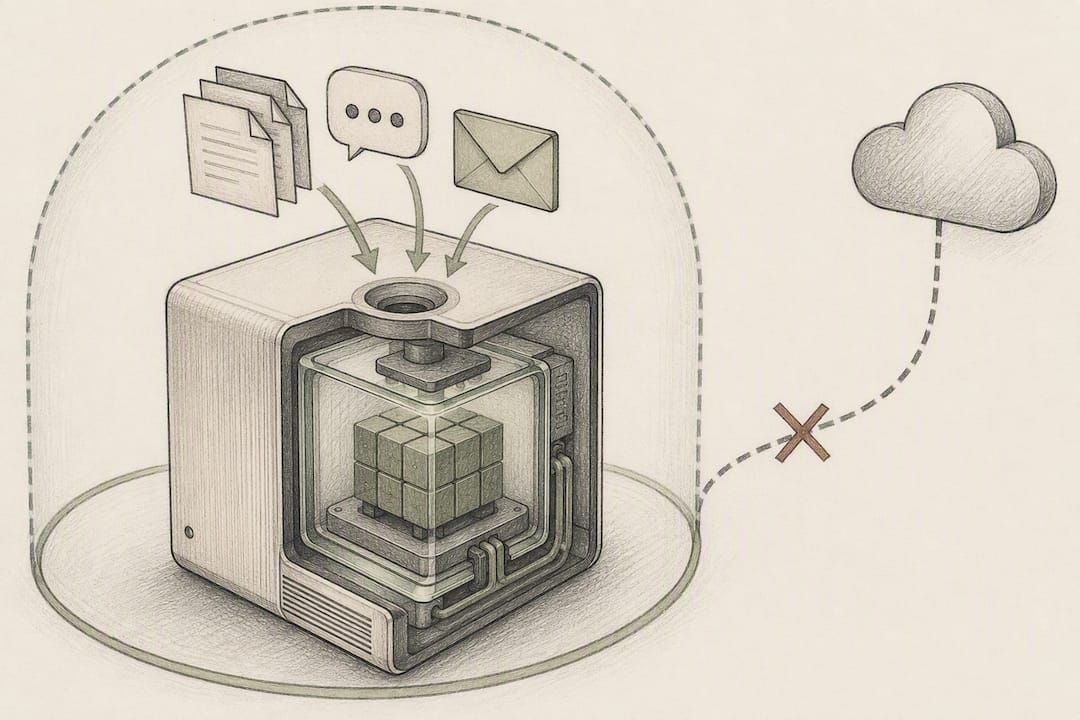
Two things do leave your device, and it's worth being upfront about both. Signing in through Google or Microsoft is required once, but only to verify your one-time license, not to sync your conversations. Checkout runs through Stripe, which means payment details go through a standard payment processor the same way they would for any other software purchase. Neither step touches your chat content or your documents.
Here's how to confirm this for yourself rather than take a brand's word for it:
- Open your system's network monitor while chatting with GreenCube and confirm no outbound traffic spikes during a conversation.
- Check that the downloaded model file (roughly 2GB or 4.2GB depending on which you picked) sits in local storage, not a temp cache tied to a server call.
- Review the app's permissions in Windows settings to see what it's actually allowed to access.
Be cautious of any AI app, GreenCube included, that adds an optional cloud feature later. Hybrid features (like a cloud fallback for harder queries) change the privacy math the moment they're turned on, so always check what a toggle actually does before enabling it. Partner guides on on-device privacy verification walk through similar checks for other private AI apps if you want a second methodology.
Pro Tip: Turn off your Wi-Fi entirely for five minutes and keep chatting. If GreenCube keeps responding normally, that's a direct, no-guesswork confirmation the chat itself needs no connection.
Which Model and Hardware Do You Actually Need?
GreenCube offers two models at setup, and the choice affects both speed and what the app can do for you. The smaller model uses Gemma 4 E2B, downloads at around 2GB, and handles text fast but can't read images. the bigger model uses Gemma 4 E4B, downloads at around 4.2GB, reads images, and builds study guides and documents, at the cost of slower responses.
Hardware matters more with the bigger model. the bigger model needs 8GB of RAM at minimum, and that's a floor, not a comfort zone. On an older laptop with 8GB total, expect to notice the fans working and responses lagging, especially with other programs open.
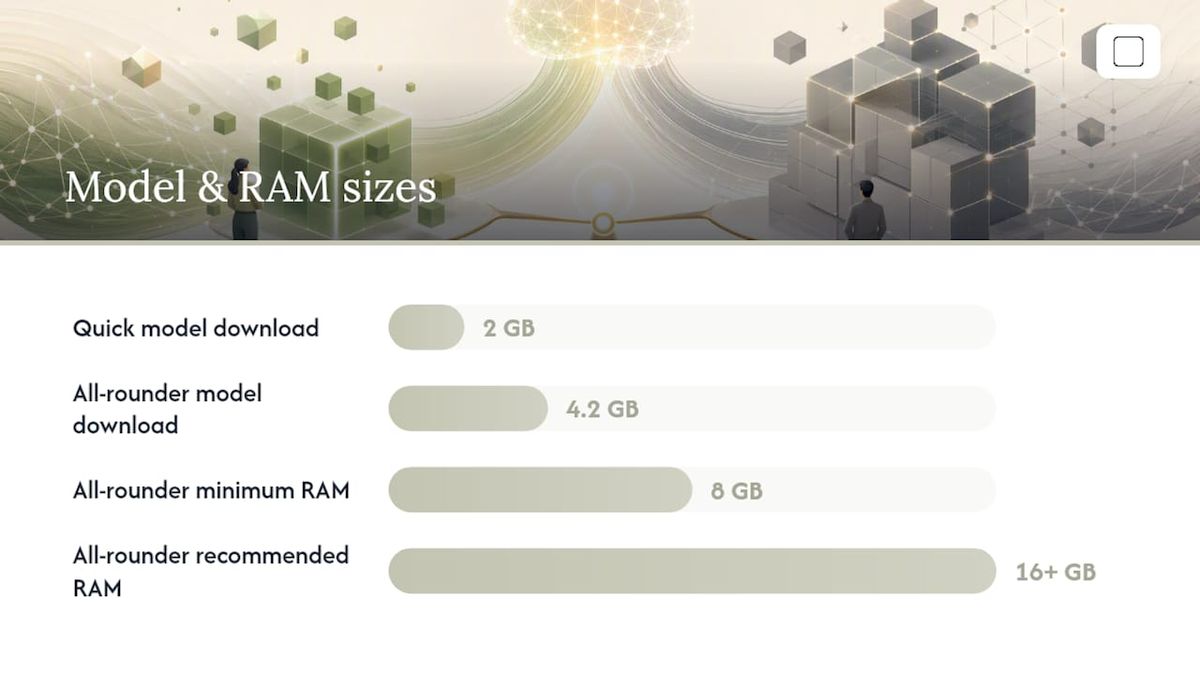
A quick reality check on numbers: a 3B parameter model at 2GB is small enough to run smoothly on nearly any Windows 10 or 11 machine from the last several years. A 4.2GB model asks more of your processor and memory simultaneously, which is why the RAM guidance matters.
Use this quick checklist to decide:
- Need speed for quick text tasks like drafting emails or brainstorming? Pick the smaller model.
- Need to analyze scanned PDFs, photos, or build study guides from images? Pick the bigger model, and confirm you have at least 8GB RAM before installing.
- Working on an older laptop with limited storage? Quick's smaller footprint is the safer bet.
- Have a modern machine with 16GB or more? the bigger model runs noticeably better with the extra headroom.
What Does GreenCube Actually Cost Compared to a Subscription?
GreenCube costs €9.99 / $9.99, paid once, tax-inclusive, with a 15-day refund if it doesn't fit your workflow. There's no recurring charge after that purchase, and no tier structure to navigate.
Compare that to Claude's Pro and Team subscription tiers, which run roughly $17 to $25 a month depending on billing cycle and seat count. Over a year, that's $200 or more for one person, every year, indefinitely, as long as you keep using it.
The math changes depending on how you actually use AI:
- Occasional offline user (a few chats a week, document review here and there): a one-time $9.99 purchase pays for itself almost immediately against even a single month of subscription pricing.
- Daily heavy user with complex reasoning needs: a subscription may still make sense if you're regularly leaning on capabilities a local model can't match.
One practical note: downloading your chosen model is part of the one-time purchase, and future app updates may occasionally require a small additional download, but there's no recurring model or feature fee layered on top of the initial license.
Local-First or Cloud-First: How to Pick the Right AI for You
Three questions cut through most of the confusion. Do you need this to work without internet? Are you handling sensitive documents you don't want touched by a third-party server? Do you need top-tier reasoning for coding, research, or long-form analysis on a regular basis?
If the first two questions dominate your answer, local-first wins. If the third one is your daily reality, cloud-first still has the edge.
- The student with sensitive coursework and spotty campus Wi-Fi: local-first. Offline access and private document handling matter more than frontier-level reasoning for essay feedback.
- The freelance writer drafting client work on a laptop in cafes: local-first, especially with client confidentiality concerns and no guaranteed connection.
- The developer debugging complex, multi-file codebases daily: cloud-first, since raw reasoning depth at that scale still favors larger cloud models.
A few more markers worth checking:
- Handle medical, legal, or financial documents regularly? Local-first reduces exposure by keeping analysis on-device.
- Need plugin integrations across dozens of third-party tools? Cloud-first assistants generally have broader ecosystems.
- Working somewhere with unreliable internet? Local-first is the only one that keeps working.
For a longer walkthrough of buyer scenarios, our guide to private AI assistants breaks down more edge cases than fit here.
Why We Built an Offline-First Alternative to Subscription AI
GreenCube exists because ownership and privacy shouldn't require a monthly bill. The philosophy is simple: pay once, own the software, keep your data on your machine, and use it without a connection when you need to.
We're not going to pretend a 3B or 4B parameter model beats a frontier cloud model at raw reasoning. It doesn't, and experts generally agree cloud assistants still lead on complex, multi-step synthesis. What GreenCube offers instead is control: no usage caps, no data leaving your machine during chat or document analysis, and a price you pay exactly once. If that trade-off doesn't fit your workflow, the 15-day refund window means testing it costs you nothing but time.
— GreenCube
Ready to Try GreenCube? Here's How to Get Started
GreenCube gives you an AI you actually own instead of one you rent every month. Where Claude asks for a recurring subscription, GreenCube asks for one payment, and then it's yours, running on your machine, for as long as you use it.

Getting started takes four steps. First, buy the license for €9.99 / $9.99, a one-time charge with a 15-day refund window if it's not for you. Second, sign in with Google or Microsoft to verify that license, which is the only moment any account data touches a server. Third, pick your model: the smaller model for chat, or the bigger model if you need image and document analysis and have at least 8GB of RAM. Fourth, download that model once, and you're set to chat completely offline from then on.
Right now, GreenCube runs on Windows 10 and 11, with a Mac version in development. Head to the GreenCube homepage to see the full breakdown before you commit, or go straight to checkout if you already know it fits.
FAQ
Is GreenCube Really Free of Cloud Dependency?
Chat and document processing run fully offline once set up, but signing in with Google or Microsoft to verify your one-time license through Stripe both require a connection at those specific moments.
Can GreenCube Read Images Like Claude Can?
Only the bigger model (Gemma 4 E4B) reads images and builds documents from them; the smaller model (Gemma 4 E2B) is .
How Much Does GreenCube Cost Compared to Claude's Subscription?
GreenCube is a one-time purchase of €9.99 / $9.99 with a 15-day refund, while Claude's subscription tiers run roughly $17 to $25 per month on an ongoing basis.
Does GreenCube Work Without Internet Access?
Yes, once you've downloaded your chosen model, chat and document analysis work with no internet connection at all.
Which Is Better for Coding and Complex Research, GreenCube or Claude?
Claude generally handles complex, multi-step reasoning and coding tasks more capably, since its cloud models aren't limited by local hardware the way GreenCube's on-device models are.
Recommended
- No Rate Limit AI for Privacy-First Users: GreenCube
- Best AI Without Subscription: Own It, Don't Rent It
- Secure AI on Your PC: A Private, Offline Buyer's Guide
- Offline AI Setup on Windows: Private, Local, and Easy
Your own AI, on your own PC
GreenCube runs on your computer: no usage limits, no subscription, works without internet. €9.99, paid once.
Get GreenCube