Own a Private Offline Assistant on Windows, Unlimited AI for €9.99
Here, "unlimited AI" means a local Windows desktop assistant that runs downloaded models on your own PC for private, unrestricted use after a one-time purchase. GreenCube fits this definition directly: no subscription, no chat logs sitting on a server, no usage caps. The trade-offs are real, though. You still download a model (roughly 2GB to 4.2GB), sign in through Google or Microsoft once to verify your license, and the model you pick decides whether it can read images at all.
TL;DR:
- Running a local AI requires at least 8GB of RAM, but optimal performance benefits from 16GB or more for larger models.
- Models that fit entirely into VRAM, ideally 24GB or more, handle faster response times, especially on GPUs, while smaller models depend more on CPU and RAM.
- The setup involves downloading a model ranging from 2GB for text-only use to over 4GB for PDF and image reading, with installation taking under an hour on Windows.
- Data stays on the device, as local inference removes third-party risks, but basic security hygiene remains essential to protect sensitive information.
- Cloud AI remains necessary for complex reasoning, web data retrieval, or serving multiple users simultaneously, making hybrid use the most practical approach.
Table of Contents
- What Does an Offline Unlimited AI Actually Do?
- What Does Your Windows PC Need to Run This?
- Does a Local AI Assistant Keep Your Data Private?
- How Do You Install and Set Up an Offline AI on Windows?
- When Should You Still Use Cloud AI Instead?
- Why GreenCube Built a Privacy-First Local Assistant
- Get Offline, Unlimited AI on Windows Today
- Sources
- FAQ
What Does an Offline Unlimited AI Actually Do?
An offline AI assistant like this runs entirely on hardware you own. Once the model is downloaded, you can chat, summarize, draft, and analyze documents without an internet connection or a monthly bill tied to how much you type.
The practical difference from a cloud chatbot is usage. There's no per-token metering, no "you've hit your limit for today" wall, and no rate throttling designed to push you toward a paid tier. You already paid once. Whether the model supports reading PDFs or images depends entirely on which one you loaded, not on the app itself.
This setup fits some people far better than others:
- Students who need to analyze lecture PDFs or draft papers without sending coursework to a third-party server.
- Professionals handling contracts, medical notes, or financial documents where privacy policy language isn't reassuring enough.
- Writers and freelancers who want a drafting partner that works on a plane or in a coffee shop with no Wi-Fi.
- Anyone privacy-conscious who just doesn't want a permanent transcript of their questions living on someone else's servers.
It's a poor fit if you need frontier-level reasoning on hard technical problems, live web browsing, or the ability to serve dozens of simultaneous users. That's still cloud territory.
What Does Your Windows PC Need to Run This?
Your graphics card's VRAM matters more than almost anything else in this equation. When a model fits entirely inside VRAM, it runs fast because the GPU handles every calculation in dedicated, high-speed memory. When it doesn't fit, the system offloads part of the model to your CPU and regular RAM, and speed drops sharply. This single detail explains most of the "why is my local AI so slow" complaints people run into.
Here's a practical rundown for setting expectations before you install anything:
- RAM: 8GB is the minimum for small models, though performance may be limited. It works, but expect sluggish performance on anything but the lightest models, especially on older laptops. More RAM, such as between 16GB and 32GB, is preferable for smoother multitasking.
- VRAM: Larger, more capable models want 24GB or more of dedicated graphics memory for interactive speed. Below that, you're relying more heavily on CPU offload.
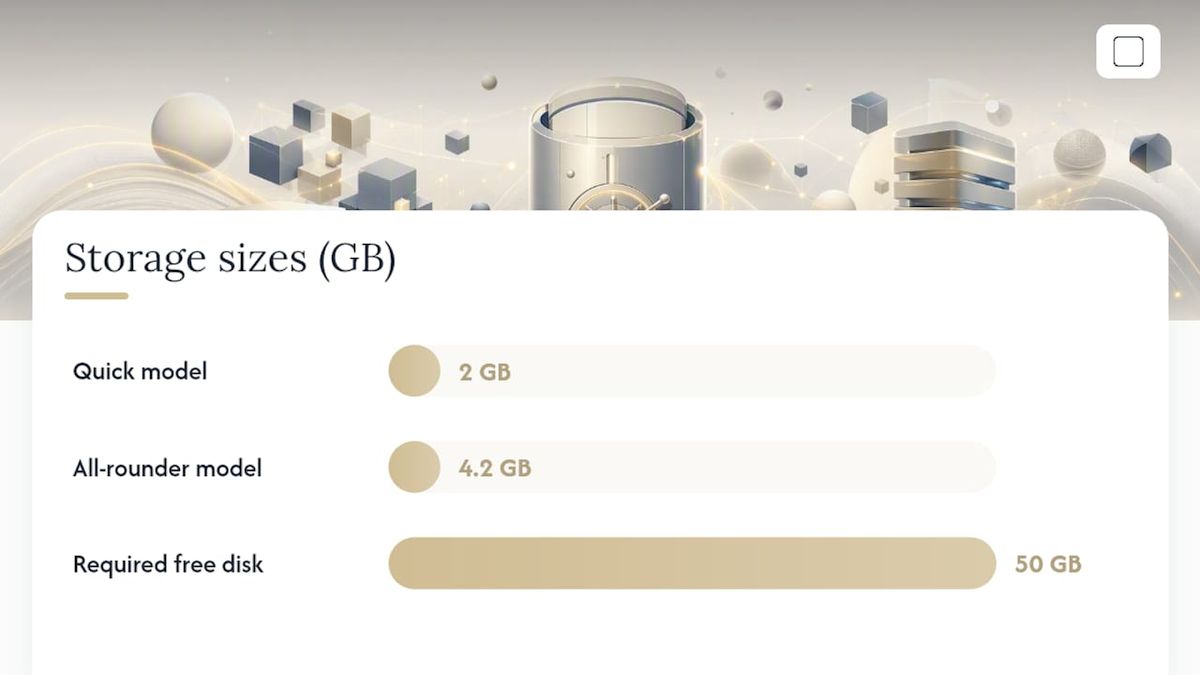
- Storage: An NVMe SSD with at least 50GB free is a sound baseline. Model files load faster from NVMe than from a traditional hard drive, and quantized model sizes vary widely: a 7B model runs around 4 to 6GB, a 27B to 30B model can run 15 to 20GB, and a 70B model can exceed 40GB, according to Llmhardware.
- CPU: A modern multi-core processor helps, but it's a backup plan for when VRAM runs short, not a primary performance driver.
Model file sizes tell the real story here. GreenCube's smaller model (Gemma 4 E2B) runs about 2GB and handles plain text only. The bigger model (Gemma 4 E4B) runs closer to 4.2GB, reads images and PDFs, and asks more of your RAM in exchange for that capability.
If you're on a standard laptop without a dedicated GPU, start with something in the 7B to 8B parameter class rather than reaching for the biggest model available. Upgrade only once you hit an actual wall, like needing longer context windows or more nuanced drafting. For a deeper breakdown of which model class suits which hardware tier, GreenCube's guide to local AI models walks through the trade-offs in more detail.
Does a Local AI Assistant Keep Your Data Private?
Chat conversations and document processing stay on your device when you're running a local model. That's the entire premise. Local inference tools shift the trust boundary away from a remote server and onto hardware you control, which removes the risk of a third party quietly storing or scanning your prompts, as Internals Decoded's breakdown of local inference tooling explains.
Signing in through Google or Microsoft is a separate step, and it exists for one reason: to verify that your license is legitimate. No chat content or document uploads travel through that sign-in. Checkout itself runs through Stripe, which is standard for handling payment, but again, it's unrelated to what happens inside your conversations once the app is running.
Running AI locally doesn't mean you can skip basic security hygiene. A short checklist worth following:
- Turn on full-disk encryption (BitLocker on Windows) so a lost or stolen laptop doesn't expose your document history.
- Use a secured user account with a real password, not an auto-login guest profile.
- Never expose your local inference server's ports to the public internet; tools built on llama.cpp are meant to run locally, not as an open endpoint anyone can reach.
- Keep backups of important chats or generated documents encrypted and stored locally rather than in an unsecured cloud folder.
Pro Tip: If you handle client or patient records, local hosting removes the third-party transfer risk, but you may still need internal documentation, consent notices, or a privacy impact assessment depending on your industry's rules. Local doesn't mean regulation-free.
How Do You Install and Set Up an Offline AI on Windows?
Getting a local assistant running takes less time than most people expect. A basic llama.cpp based setup can be operational in under an hour, according to a step-by-step llama.cpp tutorial from Tech Insider, and GreenCube's packaged installer trims that further by handling the technical scaffolding for you.
Before you start, confirm three things:
- You're running Windows 10 or Windows 11 (Mac support is still in development).
- You have at least 50GB of free disk space, ideally on an NVMe SSD.
- If you have a dedicated GPU, your drivers are current, since that affects inference speed noticeably.
From there, the setup path looks like this:
- Download the GreenCube installer and run it.
- Complete the one-time purchase and sign in via Google or Microsoft to activate your license.
- Choose your model: Quick (fast, text-only, roughly 2GB) or the bigger model (slower, reads images and PDFs, roughly 4.2GB, needs more RAM).
- Let the model download completely. This depends on your internet speed but typically takes a few minutes to under half an hour.
- Open the app, run a test chat, and if you picked the bigger model, try importing a sample PDF or image to confirm document reading works.
If performance feels sluggish, check your available RAM first. That's the usual culprit on lower-spec machines. Application logs are typically stored in the app's local data folder if you need to troubleshoot a stalled download or crash. For a more detailed walkthrough of installation and configuration, GreenCube's install local AI tutorial covers the deeper settings.
When Should You Still Use Cloud AI Instead?
Local models earn their keep on privacy and offline reliability, but they're not a wholesale replacement for cloud AI in every scenario. Cloud frontier models still handle very hard, multi-step reasoning better, pull live information from the web, and scale to serve many users at once without breaking a sweat, a distinction covered well by AI World Today's comparison of local and cloud AI.
Speed is the other honest limitation. CPU-only inference works, but it's noticeably slower than GPU-accelerated inference, and larger models need real VRAM to feel responsive rather than sluggish.
A sensible approach for most professionals:
- Use local AI for daily private work: drafting, document review, note-taking, brainstorming.
- Keep a cloud option in reserve for the rare case that genuinely needs frontier-level reasoning or current web data.
- Don't expect a 3B or 4B parameter local model to match what a massive cloud model can do on a genuinely hard research question.
That hybrid mindset, local by default with cloud as a fallback, tends to give privacy-conscious users the best of both without pretending local hardware can do everything.
Why GreenCube Built a Privacy-First Local Assistant
GreenCube exists because most AI tools ask you to trade privacy for convenience, and that trade never sat right with us. We built a Windows app around a one-time price, offline-first behavior, and zero pretense that a 3B or 4.2GB local model rivals a massive cloud system. It doesn't, and we'd rather say that plainly than oversell it.
The biggest win goes to anyone tired of subscription creep and server-side data logging. Start with the smaller model if you mainly need text help, and upgrade to the bigger model the moment you need it to actually read a document.
— GreenCube
Get Offline, Unlimited AI on Windows Today
GreenCube gives you a Windows AI assistant you actually own instead of one you rent month after month. That's the real contrast with cloud subscriptions: pay once at €9.99 / $9.99, and there's no recurring charge eating into your budget every time you open the app.

A few things worth remembering before you install: setup requires downloading one local model, either the smaller model () or the bigger model (reads images and PDFs, needs more RAM). Signing in with Google or Microsoft only verifies your license; it doesn't touch your chats or documents. If you run into a snag during setup, the install local AI walkthrough covers configuration in more depth, and for readers optimizing GPU performance on aging hardware, Tempered's AI PC optimization tools are worth a look.
GreenCube backs every purchase with a 15-day refund, so testing it on your own machine carries little risk. Ready to see it running on your PC? Get GreenCube for a one-time €9.99 / $9.99 and pick your model.
Sources
FAQ
What does "unlimited AI" mean in this article?
It refers to a local Windows AI assistant, like GreenCube, that runs downloaded models on your own hardware for unrestricted use after a one-time purchase, with no per-message billing or subscription.
Do I still need to download something to use GreenCube?
Yes. Setup always requires downloading one local model, either the smaller model (about 2GB) or the bigger model (about 4.2GB), before the assistant can run.
Which GreenCube model should I choose?
Choose the text-only model if you only need fast chat; choose the more capable model if you need PDF or image reading and document building, which requires more RAM and can run slower.
Does signing in with Google or Microsoft send my data anywhere?
No. That sign-in only verifies your one-time license; your chats and document analysis remain on your device and are not uploaded during that process.
Is a local AI assistant as capable as cloud AI like ChatGPT?
Not for the hardest reasoning tasks or real-time web lookups. Local models like GreenCube's excel at privacy and offline access, while cloud frontier models remain stronger for large-scale, complex reasoning.
How much RAM do I actually need?
8GB is the minimum for running small local models, though it can feel slow on older hardware. Most people get a smoother experience with 16GB to 32GB, depending on which model they choose.
Recommended
- Best Private AI Assistant in 2026: Local and Offline
- The Best Local AI Chatbot for Windows: Private, Simple, Yours
- AI Without Internet: Run Local AI Privately on Any Laptop
- Best AI Without Subscription: Own It, Don't Rent It
Your own AI, on your own PC
GreenCube runs on your computer: no usage limits, no subscription, works without internet. €9.99, paid once.
Get GreenCube