For most daily tasks, run a local model first and escalate to ChatGPT only when the job demands deep reasoning, live web data, or polished multimodal output. That routing works because local AI keeps sensitive files off any server and costs nothing per query after setup, while ChatGPT still wins on frontier reasoning and built-in web access. Pick local for privacy and volume, cloud for the hardest problems, and expect to use both.
TL;DR:
- Local AI is ideal for privacy-sensitive tasks like reviewing confidential documents or working offline in areas with unreliable internet.
- Heavy users benefit from local models' lower ongoing costs, but they require dedicated hardware with sufficient RAM and a compatible GPU.
- Local models perform well on routine tasks but fall behind cloud tools in current event reasoning, multimodal processing, and complex multi-step analysis.
- Regular updates and maintenance are necessary for local models, while cloud services update automatically without user intervention.
- Combining both tools by routing sensitive or routine tasks locally and escalating to ChatGPT for web-enabled or complex problems offers the most flexible workflow.
Table of Contents
- Local AI vs ChatGPT: A Dimension-by-Dimension Breakdown
- Which Tasks Actually Favor Local vs Cloud?
- What Hardware Do You Need to Run Local AI?
- Does Local AI Save You Money Compared to ChatGPT?
- Where Local Models Still Fall Short
- Is Local AI More Secure Than ChatGPT, or Just More Private?
- How Often Do You Need to Update a Local AI Model?
- What Actually Goes Wrong With Local AI
- How Does Response Speed Compare Between Local and Cloud?
- A Practical Routing Rule for Everyday Use
- Where Greencube Fits Into This Decision
- Try GreenCube if You Want a Ready-Made Local Option
- Sources
- FAQ
Local AI vs ChatGPT: A Dimension-by-Dimension Breakdown
The honest answer to "local AI vs ChatGPT" depends entirely on which dimension you weight most. Side-by-side testing from Tom's Guide found local models winning decisively on privacy and offline availability, while cloud models kept their edge on frontier reasoning and anything requiring live web access or built-in multimodal features.
Here's how the two stack up on the factors that actually change your decision:
- Privacy: Local processing keeps your files and prompts on your own hardware. Cloud tools operate under a vendor's data policy, which may include retention or training-use terms you'd need to review or opt out of.
- Cost model: Local means a one-time hardware or software cost plus your existing electricity bill. Cloud subscriptions bill monthly or per token, so heavy use compounds fast.
- Performance: Local models handle everyday writing and coding tasks well. Cloud still leads on multimodal reasoning, current events, and tasks that need a live web search baked in.
- Offline access: Local is the only option that works on a plane, in a basement office, or anywhere connectivity drops.
- Concurrency: A single local machine serves one or two people well. A small team hammering it with simultaneous requests will hit a throughput wall that cloud infrastructure doesn't have.
None of these dimensions crowns an outright winner. They just tell you which tool fits which job, which is exactly the framing RunLocalAI's comparison uses when it recommends matching the tool to the task rather than picking a permanent favorite.
Which Tasks Actually Favor Local vs Cloud?
Once you've internalized the trade-offs, the task list sorts itself out pretty cleanly.
Tasks that favor local:
- Reviewing client contracts, medical intake notes, or anything with a confidentiality clause attached.
- Summarizing a batch of internal documents where uploading two hundred files to a cloud dashboard feels like overkill.
- Working offline during travel, on a flight, or anywhere the internet connection is unreliable.
- Drafting routine emails, meeting notes, or first-pass code where speed matters more than depth.
Tasks that favor ChatGPT:
- Multi-step research that needs current web data, citations, or cross-referencing multiple recent sources.
- Any workflow mixing images, web lookups, and text generation in one continuous session.
- Quick mobile use when you're away from your main machine and just need a fast answer.
Pro Tip: Run the local model first on anything routine. If the output misses a fact, feels shallow, or can't handle a follow-up question well, that's your signal to escalate to ChatGPT rather than wasting time iterating on a weaker draft.
That escalation rule, try local first, move to cloud only on failure, keeps your sensitive data local by default while still giving you access to frontier capability when a task genuinely needs it.
What Hardware Do You Need to Run Local AI?
At least several gigabytes of RAM are needed for running a local model, with more required for better comfort and performance. Below that, expect swapping, stutters, and models that time out on longer prompts, especially on older laptops without dedicated graphics.
For smoother performance with 14B parameter models and larger, aim for a GPU with a moderate to high amount of video memory. Without one, the CPU carries the load and responses slow down noticeably on anything beyond short prompts.
What setup actually involves:
- Installing a local runtime (llama.cpp-based tools are common) that handles inference on your machine.
- Downloading at least one model file. Compact models often require a few gigabytes of storage; multimodal or "all-rounder" models need more storage space.
- Verifying your GPU drivers and, on Nvidia hardware, confirming CUDA is installed and recognized.
- Keeping the runtime and model files updated as new versions ship.
Where people get stuck: driver mismatches are the single most common support headache in local AI setups, followed by underestimating how long model decompression takes on slower storage. A 4GB download can take several minutes just to unpack even after the transfer finishes. Quantization settings, the compression level that shrinks a model to fit your hardware, also trip up newcomers, since a mismatched setting can either bloat memory use or visibly degrade output quality. Enabling GPU scheduling at the OS level can meaningfully smooth out inference performance on Windows machines running local models.
For a deeper technical walkthrough of runtimes and download requirements, see how local AI actually works on a laptop.
Does Local AI Save You Money Compared to ChatGPT?
The total cost of ownership math depends almost entirely on how much you actually use the tool, not on which one is objectively cheaper.
- Occasional user (a few queries a week): A cloud subscription or free tier is cheaper. You're not using enough volume to justify hardware spend or setup time.
- Heavy individual user (daily, multiple sessions): A one-time local purchase or capable hardware investment tends to break even within a few months compared to an ongoing subscription.
- Small team or batch workloads (bulk document processing, repeated internal tasks): Local pays for itself fastest here, since per-seat cloud subscriptions scale linearly with every added user or query.
Before you trust any breakeven number, check your own electricity rate and factor in hardware depreciation. A GPU that draws real power running inference for hours a day adds a cost line that's easy to overlook. If your hardware is underpowered or your usage is genuinely light, a subscription stays the more sensible choice, at least until your workload grows.
Where Local Models Still Fall Short
Local models have closed a lot of ground, but the gap hasn't disappeared. Controlled testing from AimadeTools found local 14B models matching ChatGPT closely on short-form writing and code debugging, roughly 80 to 90 percent as capable by their measure, but falling behind on long-form creative writing and complex, multi-step analysis.
Model size and quantization level both shape how wide that gap feels in practice. A larger, less compressed model narrows the difference; a heavily quantized small model widens it, especially on tasks requiring nuance or extended reasoning chains. Careful prompt structure helps too, sometimes dramatically, which is why prompt engineering techniques matter more for local models than for cloud tools with more built-in reasoning headroom.
The trade-off ultimately comes down to operator effort versus convenience. Cloud handles the hard reasoning problems without you tuning anything. Local rewards you for tuning your setup, but only up to a point; no amount of prompt engineering turns a 3B parameter model into a frontier reasoner.
Is Local AI More Secure Than ChatGPT, or Just More Private?
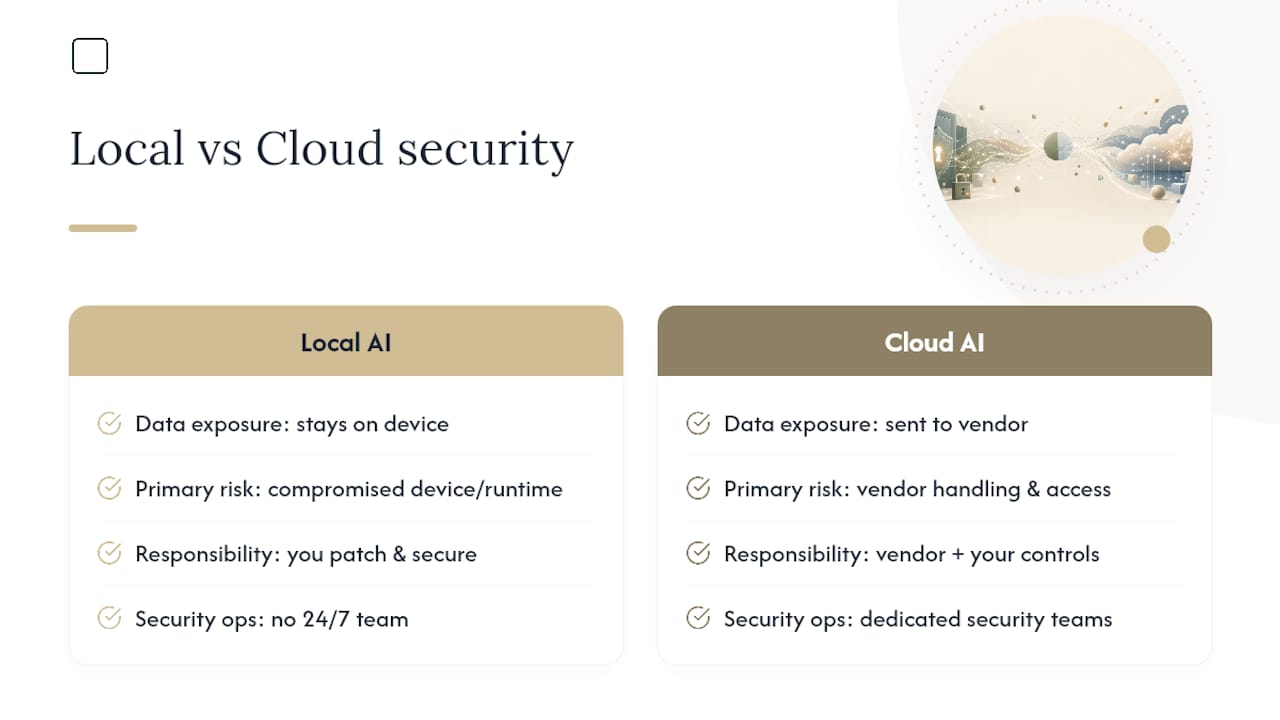
Privacy and security aren't the same thing, and conflating them is a common mistake. Privacy is about who sees your data. Security is about whether your system can be compromised at all, and local AI has its own exposure profile that cloud tools don't share.
A model running entirely on your device removes the "data sent to a third-party server" risk, but it also means any vulnerability in your local runtime, your operating system, or an outdated model file becomes entirely your responsibility to patch. Cloud vendors run dedicated security teams monitoring for intrusion attempts around the clock. Your laptop doesn't have that.
The NIST Cybersecurity Framework offers a useful lens here: threat modeling isn't about picking the option with zero risk, it's about matching your controls to your actual exposure. If you're processing legal documents locally, your risk is a compromised laptop, not a data breach at a vendor. If you're using ChatGPT for the same task, your risk shifts to the vendor's data handling practices and whatever access controls sit between your account and your data.
Neither model is inherently safer in the abstract. A poorly maintained local machine with an outdated model runtime can be more exposed than a cloud account behind modern authentication. Treat local AI security the way you'd treat any software on your device: keep it updated, watch what permissions it requests, and don't assume "offline" automatically means "safe."
How Often Do You Need to Update a Local AI Model?
Cloud tools update themselves silently, often multiple times a month, without you noticing anything beyond a occasionally different response style. Local models put that responsibility back on you.
Model files don't update automatically. When a better version ships, you download and swap it manually, which means your local assistant can quietly fall behind on capability if you never bother checking for new releases. Runtime software (the engine that actually runs the model) needs separate updates too, and driver compatibility can shift with GPU manufacturer releases, occasionally breaking a setup that worked fine the week before.
None of this is difficult, but it's not zero effort either. Budget for an occasional afternoon of checking versions, re-downloading a model file, and confirming your GPU drivers still play nicely with the runtime. Compare that to cloud, where maintenance is invisible because the vendor absorbs it entirely. For hardware sizing that stays relevant as models grow, checking what a new release actually requires before downloading it saves wasted storage and setup time.
What Actually Goes Wrong With Local AI
Local models fail in specific, predictable ways that differ from how cloud tools fail. Knowing the pattern ahead of time saves troubleshooting time later.
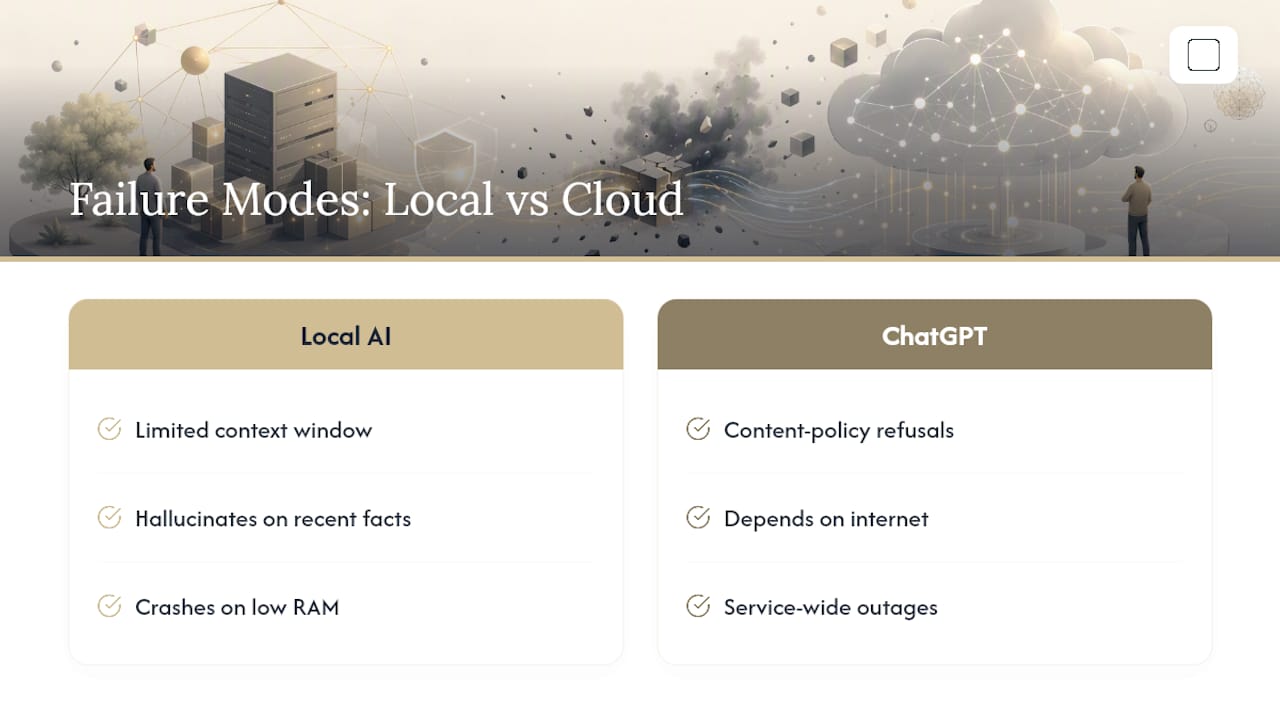
The most common failure is context limits. Local models, especially compact ones, often handle shorter conversation windows than ChatGPT, so a long back-and-forth session can start losing track of earlier details well before a cloud equivalent would. The second common failure is hallucination on anything requiring current information; a local model has no live web access, so it will confidently answer questions about recent events using stale training data, sometimes without any signal that it's guessing.
Hardware mismatches cause a third category of failure: a model that's too large for available RAM doesn't just run slowly, it can crash entirely or produce garbled output as the system struggles to swap data in and out of memory.
ChatGPT's failure modes look different. It can refuse tasks based on content policy, it depends entirely on an internet connection, and any service outage takes the tool down for everyone simultaneously, a risk local setups simply don't carry since your machine either works or it doesn't, independent of any vendor's server status.
How Does Response Speed Compare Between Local and Cloud?
Latency on a local model depends entirely on your hardware, not on network conditions. A capable GPU delivers responses that feel roughly as fast as ChatGPT for short prompts. A weak CPU-only setup can take noticeably longer per response, sometimes several seconds longer for anything beyond a quick question.
ChatGPT's responsiveness depends on server load and your internet connection instead. It's consistently fast when servers aren't strained, but that consistency is out of your hands entirely; a slow connection or a high-traffic period slows your response regardless of how good your own device is.
The practical difference shows up most in reliability, not raw speed. Local response time is predictable once you know your hardware's limits. Cloud response time varies with factors you can't see or control. For users who value knowing exactly what to expect every time they hit enter, that predictability is worth something on its own, separate from which tool happens to answer faster in any given moment.
A Practical Routing Rule for Everyday Use
Route by sensitivity and task type, not by habit. Anything involving client files, personal records, or bulk document work goes to your local model first. Anything needing current web data, image analysis paired with reasoning, or a genuinely hard multi-step problem goes straight to ChatGPT.
A simple folder system helps: keep sensitive documents in a folder your local tool watches, and default to cloud only when you've hit a defined wall, missing recent information, weak multimodal handling, or reasoning that clearly falls apart. Re-evaluate this split whenever you upgrade hardware, a new model version ships, or your actual task mix shifts noticeably from what it was six months ago. As one recurring theme across current testing puts it, the two tools work best as complementary options rather than a permanent either/or choice.
— Greencube
Where Greencube Fits Into This Decision
Greencube is a desktop app that runs entirely on your own Windows PC, no cloud, no server, for a one-time price of €8.99 / $9.99. At setup you choose one of two models to download: a smaller, faster, text-only model or a larger model capable of reading images and building study guides, which requires more RAM.
Chats and document processing happen fully offline once the model is downloaded. Signing in with an external provider may be required to verify your license, but chat data is processed locally. Greencube runs on Windows with Mac support in development and offers a refund window after purchase. It does not aim to outperform cloud AI models on advanced reasoning tasks. What it offers is ownership: a one-time purchase with no subscription or usage limits, and local document processing.
Try GreenCube if You Want a Ready-Made Local Option
If everything above pointed you toward the local column, privacy for client files, no recurring bill, offline reliability, you don't need to build that setup from scratch. GreenCube gets you there with an installer instead of a runtime, driver, and model file you assemble yourself.
The one-time price is €8.99 / $9.99, no subscription, and setup still involves downloading one model, either the 2GB Quick model for fast text work or the 4.2GB All-rounder model if you need it to read images and build study guides. Signing in via external providers is used to verify your license only; chats and documents are processed locally and offline. A refund window is available if the product does not meet your needs. Get GreenCube here and pick the model that matches your hardware and task mix.
Sources
- I tested local AI vs. ChatGPT side-by-side — here are the 7 biggest differences | Tom's Guide
- Local AI vs ChatGPT Plus — honest comparison (May 2026) | RunLocalAI
- Local AI vs ChatGPT — Honest Quality Comparison (2026) | AimadeTools
- NIST Cybersecurity Framework
FAQ
Are Local AI Models as Good as ChatGPT?
For short-form writing and code debugging, local 14B models come close, testing puts it around 80 to 90 percent as capable. They fall further behind on long-form creative writing and complex multi-step reasoning.
Why Choose a Local AI Over ChatGPT for Coding?
Local AI keeps proprietary code off any external server and works without an internet connection, which matters for client work under confidentiality agreements or for debugging on offline systems.
Which AI Is Better, Local or ChatGPT?
Neither wins outright. ChatGPT leads on frontier reasoning, current information, and multimodal tasks; local AI wins on privacy, offline access, and cost at high usage volume. Most tech-savvy users benefit from running both.
Does GreenCube Require an Internet Connection to Work?
Chat and document processing run fully offline once you've downloaded a model. An internet connection is needed only during initial setup and license verification through an external sign-in.
How Much Does GreenCube Cost?
GreenCube is a one-time purchase of €8.99 / $9.99, with no subscription and a 14-day refund window if it doesn't fit your workflow.