Not Private by Default: ChatGPT Privacy in 2026 and How to Protect Your Data
Short answer: consumer ChatGPT is not private by default. Every prompt you type travels to OpenAI's servers, where it can be stored, reviewed, and used to train future models unless you actively change your settings. That doesn't make ChatGPT unsafe to use, but it does mean the burden of protecting your own information sits with you, not the platform. If you're handing over anything sensitive, flip on Temporary Chat or opt out of model training first.
TL;DR:
- Consumer ChatGPT stores all prompts, uploads, and account data by default, and unless settings are changed, it can be used for model training.
- Deletion of chats is scheduled but not immediate, and legal or court orders can preserve or review old conversations even after deletion requests.
- Privacy controls like Temporary Chat and disabling training can limit data collection during sessions but do not prevent data passing through OpenAI's servers.
- Authorized staff, workspace admins, and law enforcement can access chat content under specific circumstances, increasing situational privacy risks.
- Using a local offline AI model remains the most private option, as it keeps all data on your device without cloud logging or training, suitable for sensitive or confidential tasks.
Table of Contents
- Is ChatGPT Private? What Actually Gets Collected
- Does ChatGPT Store Data, and for How Long?
- What Do ChatGPT's Privacy Controls Actually Do?
- Can Someone See My ChatGPT Chats?
- Encryption, Leaks, and the Gap Between "Secure" and "Private"
- How to Actually Reduce Your Exposure
- Does the Privacy Picture Change by Plan (Free, Plus, Team, Enterprise, API)?
- When Does a Local, Offline Assistant Make More Sense?
- Balancing Convenience and Privacy in Everyday Use
- A Private Alternative When the Cloud Isn't an Option
- Sources
- FAQ
Is ChatGPT Private? What Actually Gets Collected
The honest answer starts with an inventory. Whatever you type or upload gets stored, full stop, whether that's a résumé with your home address or a spreadsheet with client names. OpenAI also logs a layer of account and device data you never typed yourself.
That includes:
- Full chat logs and any files, images, or documents you upload
- Your account email and billing details
- Device identifiers, IP address, browser type, and cookies
- Usage telemetry, like session length and feature clicks
Avoid pasting Social Security numbers, medical records, financial account numbers, or a client's private contract into a prompt. Once it's in the chat window, it's part of your stored history unless you've taken steps to prevent that. OpenAI does let you request a data export or account activity report through account settings, which is worth doing if you want to see exactly what's been logged under your name.
Does ChatGPT Store Data, and for How Long?
By default, yes. Consumer ChatGPT may use your conversations to train future models unless you go into Data Controls and turn that off. This is an opt-out system, not opt-in, so silence means your chats are fair game for training pipelines.
Retention has its own wrinkle. Deleted chats aren't necessarily gone. OpenAI's own documentation notes conversations can be held for up to 30 days after deletion for safety and abuse review, and that window can stretch further under active litigation.
Data point: researchers at Stanford flagged that opt-outs are not retroactive. Turning off training today doesn't erase what earlier chats already contributed to a model.
- Default setting: training on, opt-out required
- Deletion: scheduled, but not instant or absolute
- Temporary Chats: excluded from training, removed on a short cycle, but still reviewable for abuse and subject to legal holds
- Court preservation orders can freeze deletion entirely, regardless of what you requested
Why does this matter practically? Because a legal hold in an unrelated case can keep your old chats sitting on a server long after you thought they were wiped.
What Do ChatGPT's Privacy Controls Actually Do?
The in-app controls are real, but they have edges you need to understand before you rely on them.
- Temporary Chat creates a session that's excluded from your history and from training data. It still routes through OpenAI's infrastructure, though, and can be reviewed for safety violations.
- "Improve the model for everyone" is the toggle inside Data Controls that governs future training. Switching it off applies account-wide going forward, but it does nothing to chats already logged.
- Memory settings let you clear or limit what ChatGPT remembers across sessions, separate from the training toggle.
- Multi-factor authentication protects the account itself from being accessed by someone who steals your password.
Pro Tip: Check your Data Controls settings once a quarter. OpenAI has changed defaults before, and a setting you switched off last year isn't guaranteed to stay off after a product update.
None of these controls change one basic fact: your request still has to pass through OpenAI's servers to generate a response. Controls adjust what happens to the data after that point, not whether the trip happens at all.
Can Someone See My ChatGPT Chats?
Under ordinary use, more people have potential access than most users assume. This is the core of the "is ChatGPT confidential" question, and the honest answer is: partially, and situationally.
- Authorized OpenAI employees and contracted reviewers can access conversations flagged for abuse monitoring or customer support tickets.
- Workspace administrators on Team and Enterprise plans can view content generated inside their organization's workspace.
- Anyone with physical or remote access to your logged-in device or browser session can open your chat history directly.
- Anyone you send a shared conversation link to can read that exact thread.
- Law enforcement and courts can compel OpenAI to preserve or hand over data through subpoenas and legal discovery, which is exactly the mechanism that has overridden deletion requests in past cases.
A data-driven study of user concerns found that unauthorized access was the single largest worry among ChatGPT users surveyed, ahead of concerns about public data misuse. That instinct is reasonable given how many access points exist even in normal, non-adversarial use.
Encryption, Leaks, and the Gap Between "Secure" and "Private"
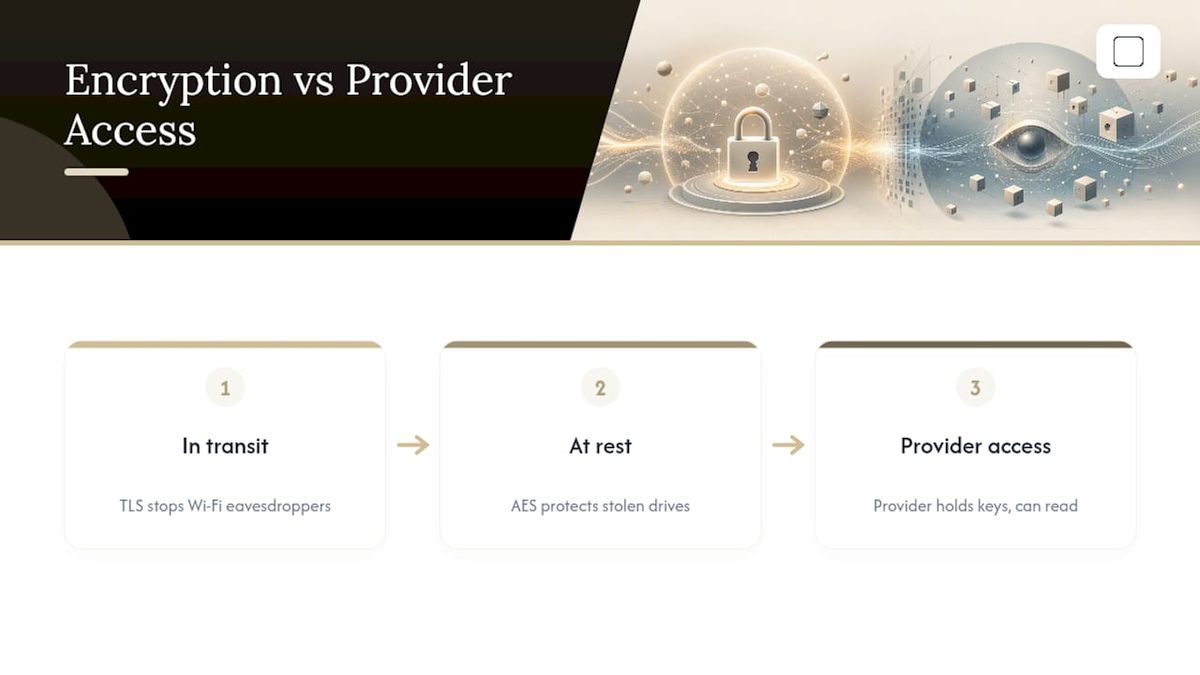
ChatGPT traffic is encrypted in transit using TLS, and stored data is encrypted at rest using standard AES-level protections. That stops an eavesdropper on your Wi-Fi or a thief who grabs a hard drive. It does nothing to stop OpenAI itself from reading, reviewing, or training on the same data, because the encryption keys and infrastructure belong to the provider, not to you.
Data point: Stanford's research team put it plainly: cloud chatbots place the provider "in the data path", and they recommend treating anything typed into one as potentially discoverable in a legal or administrative sense.
Real operational risks compound this. API keys get exposed in public code repositories. Session tokens get hijacked on unsecured networks. Employees at companies have pasted proprietary source code and internal memos into ChatGPT, not realizing that content could resurface in outputs to other users under certain conditions. "Encrypted" describes how data moves and sits. It says nothing about who is allowed to look at it once it arrives.
How to Actually Reduce Your Exposure
You can't make cloud ChatGPT fully private, but you can shrink the risk surface a lot with a few habits.
- Never paste full documents containing PII. Redact names, numbers, and addresses, or summarize the sensitive parts yourself before you type.
- Switch on Temporary Chat before any one-off prompt involving something sensitive, like a medical question or a legal draft.
- Turn on multi-factor authentication so a stolen password alone can't unlock your history.
- Go into Data Controls and disable model training, understanding that this protects future chats only, not past ones.
- For genuinely sensitive professional work, look at Enterprise or API access with contractual no-training guarantees, or move that work to a local, offline model entirely.
- Export chats you need to keep, store them securely offline, and delete or close accounts you no longer use.
Pro Tip: If you're unsure whether something counts as sensitive, ask yourself if you'd be comfortable with a stranger reading it in a support ticket. If the answer is no, redact it or don't send it.
Does the Privacy Picture Change by Plan (Free, Plus, Team, Enterprise, API)?
Yes, and this is where a lot of confusion comes from. Consumer accounts, whether free or Plus, default to training-on and keep full conversation history unless you intervene manually.
Team and Enterprise plans flip the default: training is off contractually from the start, and organizations get a documented no-training guarantee. The tradeoff is that workspace admins can see content generated under their organization, so privacy shifts from OpenAI's training pipeline to your own employer.
API access logs conversations for a much shorter operational window, and eligible business customers can request Zero Data Retention, which removes stored copies almost entirely. Notably, reporting suggests API customers with Zero Data Retention agreements have been among the few tiers fully excluded from certain legal preservation orders that swept up consumer and standard business data elsewhere.
- Consumer (Free/Plus/Pro): training on by default, full retention
- Team/Enterprise: training off by default, admin visibility inside the workspace
- API with Zero Data Retention: minimal logging, contractual protection, narrowest legal exposure
When Does a Local, Offline Assistant Make More Sense?
There's no official offline mode for ChatGPT itself. If you need to remove the cloud provider from the equation entirely, the only real option is running a local AI model on your own hardware, which is a genuinely different product category with its own tradeoffs.
- Chats and documents stay on your device; there's no server in the middle to log or train on them.
- You give up some raw capability compared to frontier cloud models, since local models run smaller and lighter.
- You need to download a model file, typically 2GB to 4.2GB depending on which one, and have at least 8GB of RAM as a bare minimum, which can still run slowly on older laptops.
GreenCube is built around exactly this tradeoff: an offline Windows app where chat and document analysis happen entirely on your machine, sign-in exists only to verify your one-time license, and nothing you type or upload gets sent anywhere. It fits people handling client contracts, medical notes, or anything they'd rather never touch a cloud server at all.
Balancing Convenience and Privacy in Everyday Use
Most people don't need to abandon cloud ChatGPT. It's genuinely useful for brainstorming, drafting, and research that involves nothing personal or confidential. The mistake is treating it the same way for a birthday card idea and a client's tax return.
Set a simple rule: sensitive material gets Temporary Chat, multi-factor authentication, and a periodic check of your Data Controls settings, at minimum. Anything you truly cannot risk exposing belongs in an Enterprise contract, an API with Zero Data Retention, or a local tool that never leaves your desk.
— GreenCube
A Private Alternative When the Cloud Isn't an Option
GreenCube isn't trying to out-think cloud AI. Cloud frontier models are still more capable for heavy reasoning and large-scale research. What GreenCube offers instead is ownership: your chats and documents stay on your own Windows PC, with no server ever in the loop for the actual conversation.

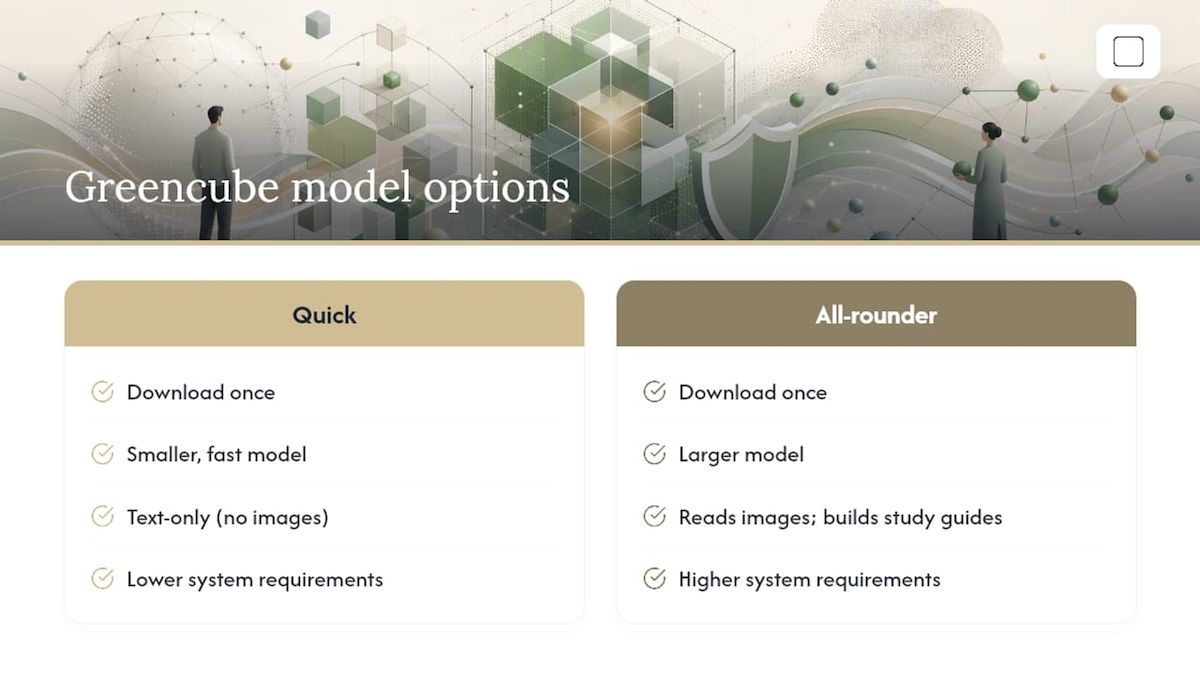
Setup means picking one of two models and downloading it once: Quick (a smaller, fast, text-only model) or the bigger model (a larger model that reads images and builds study guides, with higher system requirements). Sign-in through Google or Microsoft is required, but only to verify your license; checkout runs through Stripe, and your actual chats and files never leave your machine. It's a one-time purchase of $9.99 / €9.99, no subscription, backed by a 15-day refund.
If you're a student handling personal records, a freelancer drafting client work, or anyone who wants AI without a recurring bill or a cloud dependency, see how GreenCube works or get GreenCube now and try it inside the refund window.
Sources
For readers who want to go deeper than this explainer, a few primary sources cover the technical and legal ground in more detail:
- ChatGPT privacy, model training, and more — BYU AI
- Study exposes privacy risks of AI chatbot conversations | Stanford Report
- Privacy concerns associated with ChatGPT: data-driven study — PMC/NCBI
- ChatGPT privacy: what it collects and how to stay safe — PIRG
Court preservation rules and enterprise data policies keep shifting, so it's worth checking OpenAI's official policy page every few months rather than relying on a single article.
FAQ
Can Someone See My ChatGPT Chats?
Yes, in specific circumstances. Authorized OpenAI staff can review flagged conversations, workspace admins can see content on Team or Enterprise accounts, and anyone with access to your device or a shared link can read your history.
Is ChatGPT Confidential?
Not by default. Consumer chats can be used for training and are retained unless you adjust Data Controls, so treat anything typed into ChatGPT as something that could be seen by someone other than you.
Can Your ChatGPT Chats Be Leaked?
There's documented risk from insider access, compromised accounts, and exposed API keys, though OpenAI encrypts data in transit and at rest. Encryption protects against outside interception, not against the provider's own access or legal disclosure.
Can I Trust ChatGPT With My Data?
For non-sensitive tasks, yes, especially if you use Temporary Chat and turn off model training in your settings. For anything involving personal identifiers, financial records, or client confidentiality, a local tool like GreenCube or an Enterprise contract with no-training guarantees is the safer route.
Is ChatGPT FERPA Compliant?
OpenAI does not publish a blanket FERPA compliance guarantee for consumer ChatGPT, and schools generally need a signed data agreement to use any AI tool with protected student records. Check with your institution's compliance office before entering student data into any consumer AI product.
Recommended
- Does ChatGPT train on your data? (2026) — the honest answer
- The Best Private AI for People Who Actually Care About Privacy
- Best Private AI Assistant in 2026: Local and Offline
- Best Microsoft Copilot Alternatives for Privacy in 2026
Your own AI, on your own PC
GreenCube runs on your computer: no usage limits, no subscription, works without internet. €9.99, paid once.
Get GreenCube