Best Microsoft Copilot Alternatives for Privacy in 2026

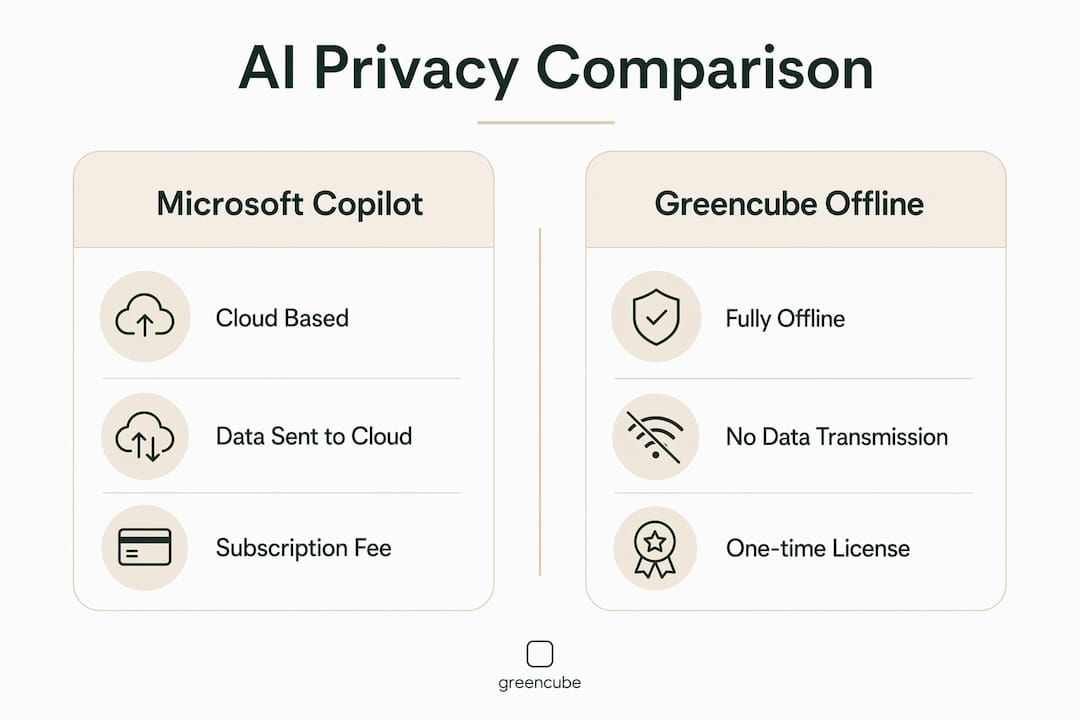
If you want an AI that works entirely on your computer, sends nothing to any server, and costs you once instead of forever, Microsoft Copilot is not it. The best private, offline desktop AI alternative for non-technical users is one that combines full offline operation, AI chat, PDF and image understanding, and a one-time purchase license. One sign-in. No subscription. No cloud.
GreenCube checks every one of those boxes:
- Fully offline: runs entirely on your device, zero cloud data transmission
- AI chat: conversational assistant available anytime, no internet required
- PDF and image understanding: analyze documents and photos locally
- One-time purchase: pay once, no renewals
- No subscriptions: install, sign in once, and use it
- Your data stays yours: GreenCube does not train on your data
Table of Contents
- Why offline AI tools beat Microsoft Copilot for individual users
- What to look for in a private, offline AI desktop app
- GreenCube: the private offline AI desktop app built for real people
- How to get started with GreenCube in minutes
- GreenCube is the offline AI your data deserves
- Key Takeaways
- FAQ
Why offline AI tools beat Microsoft Copilot for individual users
Microsoft Copilot is built around the cloud. Every prompt, every document you share with it, every image you upload travels to Microsoft's servers. For users handling personal finances, medical records, legal documents, or private correspondence, that is a real exposure. Offline desktop AI tools prevent any data, including sensitive PDFs or images, from being transmitted to external servers.
Cost is the other issue. Copilot requires a Microsoft 365 subscription plus an add-on, and that monthly charge never stops. Users who want predictable costs and data ownership consistently choose private desktop apps over cloud AI. A one-time purchase means you know exactly what you paid, and you never get a surprise renewal.
The control argument is just as strong. With a cloud tool, you depend on the vendor's uptime, their pricing decisions, and their data policies, which can change. Offline AI gives you the same capability whether you have Wi-Fi or not, and the vendor cannot revoke your access.
Key advantages of offline AI over Copilot:
- No data leaves your machine, ever
- Works without internet, including on planes or in areas with poor connectivity
- No monthly billing or subscription fatigue
- No account creation or login required
- You own the software permanently after purchase
- Vendor policy changes do not affect your access or your data
Pro Tip: When evaluating any AI tool's security, look beyond the privacy policy. Ask whether the app can function with your network adapter disabled. If it cannot, your data is going somewhere.
What to look for in a private, offline AI desktop app
Not every tool marketed as "private" or "local" delivers the full package. Here is what actually matters when you are comparing copilot alternatives for personal, offline use:
- True offline operation: the app must work with no internet connection at all, not just a "privacy mode" that still phones home
- AI chat: a conversational interface for questions, writing help, and general tasks
- PDF reading and analysis: ability to load and query documents locally
- Image understanding: analyze photos, screenshots, or scanned pages on-device
- One-time licensing: no subscription, no hidden renewal, no per-month fee
- Simple installation: no model downloads to manage, no API keys, no command line
- Windows and Mac support: Windows is the baseline; Mac support is a meaningful plus
- Accuracy comparable to cloud tools: offline AI now matches mainstream cloud models in document analysis and chat
- Transparent data policy: explicit confirmation that your data is never used for training
- Regular updates: offline software still needs security patches and improvements
- Accessible support: documentation or a support channel for when you need help
The installation experience matters more than most buyers expect. Past local AI tools required downloading multi-gigabyte models, configuring runtime environments, and troubleshooting dependencies. Modern offline desktop apps have removed those barriers entirely. You should be able to install and start using the app in minutes, the same way you would install any consumer software.
GreenCube: the private offline AI desktop app built for real people

GreenCube is designed from the ground up for users who want capable AI without the complexity, the cloud dependency, or the ongoing bill. It runs fully offline with zero cloud data transmission. Nothing you type, upload, or analyze ever leaves your computer.
The core feature set covers the three things most users actually need:
- Private AI chat: ask questions, get writing help, brainstorm, summarize, all offline
- PDF understanding: load any PDF and ask GreenCube to explain, summarize, or extract information from it
- Image analysis: drop in a photo or screenshot and get an AI interpretation, entirely on your device
| Feature | GreenCube |
|---|---|
| Offline operation | Full, no internet required |
| Data sent to cloud | None |
| AI chat | Yes |
| PDF reading | Yes |
| Image understanding | Yes |
| Licensing model | One-time purchase |
| Accounts required | One Google or Microsoft sign-in |
| Trains on your data | No |
| Current platform | Windows |
| Mac support | No |
The privacy commitment goes further than most tools advertise. GreenCube does not use your data as training data and maintains transparent data policies. That is a meaningful distinction from cloud AI services, where your inputs frequently contribute to model improvement. If you want to understand exactly how cloud tools handle your data, the ChatGPT data training question is worth reading before you decide.
GreenCube runs on Windows 10 and 11 only. For users who want a local AI companion that works alongside tools like Tempered, the AI PC optimizer that prepares Windows machines for local AI workloads, the combination covers both performance and privacy.
How to get started with GreenCube in minutes
Getting up and running requires no technical knowledge. The process is straightforward:
- Visit the GreenCube website at greencube.app and review what the app does
- Purchase your license on the buy page for a one-time fee, no subscription required
- Download the installer for Windows, which arrives immediately after purchase
- Run the installer like any standard Windows application, no configuration or model setup needed
- Open GreenCube and start a chat, load a PDF, or drop in an image
- Access support through the documentation if you have questions, though most users are up and running without it
That is the entire process. No API keys. No terminal commands. No model selection. The app handles everything internally so you can focus on using it rather than setting it up.
GreenCube is the offline AI your data deserves
Most AI tools rent you access to their servers and call it a service. GreenCube is different: it is software you own, running on hardware you own, processing data that never leaves your possession.

For anyone who has been paying monthly for cloud AI and wondering whether their documents are being read, stored, or used to train the next model, GreenCube answers that concern at the root. One purchase. Full capability. Complete privacy. Pick up your copy at greencube.app/buy and use it today, offline, on your own terms.
Key Takeaways
The best Microsoft Copilot alternative for private, offline use combines full data locality, one-time licensing, and genuine ease of use for non-technical users.
| Point | Details |
|---|---|
| Offline means truly offline | The app must work with no internet at all, not just a reduced-cloud mode. |
| One-time purchase saves money | Avoiding monthly subscriptions gives you predictable, permanent access to your AI tool. |
| Data never leaves your device | Offline AI prevents sensitive documents and images from reaching any external server. |
| No setup required | Modern offline apps install like standard consumer software, with no model downloads or configuration. |
| GreenCube covers all three | Chat, PDF reading, and image understanding, all offline, all private, for a single one-time payment. |
FAQ
What makes an AI tool truly private?
A truly private AI tool processes all data locally on your device and transmits nothing to external servers. Offline operation, not just a privacy policy, is the only reliable guarantee.
Is offline AI as capable as Microsoft Copilot?
Yes. Offline AI now matches mainstream cloud models in document analysis and conversational chat, while keeping all data on your device.
Does GreenCube work without an internet connection?
GreenCube runs fully offline with zero cloud data transmission. It works on planes, in areas without Wi-Fi, or with your network adapter disabled.
Can GreenCube read PDFs and images?
Yes. GreenCube supports PDF reading and image understanding as core features, both processed entirely on your local machine.
Is there a subscription fee for GreenCube?
No. GreenCube uses a one-time purchase model with no subscriptions and no recurring charges.
Recommended
- Does ChatGPT train on your data? (2026) — the honest answer
- GreenCube — AI that's yours, not rented
- How much water does AI use? (2026) — the real numbers
- Why GreenCube — you're not the customer, you're the training data
Your own AI, on your own PC
GreenCube runs on your computer: no usage limits, no subscription, works without internet. €9.99 (US$9.99), paid once.
Get GreenCube