The Best Private AI for People Who Actually Care About Privacy

GreenCube is the best private AI for privacy-first Windows users because it runs inference entirely on your own machine, works with no internet connection, and costs a one-time fee instead of a recurring subscription. That single combination, local processing plus a flat price, separates it from nearly every other tool in this category.
Not everyone fits that profile, though. If you want to self-host and tinker with your own model stack, look at tools built for that kind of control. If you need cross-platform support across Mac, Linux, and Windows with a choice of multiple models, a different category of tool applies. And if you're evaluating this for a regulated business with compliance requirements, you're likely looking at enterprise air-gapped deployments, not a consumer desktop app.
Here's the quick breakdown of who fits where:
- Privacy-first Windows users who want offline chat and document reading without a subscription: GreenCube.
- Self-hosters and technical tinkerers who want to run and modify their own local model pipelines: a self-hosted, open-source setup.
- Cross-platform households or teams needing flexible model support on Mac, Linux, or Windows: a multi-model local tool.
- Regulated industries needing audited, air-gapped infrastructure: an enterprise-grade private deployment, not a consumer app.
The rest of this guide walks through the actual comparison, the hardware realities nobody mentions upfront, and the privacy architecture questions worth asking before you install anything.
Key Takeaways
The most reliable private AI for everyday privacy-conscious users combines local inference, offline operation, and transparent hardware requirements rather than vague privacy marketing.
| Point | Details |
|---|---|
| Local inference beats cloud promises | A tool that processes data on your device removes the network path data would need to leave through. |
| Hardware requirements are non-negotiable | Document and image-capable models need at least 8GB of RAM as a functional floor, not a comfort zone. |
| Pricing model signals commitment | One-time purchases avoid recurring fees; open-source tools are free but require setup effort. |
| Compliance certification is not automatic | A local-only architecture reduces data exposure but doesn't equal formal GDPR or HIPAA certification. |
| GreenCube fits privacy-first Windows users | It offers offline chat and document reading for a one-time $9.99 price, with the smaller model and the bigger model options. |
Table of Contents
- Best Private AI Tools Compared Side by Side
- How We Tested and Ranked These Private AI Assistants
- How Do You Choose the Right Private AI Assistant?
- What Should You Expect During Model Download and Setup?
- Local-First vs. Cloud-First: What's the Real Privacy Trade-Off?
- Do These Tools Meet GDPR, HIPAA, or Other Compliance Standards?
- Who Owns Your Data and Controls It?
- Are There Independent Audits or Transparency Reports?
- What Happens When Security Patches Are Needed?
- Can These Tools Fit Into Your Existing Workflow?
- What the Listicles Get Wrong About "Private AI"
- Get GreenCube: The Private AI Built for Your Own Windows PC
- Primary Sources and Further Reading
- Sources
- FAQ
Best Private AI Tools Compared Side by Side
Privacy-conscious buyers keep running into the same problem: most "best private AI" roundups list a dozen names with vague one-liners and no real basis for the ranking. The honest way to compare these tools is by what actually determines privacy and usability: does inference happen on your device, does it work offline, what hardware does it demand, and what happens to your data during setup and use.
GreenCube leads this list because it's built specifically around that question. It runs on Windows 10 or 11, processes chats and documents locally using llama.cpp, and never sends your content anywhere during use. Sign-in through Google or Microsoft is required once, only to verify your one-time license; checkout runs through Stripe. That's the only network dependency in the entire product.
A few things stand out once you lay these side by side.
- GreenCube is the only entry here with a fixed, disclosed one-time price and a documented model choice built for non-technical users: pick the smaller model (Gemma 4 E2B, about 2.6 GB) or the bigger model (Gemma 4 E4B, about 4.2GB, reads images and documents, needs at least 8GB RAM).
- Jan.ai, AnythingLLM, LM Studio, Leon, and PyGPT are open-source, developer-oriented tools. They give you real control over which model you run, but that control comes with setup complexity: picking a model file, managing quantization formats, and configuring your own runtime.
- Vellum is frequently cited in 2026 roundups for its configurable permission model and persistent local memory, giving users granular control over what the assistant remembers between sessions.
- PrivateGPT.io leans into document-chat use cases specifically, which overlaps with what GreenCube's bigger model does, though PrivateGPT.io's exact architecture and pricing aren't consistently documented across sources.
- OpenClaw, AGI-0, and Hermes Agent show up in aggregated listicles emphasizing agentic or privacy-forward features, but public technical detail on their hosting model and hardware requirements is thin compared to the tools above.
- Lumo, Proton's privacy-focused assistant, draws on Proton's broader reputation for encrypted services, though its specific offline and hardware requirements vary by deployment.
If your priority is picking something up and using it today without touching a config file, GreenCube and Vellum sit closest to that experience. If you want to inspect the code, swap models freely, and don't mind a longer setup, Jan.ai, LM Studio, and AnythingLLM are built for exactly that.
How We Tested and Ranked These Private AI Assistants
Ranking privacy tools by star ratings alone tells you almost nothing, so this comparison weighs six concrete factors instead.
- Privacy architecture: does inference happen locally, and is there any data egress during normal use?
- Offline capability: does the tool function with no internet connection after initial setup?
- Model provenance: which underlying model powers the assistant, and is that documented?
- Hardware footprint: what RAM, disk space, and processing power does it actually require?
- Feature checks: can it read documents and images, or is it text-only?
- Pricing structure: one-time cost, subscription, or free and open-source?
Testing involved installing GreenCube directly on Windows, verifying that chat and document processing worked with the network disconnected, and confirming the two model options download and run as documented (roughly 2GB for Quick, 4.2GB for the bigger model). For the open-source tools in this comparison, evaluation relied on publicly documented behavior, developer documentation, and community reporting rather than a full local install of every option, since several (like OpenClaw, AGI-0, and Hermes Agent) don't have consistently published technical specifications.
What wasn't tested: long-term reliability across months of use, enterprise service-level guarantees, or performance benchmarks across dozens of hardware configurations. This is a snapshot comparison, not a longitudinal study. GreenCube is included in this comparison and is the tool recommended for the specific audience this article targets: non-technical, privacy-first Windows users who want an install-and-go experience.
How Do You Choose the Right Private AI Assistant?
Picking the wrong tool here usually isn't about the AI's quality. It's about a mismatch between what you assumed "private" meant and what the product actually does. Run through this checklist before you commit to anything.
- Confirm inference happens locally. Ask directly: does the assistant process your prompts on your device, or does it send them to a server? Privacy Guides recommends prioritizing tools where inference requires no internet connection, since that's the strongest guarantee against unauthorized data collection.
- Check whether the vendor trains on your data. Many cloud AI platforms reuse user inputs to improve their models by default. Local-first tools sidestep this entirely because there's no server to send data to in the first place.
- Verify credential isolation. Does the tool require an account for basic use, or only for license verification? GreenCube, for example, requires sign-in only to confirm your one-time purchase; the AI chat and document processing themselves stay fully offline.
- Match hardware to your model choice. A text-only model needs far less RAM than one that reads images and builds documents. Know which tier you actually need before you buy.
- Check OS compatibility. Some tools are Windows-only, others are cross-platform. GreenCube currently supports Windows 10 and 11, with Mac support in development.
- Ask about memory controls. Can you clear, export, or limit what the assistant remembers? User-controlled memory matters more than most buyers realize until they've used a tool that hoards context indefinitely.
Red flags worth walking away from: a vendor that can't clearly explain its data egress policy, a model whose training source is undisclosed, or a "private" tool that quietly requires a cloud connection for its core features.
Pro Tip: Before installing anything, disconnect your Wi-Fi and try using the tool. If it stops working entirely, it's not actually local-first, no matter what the marketing copy says.
What Should You Expect During Model Download and Setup?
Every genuinely local private AI requires downloading at least one model file before it can run, and that includes GreenCube. There's no way around this step: the model has to live on your machine for inference to happen without a network connection. GreenCube offers two options at setup. Quick uses Gemma 4 E2B, weighs in around 2GB, and handles fast text-based chat, though it can't read images. the bigger model uses Gemma 4 E4B, runs closer to 4.2GB, and can read images and help build study guides or documents, at the cost of slower response times.

Hardware requirements scale with your model choice. The bigger model needs a minimum amount of RAM generally recommended for document-capable AI models, which is typically acknowledged to be about 8GB or more. On older laptops or machines already running several background processes, 8GB can mean noticeably slower responses. If you're on the edge of that requirement, the smaller model is the more realistic choice.
Disk space matters too, though less than most people expect. Between the app itself and a downloaded model, you're looking at a few gigabytes total, small next to typical software installs today.
Under the hood, GreenCube runs on llama.cpp, a widely used local inference engine that supports quantized models, compressed versions of larger AI models that trade a small amount of precision for a dramatically smaller footprint. That's the technical reason quantized formats like GGUF have made local AI feasible on consumer laptops at all; without quantization, running these models locally would require hardware far beyond what most people own.
The practical takeaway: document-capable AI models typically need at least 8GB of RAM to run acceptably, while lighter, text-only models can function on more modest hardware. Know which category your use case falls into before you download anything, and check our full setup walkthrough if you want the step-by-step version.
Local-First vs. Cloud-First: What's the Real Privacy Trade-Off?
Local-first and cloud-first AI solve different problems, and conflating them is where most buyers go wrong. A local, air-gapped tool like GreenCube keeps every chat and document on your device, with no network path for that data to leave during inference. Encrypted cloud platforms and trusted execution environment (TEE) based services add real security layers, but the data still travels to and processes on someone else's infrastructure at some point.
Air-gapped, no-egress deployments provide the strongest compliance posture for regulated or sensitive work, because there is no network connection during inference for data to travel across. Encrypted cloud approaches reduce risk but don't eliminate the fact that your data reaches an external server.
That distinction shows up in three practical ways:
- Model freshness. Cloud models update continuously; local models only improve when you download a new version yourself.
- Capability ceiling. Cloud frontier models generally handle complex, large-scale reasoning tasks better than a model small enough to run on a laptop. That's a real trade-off, not a myth.
- Runtime risk surface. OWASP's guidance on large language model applications flags prompt injection and data leakage as top risks, particularly for tools connected to external plugins or browsing tools. A fully offline assistant with no connectors dramatically shrinks that attack surface, though it doesn't erase every risk.
Enterprises facing these same trade-offs at scale often deploy runtime protection layers like Google's Model Armor or Palo Alto's Prisma AIRS, which screen prompts and responses for injection attempts and sensitive-data leaks. Consumer tools like GreenCube sidestep the need for that kind of runtime scanning almost entirely, simply because there's no network traffic to inspect in the first place.
Do These Tools Meet GDPR, HIPAA, or Other Compliance Standards?
Most consumer-grade private AI tools, GreenCube included, aren't formally certified against frameworks like GDPR or HIPAA, and it's worth being skeptical of any consumer app that claims otherwise without documentation to back it up. What matters more practically is architecture: a tool that never transmits your data anywhere has no data pipeline to audit for GDPR compliance in the first place, because there's no processing of personal data by a third party to regulate.
That's meaningfully different from formal certification, though. If you're handling protected health information under HIPAA or need documented compliance for a regulated business, you need infrastructure explicitly built and audited for that purpose, typically an enterprise air-gapped deployment with a signed business associate agreement, not a consumer desktop app. GreenCube's local-only architecture makes it well-suited to individual professionals handling sensitive personal or client documents (a freelance writer's contracts, a tutor's student records), but it isn't a substitute for certified enterprise infrastructure when formal compliance documentation is a hard requirement. Know which category your situation falls into before you assume a local tool solves a compliance obligation.
Who Owns Your Data and Controls It?
With a local-first tool, the answer is straightforward: you do, because your data never leaves your device to begin with. GreenCube's chat history and any documents you process stay on your own machine; there's no server-side copy for the company to retain, analyze, or lose in a breach.
That's a fundamentally different model from cloud AI platforms, where the provider typically retains logs, may use inputs to improve future models, and controls the infrastructure your data sits on. Privacy Guides points out that cloud AI often stores and can train on user data by default unless the provider explicitly architects otherwise, which puts the burden on the user to read policy fine print most people never check.
The practical control question to ask any tool: can you delete your data on demand, and does the vendor have any copy of it once you do? For local-first tools, deleting your local files ends the story. For cloud tools, you're trusting a privacy policy and a company's internal practices, which can change with a terms-of-service update you never read.
Are There Independent Audits or Transparency Reports?
Third-party audits are far more common among enterprise-grade AI security vendors than among consumer privacy apps. Companies like Google and Palo Alto Networks publish detailed documentation on how their runtime protection tools work and what threats they screen for, which gives enterprise buyers a paper trail to evaluate.
Consumer-facing local AI tools, including most of the products compared in this article, generally don't publish formal third-party audit reports. That's not necessarily disqualifying, since a fully offline tool has a fundamentally smaller attack surface to audit in the first place: there's no server infrastructure, no data pipeline, and no cloud storage to inspect for compliance gaps. But it does mean buyers should rely on architectural transparency (open documentation of how the tool works) rather than formal certification when evaluating a product like GreenCube or its open-source counterparts.
Open-source tools such as Jan.ai, AnythingLLM, LM Studio, and PyGPT have a structural advantage here: their code is publicly viewable, which functions as a form of ongoing, informal community audit even without a dedicated compliance report. That transparency comes at the cost of the polish and simplicity a packaged consumer product offers.
What Happens When Security Patches Are Needed?
Update policy matters more for AI tools than most software categories, because a local model file itself can also need revision, not just the application wrapped around it. GreenCube ships updates through its standard software update mechanism, and because it's a one-time purchase rather than a subscription, updates don't come bundled with a recurring fee, though ongoing feature development is naturally tied to the product's continued commercial success.
Open-source tools handle this differently. Jan.ai, LM Studio, AnythingLLM, and similar projects rely on community and maintainer-driven update cycles, which can be fast for actively maintained projects and slow or stalled for smaller ones. Before adopting any open-source local AI tool, check the project's recent commit history and issue tracker; an abandoned repository is a real security risk if a vulnerability surfaces and nobody patches it.
For customer support specifically, packaged consumer tools like GreenCube typically offer direct support channels tied to your purchase, while open-source projects rely on community forums, GitHub issues, or Discord servers. Neither model is inherently better, but they suit different comfort levels: if you want a direct line to someone when something breaks, a paid packaged tool usually delivers that faster than waiting on a volunteer maintainer.
Can These Tools Fit Into Your Existing Workflow?
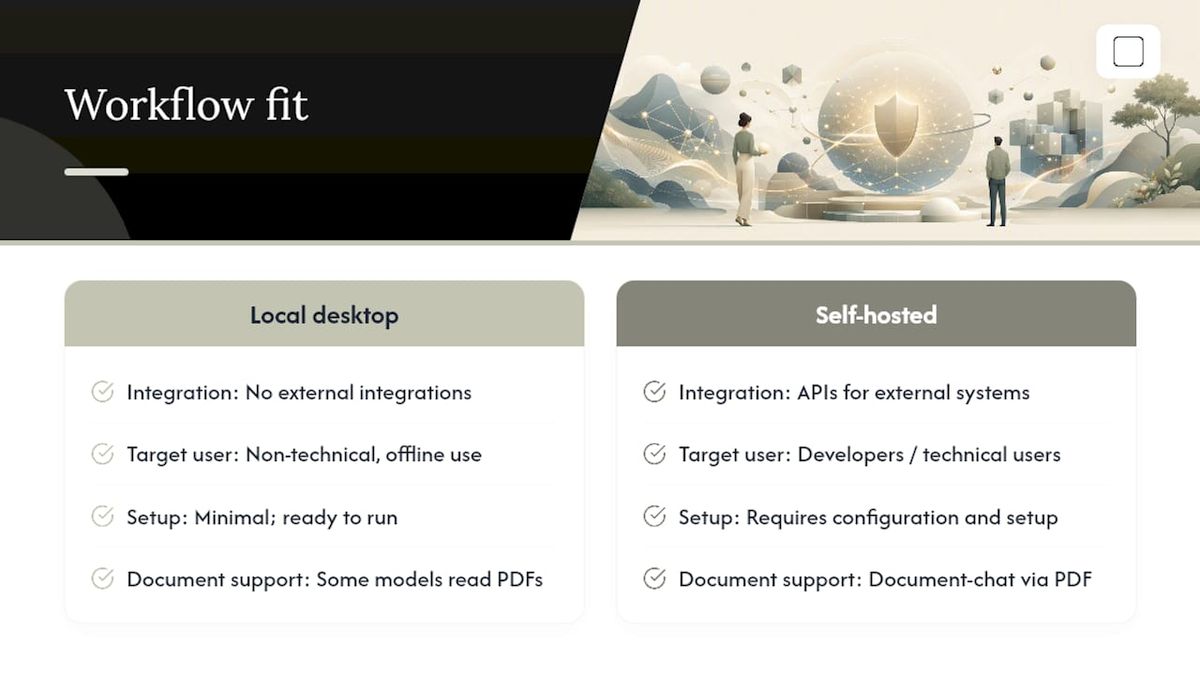
Integration capability varies sharply across this list, and it's worth being honest about where a local desktop tool fits and where it doesn't. GreenCube is designed as a standalone desktop application: you open it, chat, and process documents directly within the app. It doesn't currently plug into external systems like email clients or project management tools, which is a deliberate trade-off for keeping the architecture simple and fully offline.
Developer-oriented tools like AnythingLLM, PyGPT, and LM Studio offer more flexibility here, since they're built with APIs and configuration options that let technical users wire them into existing scripts or local workflows. That flexibility requires setup work most non-technical users won't want to do themselves.
For document-heavy workflows specifically, a private AI that reads PDFs directly, like GreenCube's bigger model or PrivateGPT.io's document-chat approach, can replace a step that otherwise requires a separate private PDF editing tool for reviewing sensitive contracts or records offline. If your workflow depends on connecting an assistant to live external systems (a database, a cloud drive, a browser), a local-only tool like GreenCube isn't the right fit; that use case points toward the self-hosted, API-driven tools in this comparison instead.
What the Listicles Get Wrong About "Private AI"
Most private AI roundups treat "private" as a checkbox rather than a spectrum, and that's the core problem with how this category gets covered. A tool that stores your chats on an encrypted cloud server isn't in the same privacy tier as one that never sends data anywhere, yet both get lumped into the same "privacy-focused" listicle with a five-star badge slapped on top.
The bigger gap, though, is that most coverage skips the hardware conversation entirely. Readers get told a tool is "lightweight" or "runs anywhere" without a single mention of RAM requirements or model file sizes, then they're surprised when a document-capable model chugs on an older laptop. That's not a minor omission. It's the difference between a tool working the way you expected and a frustrating first hour with software you already paid for.
If there's one thing worth prioritizing above feature lists and star ratings, it's matching your actual hardware and technical comfort to the tool's real requirements before you commit. A privacy-first architecture only helps you if the software actually runs well on the machine you own.
— GreenCube
Get GreenCube: The Private AI Built for Your Own Windows PC
GreenCube gives you something most private AI tools on this list don't: a fixed price and a finished product, not a project you have to configure yourself. For $9.99 (€9.99), paid once, you get a Windows desktop app that chats, reads documents, and analyzes images without a subscription, without a usage limit, and without your data ever touching a server during use.

Setup is straightforward. Choose the smaller model if you want chat in a compact 2GB download, or the bigger model if you need image and document reading, at roughly 4.2GB and a minimum of 8GB RAM. Sign-in through Google or Microsoft happens once, purely to verify your license; it doesn't touch your chats or documents. GreenCube currently runs on Windows 10 and 11 only, with Mac support in development, and it's worth being upfront that it won't outreason a cloud frontier model on complex tasks. What it offers instead is ownership: a tool you buy once, run offline indefinitely, and never have to renew.
If you handle sensitive documents, study materials, or client work and want that off the cloud entirely, get GreenCube and try it with the 15-day refund window as your safety net.
Primary Sources and Further Reading
- Privacy Guides — Recommended AI Chat: Guidance on evaluating private AI chat tools and local-first architecture.
- OWASP Top 10 for LLM Applications: Runtime and data exposure risks for AI applications.
- Google Model Armor: Enterprise runtime protection against prompt injection and data leaks.
- Stanford HAI — AI Index: Data on AI adoption trends and public privacy concerns.
- Totally Private AI: Overview of air-gapped AI deployment for regulated industries.
Sources
- Recommended AI Chat: Private ChatGPT Alternatives - Privacy Guides
- OWASP Top 10 for Large Language Model Applications
- HAI — AI Index
- Totally Private AI — Air-gapped AI for regulated industries
FAQ
What Makes an AI Tool Actually Private?
An AI tool is genuinely private when it processes your data locally, with no network transmission required for inference, and doesn't use your inputs to train its underlying model.
Is GreenCube Really Offline After Setup?
Yes, once you download your chosen model (the smaller or bigger model), GreenCube's chat and document processing work with no internet connection; only license verification at sign-in requires a network connection.
Do Free Open-Source Tools Offer Better Privacy Than Paid Ones?
Not automatically. Open-source tools like Jan.ai and AnythingLLM offer code transparency, but privacy depends on your specific configuration, not just the license type.
How Much RAM Do I Need for a Private AI Assistant?
Text-only models can run on modest hardware, but document and image-capable models, including GreenCube's bigger model, need a minimum of 8GB of RAM to function properly.
Can a Private AI Tool Replace Cloud AI for Complex Tasks?
Not entirely. Local tools like GreenCube prioritize privacy, offline access, and cost over raw capability, so cloud frontier models still handle large-scale, complex reasoning tasks more effectively.
Recommended
- Best Private AI Assistant in 2026: Local and Offline
- Best Microsoft Copilot Alternatives for Privacy in 2026
- Best Laptop AI Assistant for Privacy: Local and Offline
- Secure AI on Your PC: A Private, Offline Buyer's Guide
Your own AI, on your own PC
GreenCube runs on your computer: no usage limits, no subscription, works without internet. €9.99, paid once.
Get GreenCube