$9.99 One-Time DeepSeek Alternatives for Windows That Keep Data Local
If you want a Windows desktop AI that keeps chats and files off the cloud and skips the subscription, the class of tool you're actually looking for is offline, one-time-license desktop AI, not another hosted chatbot. GreenCube fits that job directly with a one-time purchase and no data leaving your machine. The trade-off is real: you give up some of the raw reasoning power of frontier cloud models in exchange for privacy and a fixed price.
TL;DR:
- Local desktop AI tools like GreenCube require careful matching of model size to your hardware's VRAM, especially for image reading and complex tasks.
- GreenCube offers a simple two-model setup, making it ideal for quick, private document processing without configuration, unlike open models that demand management.
- Your GPU's video memory influences performance more than specs suggest; running out of VRAM causes slowdowns, so choose a model tier matching your hardware.
- Once downloaded, GreenCube fully operates offline, with the only online step being a one-time license verification, ensuring data stays on your machine.
- Generic local AI apps provide more model choice but demand more setup, hardware, and support management, while GreenCube prioritizes simplicity and privacy.
Table of Contents
- What Are the Best DeepSeek Alternatives That Run Locally?
- How Do I Choose the Right Local Desktop AI?
- Can a Local AI Fit Into Your Existing Workflow?
- Why VRAM Matters More Than the Marketing Says
- How to Try GreenCube Today
- Sources
- FAQ
What Are the Best DeepSeek Alternatives That Run Locally?
Most "DeepSeek alternatives" lists point you toward other cloud chatbots. That's not what a privacy-first Windows user needs. The real alternatives are desktop apps that download a model once and run every chat on your own hardware, with no server in between.
Two categories cover this space right now: purpose-built privacy apps like GreenCube, and the broader field of generic local desktop AI tools built around open runtimes. Both let you work offline. They differ in setup effort, hardware demands, and how much you have to manage yourself.
GreenCube runs on llama.cpp style local inference under the hood, wrapped in a simple installer, and gives you exactly two model choices at setup: a small the smaller model for fast plain text, or a larger the bigger model that also reads images and builds documents. Generic local desktop AI tools, by contrast, often ask you to pick from a longer menu of open models yourself and manage the runtime more directly.
| Product | Pricing Model | Offline / Local Inference | OS Support | Model Options | Hardware Needs | Privacy / Data Flow |
|---|---|---|---|---|---|---|
| GreenCube | One-time, $9.99 / €9.99 | Yes, fully local chat and document analysis | Windows 10 and 11 | the smaller or bigger model | 8GB RAM recommended for the bigger model; less for Quick | Chats and files stay on device; sign-in only verifies license |
| Generic local desktop AI | Often one-time, varies by product | Yes, typically fully local once model is downloaded | Usually Windows; Mac support varies | Varies; usually several open model sizes to choose from | Varies widely; larger models need more VRAM/RAM | Usually local by design, but telemetry policies vary by product |
- GreenCube is a private desktop assistant built for users who want to work locally with documents and questions. It offers two model options: a smaller one for faster responses and a larger one for more features including image reading. Neither option matches the capability of large cloud models on complex reasoning.
- Generic local desktop AI tools cover a wide field of apps that wrap open runtimes with a one-time license or a free download. They're best for users comfortable choosing their own model and meeting its specific hardware bar. The standout varies by product, but the common thread is that you're managing more of the setup yourself, and support quality is inconsistent across the category.
For someone who wants a document read privately in the next five minutes with no configuration, GreenCube's fixed two-model choice removes a decision point that generic tools leave to you. For someone who already knows which open model they want and has the VRAM to run it, a generic local desktop AI tool offers more room to experiment.
How Do I Choose the Right Local Desktop AI?
Picking a local alternative comes down to three checklists: privacy, usage fit, and purchase terms, as advised by AI Agency Australia for professional buyers considering vendor due diligence. Skip any of them and you risk buying something that doesn't match your machine or your comfort level with data handling.
Privacy checklist
- Confirm the license terms state chats and documents stay on your device, not just "encrypted in transit."
- Check whether the required sign-in (Google or Microsoft, in GreenCube's case) is used only to verify the license, or whether it also enables background data collection.
- Look for explicit language about telemetry: does the app phone home usage data by default, and can you turn that off?
Usage checklist 4. Verify whether the model you'll actually use supports images and documents, or plain text only, since that varies by model tier, not just by app. 5. Match the model size to your hardware before buying. A hybrid workflow using local tools for sensitive work and cloud tools for occasional heavy tasks is a reasonable fallback if your machine is underpowered. 6. Confirm the app genuinely works with no internet connection once the model is downloaded, not just "mostly offline."
Purchase checklist 7. Check the refund window. GreenCube offers 15 days. 8. Confirm it's a true one-time license, not a "one-time fee" that later requires a renewal for updates. 9. Read what the installer actually downloads. A local AI models guide can help you understand what that first download includes before you commit.
Pro Tip: Check your GPU's video memory before picking a model size, not just your system RAM. Running out of VRAM is what actually slows a local AI down, not disk space.
Can a Local AI Fit Into Your Existing Workflow?
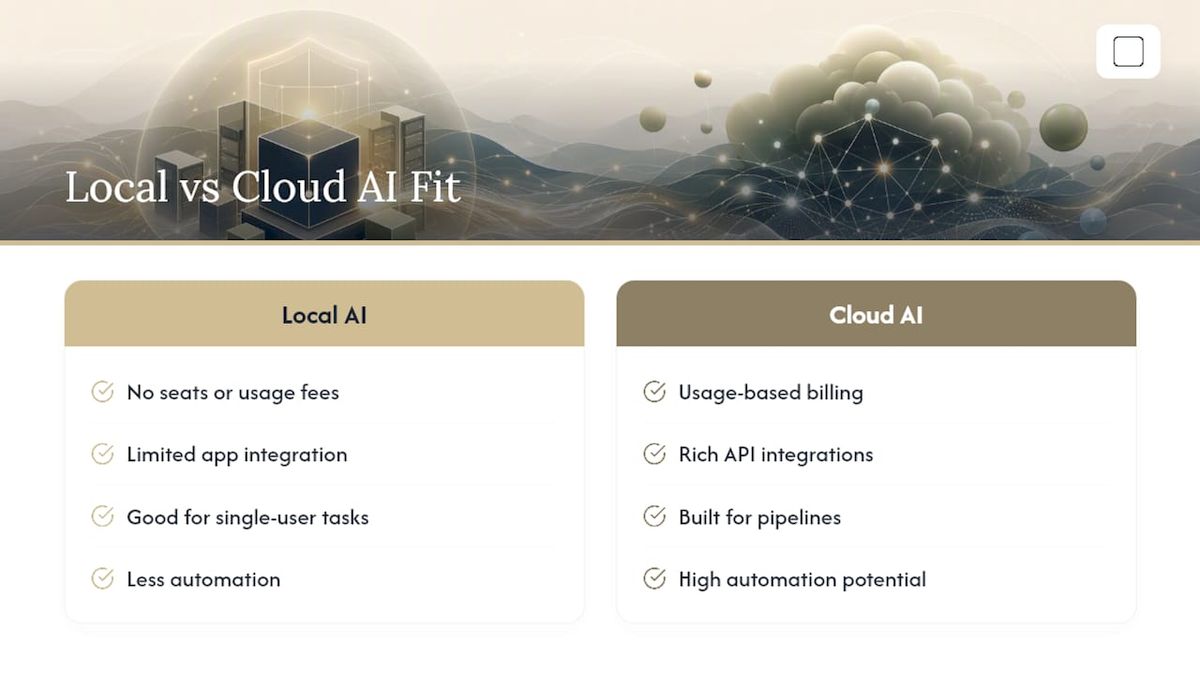
Local desktop AI tools scale differently than cloud subscriptions. There's no seat count to negotiate and no usage meter to watch. Once GreenCube's model is downloaded, you can run it as many times a day as you want at no extra cost, whether that's one document a week or twenty.
Integration is more limited than what you'd get from a cloud API. GreenCube and similar local apps are designed as standalone assistants, not as a plug-in layer for existing business software. If your workflow depends on connecting AI output directly into a CRM or a shared team pipeline, a local desktop app is not built for that job.
Where local tools do integrate well is at the individual task level: reading a PDF before a meeting, drafting a document, summarizing a report you can't upload anywhere. Local-first architecture keeps that work self-contained, which is exactly the point for privacy-conscious professionals, even though it means less automation than a networked tool would offer. Community support also looks different here. Generic local AI tools often have active forums and plugin ecosystems built around open runtimes; a focused app like GreenCube trades that breadth for simplicity, with fewer moving parts to configure.
Why VRAM Matters More Than the Marketing Says
Most comparisons of local AI tools spend their time on price and privacy and barely mention the one factor that actually determines whether the thing feels usable: your graphics card's memory. Windows itself documents this plainly. Local inference depends on CPU, GPU, memory, and storage together, and when VRAM runs short, the workload falls back to the CPU and can slow to a crawl.
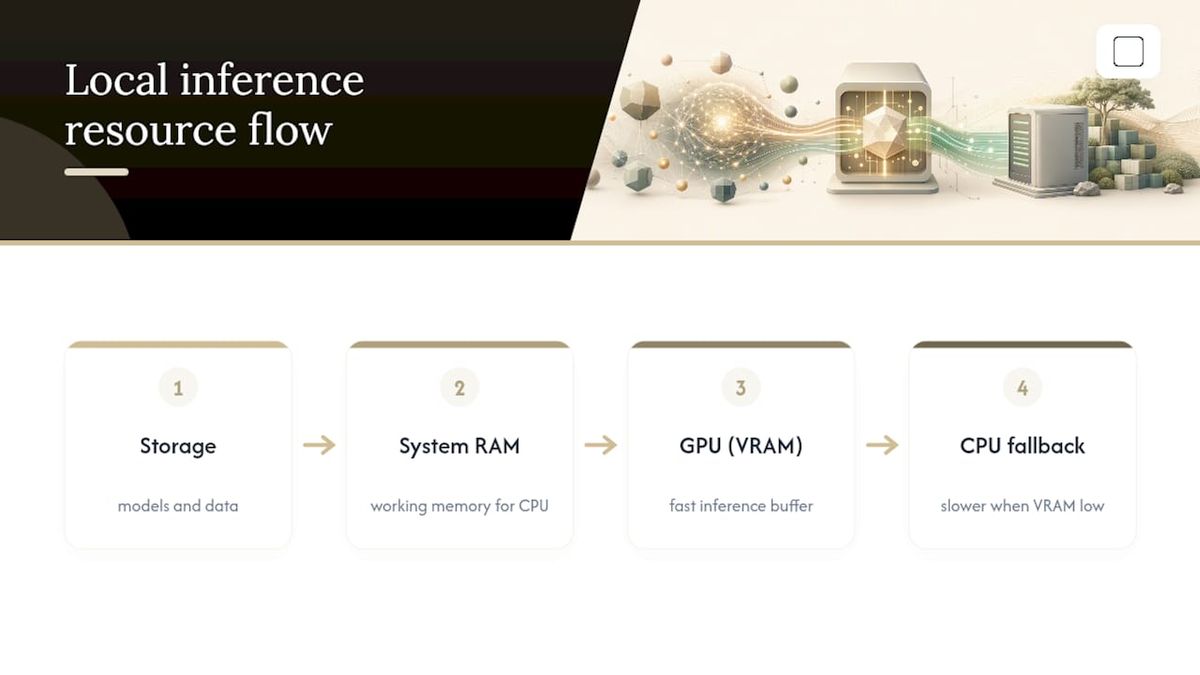
That's the gap between what a spec sheet promises and what you'll actually experience. A laptop with plenty of RAM but a weak GPU can still choke on a model that looks modest on paper. This is where GreenCube's two-tier approach earns its keep: the smaller model is genuinely light enough for machines without much graphics power, while the bigger model asks for real memory headroom in return for reading images and building documents. Generic local AI tools that hand you a dozen model choices don't solve this problem for you. They just move the decision earlier and expect you to already know your hardware's limits.
The other overrated idea is that local always means slower. For repetitive document work, local models often finish faster than cloud workflows once you count upload and download time. The right move isn't chasing the biggest model you can find. It's matching model size to the machine in front of you and accepting that a cloud model still wins on the hardest reasoning tasks.
— Hector Gras
How to Try GreenCube Today
GreenCube provides the full app for a single payment, with no subscription, available for Windows 10 and 11.

Setup takes three steps: buy the license, let the app download your chosen model once, and get the smaller model for speed or the bigger model if you need image reading and document building. Everything you type stays on your own computer. The one-time Google or Microsoft sign-in only confirms your license; it doesn't send your chats anywhere. If it's not the right fit, GreenCube's 15-day refund policy gives you room to test it without risk. Slower computers will still answer and build documents more slowly than fast ones, and that's worth knowing before you pick your model tier. Buy GreenCube directly, or visit the GreenCube landing page to see the full feature breakdown first.
Sources
- Choose between cloud-based and local AI models | Microsoft Learn
- Local AI vs Cloud AI: What Actually Works Better on a Windows PC
- Local LLMs vs Cloud AI: Why Offline Models Win for Privacy, Speed & Cost on Windows
- Local First AI vs Cloud AI: Real Trade-Offs — Lapu AI
FAQ
Is There a Real DeepSeek Alternative That Works Offline?
Yes. Offline desktop AI apps like GreenCube run entirely on your own Windows computer after a one-time model download, with no ongoing internet connection required for chats. That's a different category from cloud chatbots, which need a live connection for every response.
What Does GreenCube Cost?
GreenCube is a one-time purchase of $9.99 / €9.99, covering everything with no subscription. A 15-day refund policy applies if it doesn't fit your needs.
Do I Need a Powerful Computer to Run a Local AI Model?
It depends on the model, not just the app. GreenCube's smaller model runs on modest hardware, while the bigger model needs around 8GB of RAM and benefits from a GPU with enough VRAM to avoid slow CPU fallback.
Are Local Desktop AI Tools as Powerful as Cloud Models Like DeepSeek?
Not on complex, multi-step reasoning tasks. Local models trade some raw capability for privacy, offline access, and a one-time price, which suits everyday document and chat tasks better than heavy specialist reasoning.
Can I Use a Local AI Tool With No Internet at All?
Yes, once the model is downloaded, GreenCube works with no internet connection for chats, documents, and images. The only online step is a one-time sign-in through Google or Microsoft to verify your license.
Recommended
- Protect Research: GreenCube, an Offline Elicit Alternative (€9.99)
- €9.99 One Time NovelAI Alternatives for Windows That Run Offline
- Gemini Alternatives for Private, Offline Windows AI
- The Best Local AI Chatbot for Windows: Private, Simple, Yours
Your own AI, on your own PC
GreenCube runs on your computer: no usage limits, no subscription, works without internet. €9.99 (US$9.99), paid once.
Get GreenCube