€9.99 One Time NovelAI Alternatives for Windows That Run Offline
If you need a private, one-time-purchase Windows alternative to cloud AI tools that keeps chats and PDF or image analysis entirely on your device. The right category is a local desktop assistant, not another subscription service. GreenCube fits that brief directly: it runs offline after a one-time model download, costs a flat fee, and keeps your chat and document data local to your device. The trade-off is honest, too. You gain full ownership and privacy, but a local model still won't out-reason a frontier cloud AI on heavy, large-scale tasks.
TL;DR:
- Local models with a size of 2GB suit text-only tasks and run efficiently on machines with 8GB of RAM, while the 4.2GB image-capable model needs more memory and processing power.
- Ensuring OCR, embedding, and inference processes happen entirely on your device is critical for genuine privacy and requires verifying no external API calls during operation.
- Running inference locally reduces the risk of data interception but shifts security responsibilities to users, requiring encryption, strong passwords, and careful management of files and backups.
- GreenCube offers a one-time purchase with models that operate fully offline, providing ownership and privacy without subscription costs, but with performance trade-offs compared to cloud AI.
- A machine with at least 8GB of RAM is essential for smooth operation, especially for image-related tasks, and lower specifications can cause significant slowdowns during document processing.
Table of Contents
- What Does a One-Time-Purchase Offline Windows Assistant Actually Deliver?
- How Does Local Document AI Actually Work?
- How Do You Choose an Offline Windows AI Assistant?
- What Are the Hardware Requirements for Local AI on Windows?
- What Does Local AI Actually Protect, and What Does It Not?
- What Are GreenCube's Actual Specs and Limits?
- Why Most "Private AI" Advice Misses the Point
- Ready to Try a Local Assistant Instead of a Subscription?
- Sources
- FAQ
What Does a One-Time-Purchase Offline Windows Assistant Actually Deliver?
The product category here is a local inference app: software that downloads a language model once, then answers questions and reads documents entirely on your own hardware. No monthly bill, no server round trip, no usage cap tied to a subscription tier. For someone comparing apps like NovelAI that run in the cloud, this is a structurally different product: you're buying software, not renting access.
At setup, you typically pick between two model sizes, each downloaded once and stored locally:
- A smaller, faster text-only model (roughly 2GB) built for quick chat and drafting.
- A larger model (roughly 4.2GB) that can also read images and scanned pages, at the cost of more RAM and slower responses.
The pros are straightforward: your chats and documents stay on the machine, there's no recurring cost, and usage isn't metered, reflecting Alhora's AI Principles: It Never Writes Your Book around privacy-first design. The cons matter too. Local models trail cloud giants on complex multi-step reasoning, the image-capable option needs meaningfully more memory, and you're responsible for your own backups and device security instead of a vendor's infrastructure. For privacy-first buyers, that trade usually still wins. For someone who needs top-tier reasoning on every query, it might not.
How Does Local Document AI Actually Work?
Three separate stages have to happen on your device, not one server somewhere, for a document assistant to be genuinely private. Skip the mechanics and you're trusting a marketing claim instead of an architecture.
- Local OCR and parsing. The app reads a scanned PDF or image and converts it into text using an on-device vision model, no cloud vision API involved.
- Local embeddings and vector search. The extracted text gets converted into numerical vectors and indexed locally, so the assistant can pull the relevant passage when you ask a question.
- Local LLM inference. The language model generates your answer using only that locally retrieved text, running entirely on your CPU or GPU.
A document assistant is only as private as its weakest link in that chain. If any single stage quietly calls an external OCR service or a cloud embedding API, the offline privacy guarantee is broken even if the chat window looks completely local. Poor OCR is also the most common failure point: garbled text extraction leads to bad retrieval, and bad retrieval leads to a confident, wrong answer from the model.
Pro Tip: Open Task Manager's network tab (or a free tool like GlassWire) while you feed a PDF into the app. If you see outbound traffic during processing, something in that pipeline isn't actually local.
How Do You Choose an Offline Windows AI Assistant?
Run any candidate, including GreenCube, through the same checklist. A polished interface tells you nothing about what's happening under the hood.
- Confirm OCR happens locally, not through a cloud vision API, especially if you'll be scanning images or receipts.
- Confirm embeddings and vector search run on-device rather than through a hosted service.
- Confirm inference itself is local, meaning the model file lives on your drive.
- Check whether the app supports scanned-image analysis at all. Not every local model does; text-only models simply can't read pictures.
- Look at installer quality, the pricing structure (one-time versus recurring), the refund window, and whether support documentation actually exists.
- Ask who's responsible for security once the app is local. Disk encryption, account access, and update habits become your job, not the vendor's.
What Are the Hardware Requirements for Local AI on Windows?
Every local model has to be downloaded once before it runs offline, so plan for that download regardless of which option you pick. Microsoft's own guidance on choosing between cloud and local Windows AI models confirms that on-device viability depends heavily on your machine's memory and processor, not just the software itself.
- The lighter text-only model runs around 2GB and works fine on modest hardware.
- The image-capable model runs around 4.2GB and needs more headroom to process scanned pages and pictures.
8GB of RAM is the floor for image-capable local models, not a comfortable target. On older or budget laptops, that floor can still mean noticeably slower responses, especially the first time a large scanned PDF gets processed.
If your machine has 8GB of RAM and mostly handles text chat, start with the smaller model. Save the larger, image-capable one for machines with 8GB or more where you specifically need OCR on scanned documents. Once both models are downloaded, everything runs with no internet connection required, though CPU-only machines will feel noticeably slower than anything with a dedicated GPU. Local document parsing tools show similar patterns, offering low-VRAM modes specifically because image processing spikes memory use fast.
What Does Local AI Actually Protect, and What Does It Not?
Running inference locally removes the biggest structural risk of cloud AI: your conversation and document content simply never leaves the device, so there's nothing for a third-party server to intercept or log. That also reduces exposure under frameworks like GDPR or HIPAA, since data residency stops being a question when nothing gets transmitted.
Local doesn't fix everything, though. The risks that remain are yours to manage:
- Malware or spyware already on your machine can still read local files, model outputs, or logs.
- Unencrypted drives expose everything if the laptop is lost or stolen.
- Shared Windows accounts or weak passwords defeat the privacy benefit entirely.
- Unmanaged backups can quietly copy sensitive chats or documents to less secure storage.
Pro Tip: Turn on BitLocker, use a dedicated Windows account with a strong password, and check your firewall logs occasionally for anything unexpected reaching out. Local software shifts the security burden from a vendor's servers to your own habits.
What Are GreenCube's Actual Specs and Limits?
GreenCube is built with Tauri, Rust, and React, and it runs inference through llama.cpp entirely on your machine. That's a deliberately lightweight, native stack rather than a browser wrapper around a remote API.
The license costs a one-time fee, with a 15-day refund window and no subscription attached. Signing in through Google or Microsoft is required to verify the license. Chats and document processing run locally on your machine.
At setup, you choose between two models, downloaded once each: a smaller, faster text-only model around 2GB, and a larger model of about 4.2GB that can read images and scanned pages but requires more memory. GreenCube runs on Windows 10 and 11 only.
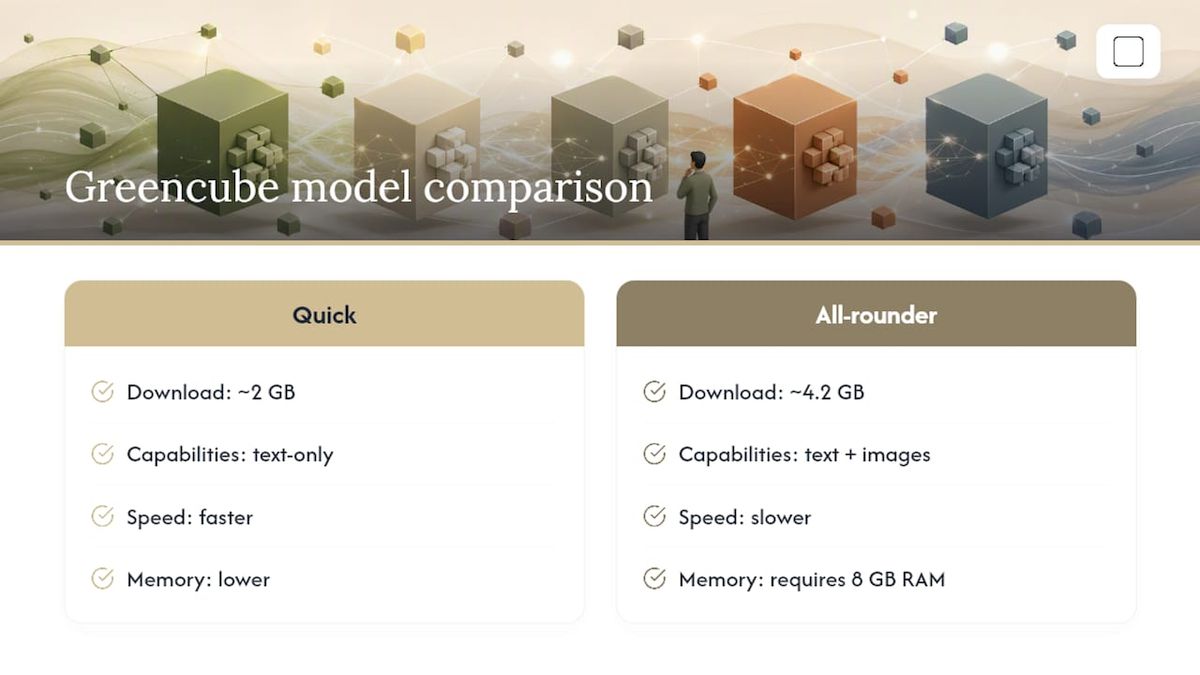
Worth saying plainly: GreenCube isn't pitched as smarter than a top cloud model. It offers privacy, offline access, no usage limits, and a price you pay once.
Why Most "Private AI" Advice Misses the Point
Most guides to private AI stop at "it runs on your device" and call that enough. That's the wrong finish line. A chat window can feel completely offline while the document you just uploaded gets shipped to a cloud OCR endpoint behind the scenes, because the interface doesn't distinguish between local inference and local-looking inference.
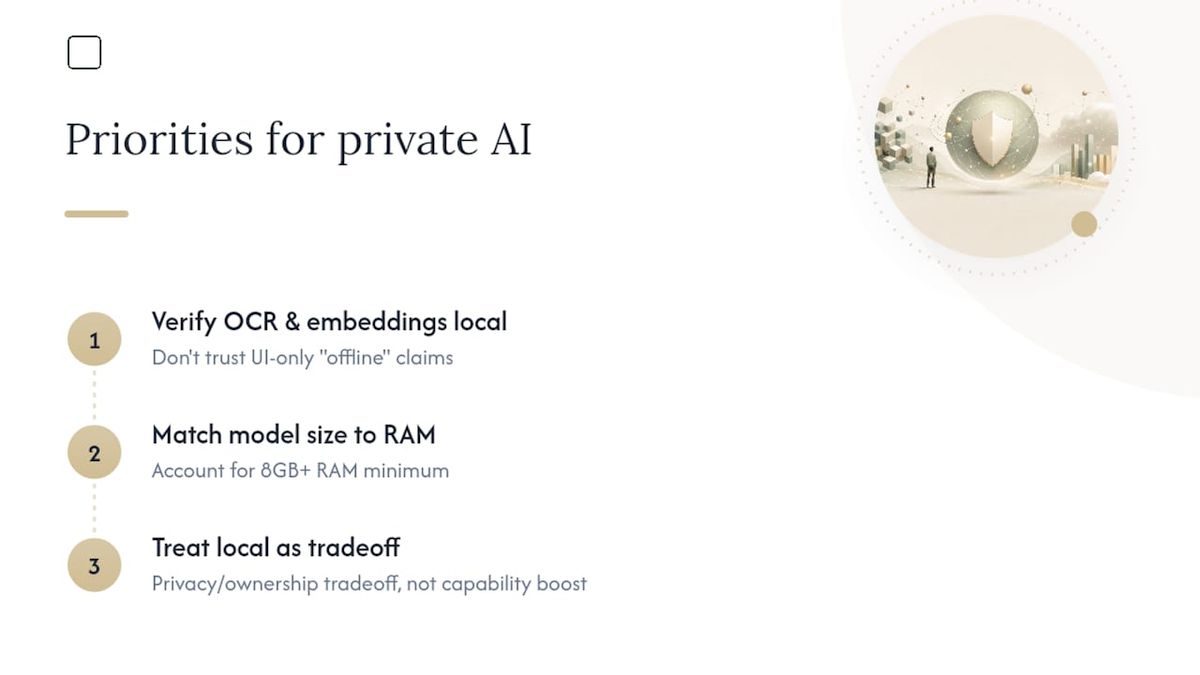
The conventional advice also treats RAM requirements as a footnote. It isn't one. An 8GB floor for image-capable models is a real constraint that determines whether your specific laptop will feel usable or frustrating, and vendors that gloss over that number are setting buyers up for a bad first impression.
What actually deserves priority, in order: verify the OCR and embedding steps are local before you trust anything else about the app, match the model size to your RAM honestly rather than optimistically, and accept upfront that a local model is a privacy and ownership trade, not a capability upgrade. Readers who go in with that framing end up satisfied. Readers expecting a pocket-sized GPT-4 competitor usually don't.
— GreenCube
Ready to Try a Local Assistant Instead of a Subscription?
GreenCube is the alternative to another monthly AI subscription: pay once, own the app, and keep every chat and document on your own laptop instead of a vendor's server. That's a meaningful shift for anyone who's tired of recurring charges for tools they use inconsistently, and it matches what owning your AI outright is supposed to mean.

If your laptop has 8GB of RAM or less, or you mainly need text chat and drafting help, start with the smaller model. If you regularly scan receipts, contracts, or handwritten notes and have 8GB or more to spare, the bigger model is worth the extra download size. Either way, the license is a one-time €9.99 / $9.99, backed by a 15-day refund if it's not a fit. Grab it from the GreenCube purchase page, or browse the full product overview first if you want the details before you commit.
Sources
- Why “Local Document AI” Is Really an OCR + RAG + Local Inference Problem - DEV Community
- Local AI vs Cloud AI: Privacy, Cost and Speed
- Choose between cloud-based and local AI models | Microsoft Learn
- Vision Ingest — local-first document parsing (GitHub)
FAQ
Is There a Free, Fully Offline Alternative to Cloud AI Chat Tools?
Free local model runners exist, but a polished one-time-purchase desktop app with built-in document OCR, like GreenCube at €9.99 / $9.99, usually saves setup time compared with assembling free tools yourself.
Can an Offline Windows Assistant Read Scanned PDFs and Photos?
Only if the model you choose supports image input. GreenCube's bigger model (Gemma 4 E4B, about 4.2GB) reads images and scanned pages; the smaller the smaller model is .
How Much RAM Do I Need for a Local AI Assistant on Windows?
Eight gigabytes of RAM is the stated minimum for image-capable local models, and it's a floor, not a comfort zone. Older machines at that level may still run noticeably slowly.
Does Signing In Break the Privacy Promise of a Local AI App?
Not in the way people assume. Sign-in through Google or Microsoft verifies your license only; your actual chats and document analysis still run entirely on-device with no data transmitted.
How Can I Verify an App Is Actually Processing Documents Locally?
Watch network activity with a monitor like GlassWire while processing a file. Genuine local pipelines show no outbound traffic during OCR, embedding, or inference.
Recommended
- Own a Private Offline Assistant on Windows, Unlimited AI for €9.99
- The Best Local AI Chatbot for Windows: Private, Simple, Yours
- Gemini Alternatives for Private, Offline Windows AI
- Pay €9.99 Once for GreenCube, a Private Local AI UI for Windows
Your own AI, on your own PC
GreenCube runs on your computer: no usage limits, no subscription, works without internet. €9.99 (US$9.99), paid once.
Get GreenCube