Desktop First Private Self Hosted AI Assistant: 3 Deployment Paths
Yes, you can run a private AI assistant entirely on your own hardware, and three practical paths get you there. A desktop app like GreenCube gets non-technical users chatting offline in minutes. A self-hosted server with a separate web interface gives developers full control over models and data. A hybrid setup keeps sensitive documents local while routing complex reasoning to cloud models when needed.
TL;DR:
- Running a private AI on your hardware requires matching your technical skills, hardware capacity, and privacy needs to one of the three main setups: desktop app, self-hosted server, or hybrid.
- A desktop app suits non-technical users seeking fast, offline chat with minimal setup, while self-hosted servers are ideal for more control, multi-user access, and custom retrieval pipelines.
- Hardware requirements mainly depend on the model size, with 8GB RAM needed for efficient inference of models up to 3 billion parameters, and storage planning must account for model file sizes and quantization.
- True privacy involves minimal network traffic, with license verification being the only online step, and all data and models should stay on local devices unless explicitly routed to the cloud.
- Cost-effective options include one-time purchases for desktop apps, whereas self-hosted servers entail ongoing maintenance, and cloud API bills can escalate quickly with heavy document processing.
Table of Contents
- Which Setup Fits You? A 60-Second Checklist
- How Do You Choose the Right Approach?
- What's Inside a Self-Hosted AI Assistant?
- How Much Hardware Do You Actually Need?
- Setting Up Your Assistant: Three Recipes
- What Does "Private" Actually Mean Here?
- Common Setup Problems and How to Fix Them
- Why GreenCube Bets on Desktop-First Simplicity
- How to Get Started With GreenCube
- Sources
- FAQ
Which Setup Fits You? A 60-Second Checklist
Before you download anything, match your skills, hardware, and privacy requirements against the three approaches. Guessing wrong here means wasted hours reinstalling software or discovering your laptop can't handle the model you picked.
A desktop app fits you if you want something running today, not this weekend. You don't need to touch a terminal, and you're fine trading some flexibility for simplicity. This is where a local AI assistant like GreenCube lives. It installs, downloads one model, and you're chatting. The tradeoff is fewer customization knobs than a server build.
A self-hosted server plus a web UI fits you if you already run Docker, want multi-user access, or need to plug in a custom retrieval pipeline. You'll spend a weekend on setup and periodic maintenance afterward, but you get full control over which model runner, database, and interface you use.
A hybrid model fits you if some of your work is genuinely sensitive (client contracts, medical notes, financial records) and some isn't. You keep the sensitive stuff local and let a cloud API handle the reasoning-heavy tasks that a small local model struggles with.
Quick fit check:
- Non-technical, wants privacy fast: desktop app (GreenCube or similar).
- Comfortable with Docker and command lines: self-hosted server + UI.
- Mixed sensitivity workload, wants frontier reasoning sometimes: hybrid.
- Team of five or more: self-hosted server, likely on dedicated hardware.
- Budget under $50 total: desktop app, one-time purchase, avoids recurring API bills.
Cost and maintenance scale with control. A desktop app needs zero maintenance beyond occasional updates. A self-hosted stack needs someone watching disk space, model versions, and security patches indefinitely.
How Do You Choose the Right Approach?
Pick your deployment path by answering ten questions honestly, not by chasing whichever tool has the most GitHub stars this month. The best self-hosted assistant for a solo writer looks nothing like the best one for a five-person legal team.
- What data actually touches the assistant, and does any of it legally need to stay on-premises?
- Does the tool require a network call for anything beyond license checks or updates?
- If the local model can't handle a task, is there a fallback, and where does that data go?
- Who manages credentials, and does the setup support single sign-on if you're deploying for a team?
- How often do you plan to swap or upgrade models, and does the architecture make that painless?
- What's the realistic maintenance load: patching a server monthly, or nothing at all?
- Is pricing one-time, subscription, or usage-based, and which fits your actual usage pattern?
- How large is the model download, and do you have the disk space and bandwidth to spare?
- Does the tool support the file types you actually work with (PDFs, images, spreadsheets)?
- What happens to your chat history and documents if you uninstall or switch machines?
Question one matters more than the rest combined. A tool that phones home for anything beyond a one-time license check isn't really local, no matter what the marketing says.
Pro Tip: Ask any vendor point-blank: "What leaves my device, and when?" If the answer takes more than one sentence, that's a sign the privacy story has fine print.
Cost modeling deserves its own line item. A one-time purchase with no subscription is predictable. A cloud API bills per token, and those costs compound fast if you're processing long documents daily. Community deployment notes on the self-hosted AI setup thread on Reddit show users repeatedly underestimating storage and bandwidth needs for model downloads before their first successful chat.
What's Inside a Self-Hosted AI Assistant?
Every self-hosted setup, regardless of complexity, breaks down into four components: a model runner, a front end, a storage layer, and optional connectors. Understanding these pieces matters even if you're buying a packaged app, because it tells you exactly what you're trusting with your data.
The model runner does the actual inference. Options like llama.cpp run efficiently on CPU-only machines, while tools like Ollama and LM Studio wrap that inference in a friendlier interface with model management built in. Some setups add an OpenAI-compatible gateway on top, which lets you swap models without rewriting your front end's code. The project behind eVi demonstrates this well: a Python core with pluggable backends across LM Studio, Ollama, and llama.cpp, so the same assistant runs whether you're on a laptop or a dedicated server.
Your front end is how you actually talk to the assistant. A desktop app bundles everything into one installer, which is the pattern behind consumer tools like Local AI Assistant on the Microsoft Store. A web UI gives you browser access from any device on your network, useful if multiple people need access. A command-line interface is fastest for developers who live in a terminal and don't want a GUI eating resources.
Storage is where architecture choices get serious. Chat history and documents need somewhere to live, and if you're doing retrieval-augmented generation (RAG), you need a vector store for embeddings. OwnPilot's deployment documentation recommends a Docker Compose stack running Postgres with the pgvector extension, a pragmatic combination that handles both structured chat logs and vector search without adding a separate database engine. Encryption at rest matters here too, especially if the machine running your assistant isn't physically secured.
Connectors extend the assistant into your existing tools, calendar sync, email search, file system access, but each one is a privacy tradeoff. Thoth's architecture defaults to local-first operation with optional cloud provider integrations, a pattern worth copying: local by default, cloud only when you explicitly opt in for a specific task. If you're building assistant integrations into a development workflow, guidance on Claude Code IDE integration covers similar tradeoffs around local tooling versus cloud calls.
How Much Hardware Do You Actually Need?
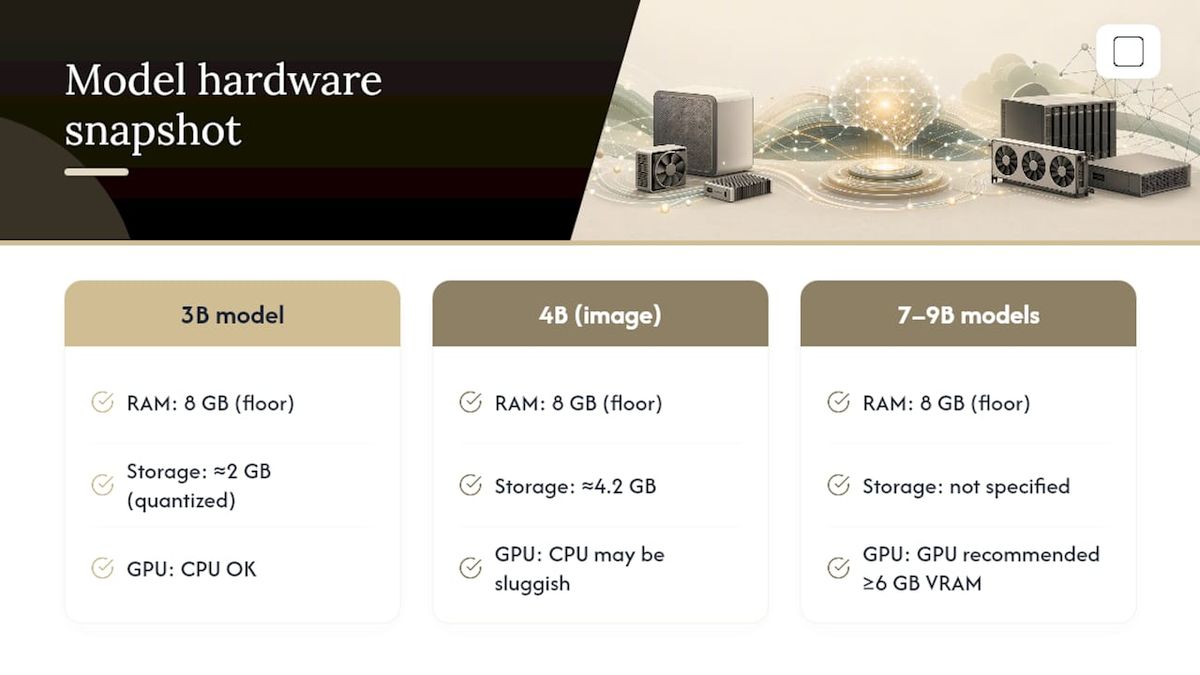
Model size dictates hardware more than any other single factor, and getting this wrong is the single most common reason self-hosted setups feel sluggish. A 3 billion parameter model like Llama 3.2 3B runs comfortably on 8GB of RAM with CPU-only inference, no graphics card required. Step up to a model in the 7 to 9 billion parameter range, and you're looking at noticeably slower responses on CPU alone unless you add a GPU with at least 6GB of video memory.
Here's the practical breakdown:
Eight gigabytes of RAM is a floor, not a comfort zone. On older laptops with slower memory or background processes competing for resources, even a 4 billion parameter model can feel sluggish at that minimum. The Stanford AI Index tracks the broader trend driving this: model capability keeps climbing while efficient smaller models close the gap with much larger ones, which is exactly why an 8GB machine can now run something genuinely useful that would have needed a workstation three years ago.
Model file sizes matter for storage planning too. A quantized 3B model runs around 2GB on disk. A 4B model with image capabilities lands closer to 4.2GB. Multiply that by however many models you're testing, and a modest laptop SSD fills up fast.
Quantization, running the model at reduced numerical precision, is the single biggest performance lever available to you. It shrinks file size and speeds inference with a small, usually acceptable, quality tradeoff. Batching multiple requests together helps on servers handling several users at once, but it does nothing for a single-user desktop setup.
Setting Up Your Assistant: Three Recipes
Pick the recipe matching your chosen approach and follow it start to finish. Each one gets you to a working first chat, though "working" means different things depending on the path.
Recipe 1: GreenCube desktop app
- Download the installer from the official site and run it on Windows 10 or 11.
- Choose your model: the smaller model (Gemma 4 E2B, about 2.6 GB) or the bigger model (Gemma 4 E4B, about 4.2GB, reads images, needs 8GB RAM minimum).
- Let the model download complete, this happens once and runs locally afterward.
- Sign in with Google or Microsoft to verify your one-time license. This step confirms purchase only; it doesn't send your chats or documents anywhere.
- Start chatting or drop in a PDF for analysis. Everything from this point runs offline.
Total time to first chat: typically under 15 minutes, most of it spent waiting on the model download.
Recipe 2: Self-hosted server + web UI
- Install a model runner like Ollama or llama.cpp on a machine with adequate RAM for your chosen model.
- Start an OpenAI-compatible gateway so your front end can talk to the model using a standard API format.
- Deploy a web UI, either a lightweight custom front end or a packaged option, pointing it at your gateway's address.
- Set up Postgres with pgvector if you want document retrieval, following a pattern similar to OwnPilot's Docker Compose stack.
- Ingest your documents into the vector store, then test retrieval with a few sample queries before trusting it with real work.
Expect a full weekend for a first working setup, longer if you're new to Docker or database configuration.
Recipe 3: Hybrid local plus cloud fallback
- Run your RAG pipeline and document storage entirely locally, exactly as in Recipe 2.
- Configure a fallback rule: when a query needs reasoning beyond your local model's ability, route it to a cloud API.
- Strip or redact sensitive identifiers before any fallback call leaves your machine.
- Log which queries triggered a cloud fallback so you can audit exposure after the fact.
The hybrid path demands more discipline than either pure approach, because one misconfigured routing rule can leak something you meant to keep local. Test your redaction logic before you trust it with anything sensitive.
What Does "Private" Actually Mean Here?
"Local" rarely means "zero network traffic, ever," and any tool claiming otherwise is oversimplifying. Even the most privacy-focused desktop assistants typically need one connection: verifying that you own a valid license. GreenCube works this way. Sign-in through Google or Microsoft confirms your purchase, and checkout itself runs through Stripe. Beyond that single verification step, your chats and any documents you upload stay on your machine and are never transmitted anywhere. The AI processing itself, the actual analysis, runs fully offline.
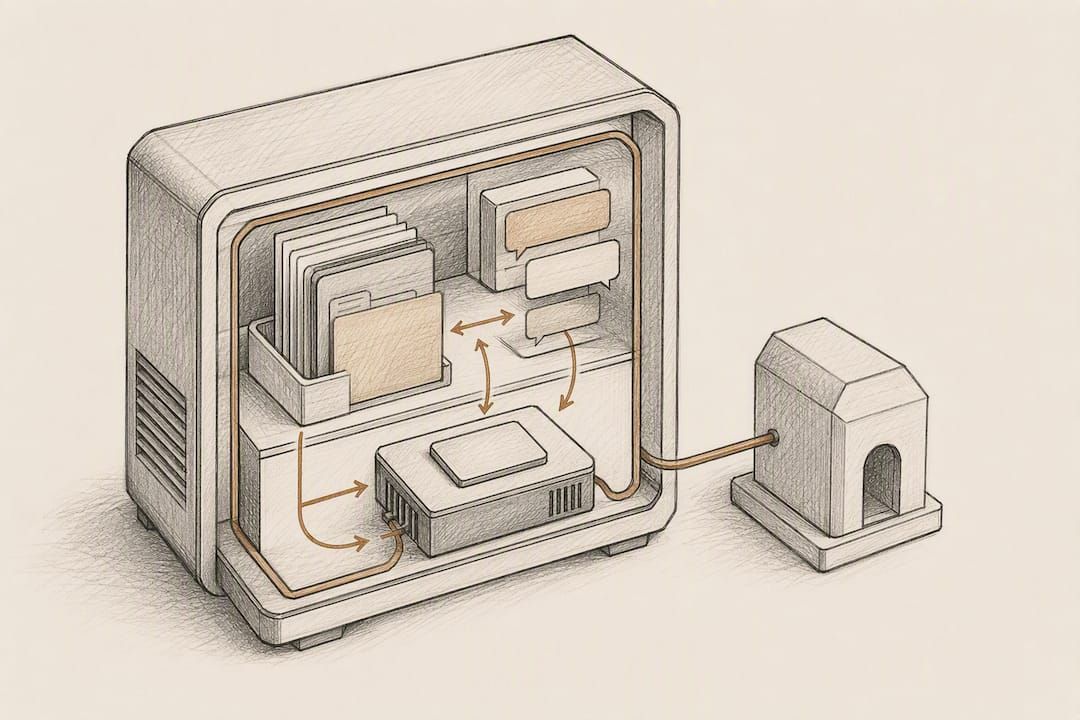
That distinction, license verification versus data processing, is worth understanding before you buy anything marketed as private. A tool that needs your API key to function is fundamentally different from one that needs a one-time login to unlock features you already own.
Security practices matter regardless of which path you choose. Store any API keys in an environment variable or a dedicated secrets manager, never hardcoded in a config file you might commit to a repository. If you're exposing a self-hosted gateway to your home network, put it behind a firewall rule that blocks external access by default. Enterprise deployments of desktop AI tools increasingly ship with managed installers and SSO support, a pattern worth watching if you're rolling out an assistant across a team rather than a single machine.
Cost comparisons make the tradeoffs concrete. A one-time desktop purchase at $9.99 costs less than a single month of most subscription AI services. A self-hosted server costs nothing beyond electricity and hardware you already own, but ongoing cloud API calls for a hybrid setup can run anywhere from a few dollars to well over $50 monthly depending on document volume and query complexity.
Common Setup Problems and How to Fix Them
Most self-hosted assistant failures trace back to a handful of repeat offenders, and nearly all of them are fixable in under ten minutes once you know what to check.
- Model won't load or throws a format error: confirm you downloaded the correct quantization format for your runner; llama.cpp and Ollama don't always accept the same file types interchangeably.
- System freezes or crashes during inference: you're likely out of RAM; close background applications or switch to a smaller model before assuming your hardware is broken.
- Connector or credential errors: double-check API keys are current and stored correctly; expired keys are the most common cause of a connector silently failing.
- Slow responses after an update: a new model version sometimes defaults to a larger context window than your hardware handles well; check the settings before reverting anything.
- Lost RAG index after an upgrade: back up your vector store separately from your application before any major version upgrade, since some migrations rebuild indexes from scratch.
Pro Tip: Keep a copy of your last known-working model file even after upgrading. If a new version underperforms on your specific hardware, you'll want to roll back without re-downloading gigabytes.
Why GreenCube Bets on Desktop-First Simplicity
Most of the self-hosted AI conversation online assumes you want to tinker. Docker Compose, vector databases, gateway configuration, that's a legitimate path, and we covered it in detail above because plenty of readers genuinely want that control. But the loudest voices in this space consistently undersell how much friction that setup demands from someone who just wants a private place to ask questions and read a PDF without a subscription meter running.
GreenCube exists for the reader who wants the privacy benefits of self-hosting without the maintenance burden of running one. Two local models, a one-time price, and no ongoing infrastructure to patch. That's a deliberate tradeoff, not an oversight. We're not claiming it out-reasons a frontier cloud model on a hard problem, because it doesn't. Cloud models with far more compute behind them remain ahead on large-scale reasoning, and anyone telling you otherwise about any desktop tool is overselling.
What GreenCube offers instead is ownership. You buy it once, it runs on your machine, and it keeps working with no internet connection after setup. The bigger model needs at least 8GB of RAM to read images and build documents, and that's a floor, not a guarantee of speed on older hardware. The smaller model skips image reading entirely in exchange for smaller size and faster responses. Know which one matches your actual workload before you install.
— GreenCube
How to Get Started With GreenCube
GreenCube costs a one-time purchase price with no subscription, covered by a 15-day refund window. It runs on Windows 10 and 11, with a Mac version currently in development.

Setup starts with picking your model. the smaller model (Gemma 4 E2B, about 2.6 GB) handles fast text chat and drafting but can't read images. the bigger model (Gemma 4 E4B, about 4.2GB) reads images, builds study guides and documents, and needs at least 8GB of RAM to run smoothly, more if you're also multitasking with other heavy applications. Before installing, confirm you have enough free disk space for whichever model you choose, plus a little headroom for updates.
You'll sign in once with Google or Microsoft to verify your license after purchase. That's the only step involving a network call. Every chat and every document you analyze afterward stays on your machine, processed offline, with no subscription meter and no usage cap. If you're deciding between a subscription AI chatbot and owning your tool outright, see how GreenCube compares as a private AI assistant or check the step-by-step install walkthrough before you buy. Ready to skip the server setup entirely? Get GreenCube here and have it running before your coffee gets cold.
Sources
The self-hosted AI ecosystem moves fast, and the projects below shaped much of the practical guidance in this article. The Stanford AI Index tracks capability and deployment trends across the broader AI landscape, useful context for why smaller local models keep closing the gap with cloud giants. OwnPilot documents a privacy-first, Docker-based deployment pattern for readers building a server stack from scratch. Thoth on GitHub shows a local-first architecture with optional cloud fallbacks, a template worth studying regardless of which tool you ultimately choose. eVi demonstrates multi-frontend, multi-backend flexibility for anyone planning a setup spanning several machines.
For hands-on troubleshooting from people who've actually done this, the community setup guide on Reddit remains one of the more grounded resources available, warts and all. If you want the desktop route instead of a server build, GreenCube's product page covers pricing and download details directly, and the Windows offline setup guide walks through first-run configuration.
- AI Index — Stanford HAI
- The Complete Guide to Building Your Free Local AI — Reddit
- OwnPilot — Privacy‑First Personal AI Assistant
- eVi — local-first personal AI assistant
FAQ
Can you self-host your own AI?
Yes. You can run a model runner like Ollama or llama.cpp on your own hardware, pair it with a web interface, and keep all your data on your machine, or choose a packaged desktop app that handles the setup for you.
Can I build my own personal AI assistant?
Yes, using open-source components like a local model runner, a front end, and a vector database for document retrieval, though it typically takes a full weekend for a first working setup if you're new to the tools involved.
How much does a personal AI assistant cost?
Costs range from a one-time purchase like GreenCube's $9.99 to free open-source stacks that cost nothing but your time, up through cloud API bills that can exceed $50 monthly for heavy document processing.
Can I build my own AI agent for free?
Yes, open-source model runners and front ends are free to download and run, though you'll need hardware capable of running the model and time to configure the retrieval and connector pieces yourself.
What's the difference between a desktop AI app and a self-hosted server?
A desktop app like GreenCube installs everything in one package for single-user offline use, while a self-hosted server separates the model runner, database, and web interface across components you configure and maintain yourself, typically for multi-user or team access.
Recommended
- Best Private AI Assistant in 2026: Local and Offline
- Install Local AI: Get a Working Offline LLM on Your PC
- Offline AI: Why It Matters and How to Get Started
- Offline AI Setup on Windows: Private, Local, and Easy
Your own AI, on your own PC
GreenCube runs on your computer: no usage limits, no subscription, works without internet. €9.99, paid once.
Get GreenCube