Run LLMs Locally: 2–5GB Models for Privacy-First Users
An LLM (large language model) is a transformer-based neural network trained to predict the next word in a sequence, and that simple mechanism is what powers modern chatbots, code assistants, and document tools. The practical takeaway: these models handle writing, summarizing, coding, and analysis remarkably well, but you get to choose between running one locally on your own machine for privacy or tapping a cloud API for raw scale.
TL;DR:
- Smaller models under 3 billion parameters run quickly on modest hardware and are suitable for drafting and simple questions, but lack advanced reasoning.
- Medium models between 4 and 9 billion parameters improve reasoning and often support multimodal functions, requiring more RAM and dedicated GPU hardware.
- Large models exceeding 15GB in size demand significant computing resources and are generally impractical for personal hosting, favoring cloud access for complex tasks.
- Fine-tuning and reinforcement learning from human feedback significantly enhance instruction-following, tone, and helpfulness, rather than just increasing raw size.
- Pairing local models with retrieval systems helps mitigate hallucinations and improve factual accuracy, especially in sensitive or detailed use cases.
Table of Contents
- What Are LLM Models and How Do They Actually Work?
- How Are LLMs Trained? Pretraining, Fine-Tuning, and RLHF
- What Can LLMs Do Well, and Where Do They Fail?
- Which Open-Source LLM Models Can You Run Yourself?
- How Do You Choose the Right LLM for Your Needs?
- What Does Running an LLM Locally Actually Look Like?
- Where Can You Learn More About LLMs?
- Our Take: What Actually Matters When Evaluating LLMs
- Sources
- FAQ
What Are LLM Models and How Do They Actually Work?
Getting a large language model to write a coherent paragraph starts with breaking your sentence into pieces it can digest. That process, called tokenization, chops text into chunks (sometimes whole words, sometimes fragments like "un" and "packing") and converts each chunk into a number. From there, every token gets mapped into a vector, a long list of numbers called an embedding, that captures something about its meaning and how it relates to other words nearby.

Once text becomes numbers, the transformer architecture takes over. Each transformer block runs two main operations: self-attention and a feed-forward layer. Self-attention lets every token look at every other token in the input at the same time and decide which ones matter for understanding it. That's a real departure from older recurrent networks, which read text one word at a time and struggled with long documents. Because attention processes a full sequence in parallel, transformers scale across GPUs far more efficiently, which is a big part of why they went from research curiosity to industry standard in a few years.
A positional encoding gets added alongside the embeddings so the model knows word order. Without it, "dog bites man" and "man bites dog" would look identical to the attention mechanism, since attention on its own has no sense of sequence.
Not every transformer is built the same way. Three flavors show up constantly:
- Decoder-only models (the GPT family, Llama, Gemma) generate text one token at a time and dominate today's chatbots and assistants.
- Encoder-decoder models (like the original T5) read an entire input first, then generate output, which suits translation and structured summarization.
- Encoder-only models (like BERT) never generate free text at all. They're built for classification and understanding tasks, such as sentiment scoring or search ranking.
Inference, the act of actually generating a response, is just this process repeated over and over: predict the most likely next token, add it to the sequence, and repeat. That's why outputs are probabilistic rather than fixed. The model isn't retrieving a stored answer. It's sampling from a probability distribution over its entire vocabulary at every step, which is also why the same prompt can produce slightly different phrasing each time.
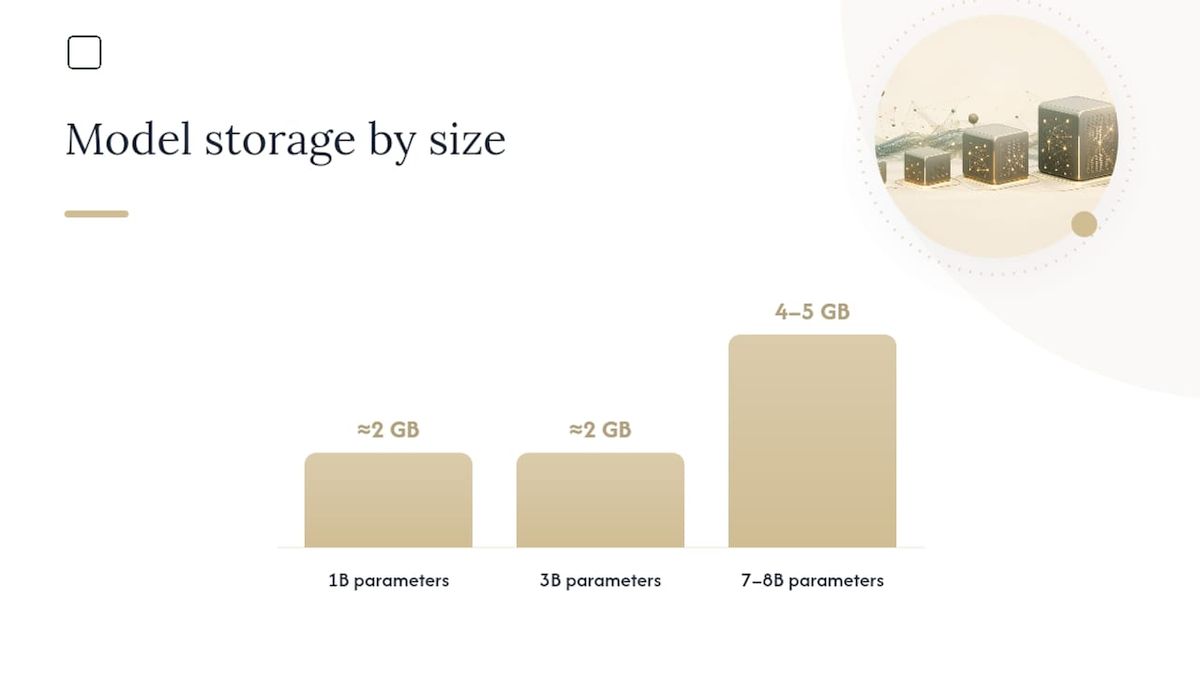
Resource math worth knowing: a rough rule of thumb is that 1 billion parameters take up about 2GB of storage once quantized down from full precision. That's why a 3 billion parameter model lands around 2GB on disk, while a model in the 7 to 8 billion parameter range needs 4 to 5GB. If you're planning to run anything locally, that math is the first thing to check against your available disk space and memory.
How Are LLMs Trained? Pretraining, Fine-Tuning, and RLHF
A raw language model starts life as a next-token predictor with no manners. It has read an enormous amount of text and gotten very good at completing sentences, but nobody has taught it to follow instructions or refuse harmful requests. Getting from that raw state to something like a helpful assistant takes several distinct stages.
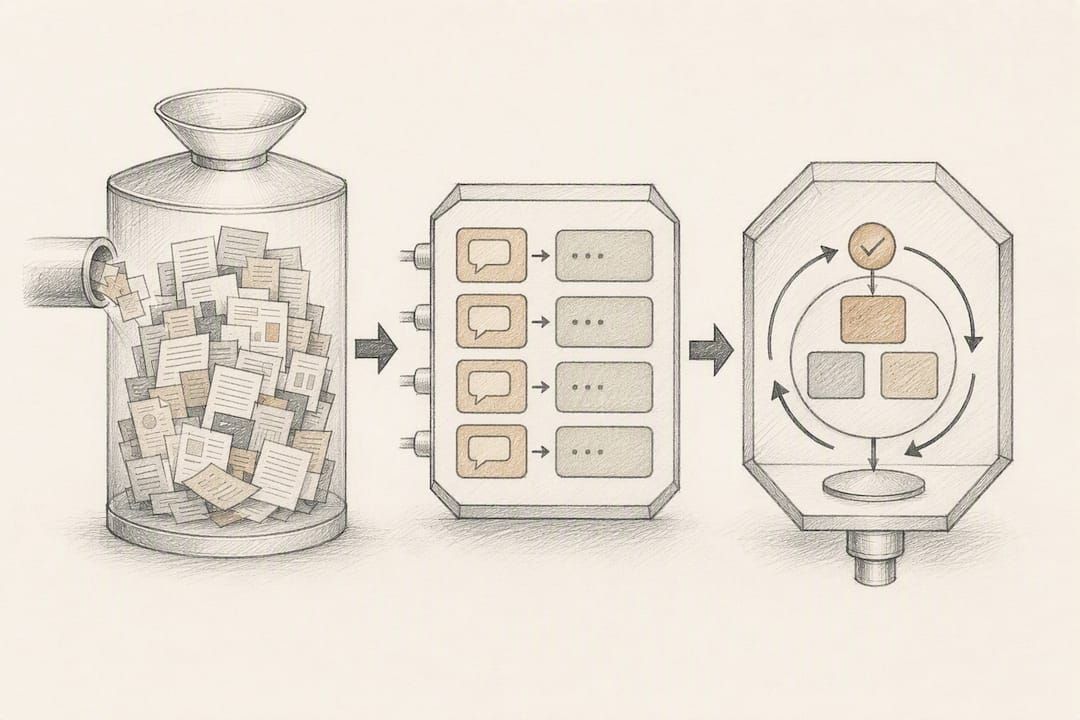
Pretraining comes first. The model learns through self-supervised learning on massive text corpora, meaning it doesn't need human-labeled examples. It just tries to predict masked or upcoming tokens across billions of documents pulled from sources like Common Crawl, digitized books, and curated web text. This stage is where the model absorbs grammar, facts, reasoning patterns, and, unfortunately, whatever biases exist in that data.
Fine-tuning narrows that broad competence toward specific behavior. Instruction tuning shows the model thousands of examples of prompts paired with the kind of response a human would want, teaching it to follow directions instead of just continuing text in whatever direction is statistically likely. Few-shot prompting is a lighter-weight alternative: instead of retraining anything, you show the model two or three examples directly in your prompt and let it infer the pattern on the fly.
RLHF (reinforcement learning from human feedback) is the step that gets a model to sound genuinely cooperative rather than technically correct. Human raters rank multiple model responses to the same prompt, and that ranking data trains a reward model, which then nudges the LLM toward outputs people actually prefer. Pretraining plus fine-tuning plus RLHF is the standard pipeline behind most assistant-style models on the market today.
A few things worth knowing before you assume bigger is always better:
- Scaling up pretraining data and parameters generally increases capability, but it also multiplies compute cost and energy use substantially.
- Models trained without RLHF tend to be technically fluent but noticeably worse at following nuanced instructions or declining inappropriate requests.
- RLHF isn't a cure for factual errors. It shapes tone and helpfulness, not truthfulness.
- Alignment quality and training data quality shape a model's perceived intelligence more than raw parameter count, according to AWS's technical breakdown of LLM training.
What Can LLMs Do Well, and Where Do They Fail?
Modern language models handle a surprisingly wide range of tasks: drafting and editing text, summarizing long documents, translating between languages, generating and debugging code, and working through multi-step reasoning problems when prompted carefully. Combine an LLM with memory, API access, and decision logic, and you get an AI agent capable of booking things, querying databases, or chaining multiple tasks together without a human approving every step.
Some of that capability doesn't show up gradually as models get bigger. Research on emergent abilities has documented skills, like multi-step arithmetic or certain reasoning tasks, that essentially don't work at all below a certain scale threshold and then click into place once a model crosses it. That's a genuinely strange property of these systems, and it's part of why predicting what a bigger version of a model will be able to do is harder than it sounds.
None of this comes without real failure modes:
- Hallucination. Because an LLM is fundamentally a statistical next-token predictor, it optimizes for plausible-sounding text, not verified truth. It will confidently invent citations, dates, and facts that sound entirely reasonable and are completely wrong.
- Bias. Training data reflects the internet's skew, so models can reproduce stereotypes or underrepresent certain viewpoints unless specifically corrected during fine-tuning.
- Compute cost. Running and training frontier-scale models consumes enormous energy and hardware resources, which is part of why the OECD treats language models as a serious policy and governance concern.
- Multimodality gaps. A model trained only on text cannot interpret an image or audio clip. Reading a photo of a receipt or a scanned PDF requires a model specifically trained or fine-tuned for vision input.
Pro Tip: If hallucinations are a dealbreaker for your use case, pair your LLM with retrieval-augmented generation (RAG), which grounds answers in a specific document or database instead of the model's memory alone. It's the single most effective mitigation available right now, short of manual fact-checking.
Which Open-Source LLM Models Can You Run Yourself?
Open-weight models publish their trained parameters for anyone to download, inspect, and run, which is different from a fully open-source project that also releases training code and data. That distinction matters if you're evaluating license terms, since some open-weight models restrict commercial use while others don't.
Rather than naming specific products, it helps to think in three capability tiers:
- Small models (roughly 1 to 3 billion parameters): fast, text-only, and light enough to run on a laptop with modest specs. Good for drafting, quick Q&A, and simple summarization.
- Medium models (roughly 4 to 9 billion parameters): a meaningful step up in reasoning quality, often multimodal, but they demand more RAM and run noticeably slower on older hardware.
- Large models (tens of billions of parameters and up): the most capable tier, but they typically require dedicated GPU hardware and are impractical for most people to host on a personal machine.
Here's how those tiers stack up on the practical decisions that matter for local hosting:
| Factor | Small models | Medium models | Large models |
|---|---|---|---|
| Typical download size | ~2GB | ~4 to 5GB | 15GB+ |
| RAM/VRAM needed | Small models need moderate RAM | Medium models require more RAM and possibly dedicated GPU hardware | Large models demand significant RAM and typically a strong GPU |
| Inference speed on CPU | Generally fast for small models | Moderate to slow for medium models | May be impractical for large models on CPU |
| Modality | Usually text only for small models | Medium models often handle text and images | Modality support varies for large models |
Quantization, the process of compressing a model's weights into lower-precision numbers, is what makes running any of these tiers on consumer hardware feasible at all. It shrinks file size and memory needs substantially, sometimes at a modest cost to output quality, so testing a quantized model locally before committing to it for serious work is worth the hour it takes.
The local versus cloud decision usually comes down to three factors. Choose local hosting when privacy matters more than raw capability, when you need offline access, or when you want to avoid per-token costs on high-volume tasks. Choose a cloud API when you need the largest available models for complex reasoning, when latency from your own hardware would be a bottleneck, or when your workload is occasional enough that a subscription or pay-per-use model makes more financial sense. For a deeper breakdown of which models fit which hardware, GreenCube's guide to local models by hardware tier walks through the specifics.
How Do You Choose the Right LLM for Your Needs?
Start with the job you're actually trying to do, because that answer eliminates most of the noise. Someone summarizing sensitive legal documents has an entirely different priority list than someone building a customer-facing chatbot or a developer wiring an LLM into an automated pipeline.
Run through this checklist before committing to any model or deployment:
- Context window. How much text can the model hold in memory at once? A model with a short context window will forget the beginning of a long document by the time it reaches the end.
- Modality. Do you need the model to read images or PDFs, or is text-only sufficient? Not every model handles both.
- Latency and cost model. Is a subscription fee acceptable, or do you need a one-time cost with no per-query billing?
- License terms. Some open-weight models restrict commercial use or require attribution. Read the actual license, not just the marketing page.
- Update cadence. Does the provider patch security issues and improve the model regularly, or has it been abandoned?
A few concrete questions to ask a vendor, or to check yourself for a DIY local setup:
- What data was this model trained on, and is that disclosed anywhere?
- What's the real-world token limit for context, not just the marketing number?
- Does this model run entirely offline, or does it phone home for any part of inference?
- What hardware does it realistically need to hit usable speed?
Watch for a few red flags: vendors who won't specify the license clearly, platforms that are vague about where your data goes during processing, and benchmark claims that sound too good relative to the model's size. If you decide to try local hosting yourself, this step-by-step installation guide covers the hardware checklist in more detail than a shopping list ever could.
What Does Running an LLM Locally Actually Look Like?
GreenCube is a concrete example of what local deployment involves in practice, and it's worth using as a reference point rather than an abstraction. It's a desktop app that runs entirely on your own Windows PC, offering private chat plus document and image reading, for a one-time price of €9.99 / $9.99 with a 15-day refund window. No subscription, no per-query billing.
Setup isn't instant, and it shouldn't be marketed that way. You pick one of two models and download it once: the smaller model (Gemma 4 E2B, about 2.6 GB, fast, text only) or the bigger model (Gemma 4 E4B, about 4.2GB, reads images and builds study guides, slower, and needs at least 8GB of RAM, which is a floor, not a comfort zone on older machines). A few realities worth knowing going in:
- Windows 10/11 only for now, with a Mac version in development.
- Sign-in via Google or Microsoft confirms your one-time license, and checkout runs through Stripe. Your chats and documents themselves never leave your machine.
- Heavier document analysis tasks will run noticeably slower on aging hardware, regardless of which model you pick.
- Pairing local retrieval, feeding a model your own documents directly, improves factual grounding compared to relying on the model's training memory alone.
Where Can You Learn More About LLMs?
A handful of primary sources go a long way past this overview. Wikipedia's large language model entry is a solid technical reference for architecture and terminology. AWS's explainer breaks down attention mechanisms in plainer engineering terms. IBM's overview of LLMs covers the training pipeline, including RLHF, in more depth. The arXiv paper on emergent abilities is denser but rewarding if you want the research behind scale thresholds, and the OECD's report on AI language models frames the policy and risk side of things. If you're curious how LLMs are reshaping adjacent fields, this strategy guide on LLMs and SEO is a useful look at how these models are changing content workflows outside the chatbot use case.
Our Take: What Actually Matters When Evaluating LLMs
Most explainers treat parameter count as the headline number, and that's the wrong obsession. A 7 billion parameter model with clean training data and solid instruction tuning will outperform a sloppily aligned larger model on real tasks more often than the spec sheet suggests. Alignment quality and data curation do more work than raw scale, and that gap only gets wider once you factor in emergent abilities that don't scale predictably.
The bigger blind spot in most advice on this topic is the false binary between "use ChatGPT" and "learn to train your own model." Most people don't need either extreme. A tuned local model handling private documents, paired with a cloud model for the occasional heavy reasoning task, covers the actual spectrum of needs far better than committing to one or the other.
If you're evaluating options for yourself, prioritize the job first: privacy-sensitive document work points toward local hosting, complex multi-step reasoning points toward cloud scale. Match the tool to the task, not the other way around.
— GreenCube
Sources
- Large language model — Wikipedia
- What is LLM (Large Language Model)? - AWS
- What Are Large Language Models (LLMs)? | IBM
- Emergent abilities of large language models — arXiv
- AI language models — OECD
FAQ
What Are the Different Types of LLM Models?
LLMs generally split into decoder-only models (used for text generation, like most chatbots), encoder-decoder models (used for translation and structured summarization), and encoder-only models (used for classification tasks rather than generation).
Is ChatGPT an LLM or Generative AI?
ChatGPT is a product built on top of an LLM, and that LLM is itself a specific category of generative AI trained to predict the next token in a sequence.
What Are the Top LLM Models Right Now?
Rather than a fixed leaderboard, models are best grouped by capability tier: small models (1 to 3 billion parameters, fast and text-only), medium models (4 to 9 billion parameters, often multimodal), and large frontier-scale models that need dedicated GPU infrastructure.
What Are LLM Models, in Plain Terms?
An LLM model is a transformer-based neural network trained on massive text data to predict the next word in a sequence, which is the mechanism underlying chatbots, code assistants, and summarization tools.
Can I Run an LLM without an Internet Connection?
Yes, if you use a locally hosted model with enough RAM and disk space for the download, which is typically 2 to 5GB for smaller and mid-sized models, though sign-in for license verification may still require a brief internet connection.
Recommended
- Local AI Models Explained: Privacy, Use Cases, How to Start
- Best Local AI Models by Hardware Tier in 2026
- Install Local AI: Get a Working Offline LLM on Your PC
- Best LM Studio Alternatives for Local AI in 2026
Your own AI, on your own PC
GreenCube runs on your computer: no usage limits, no subscription, works without internet. €9.99, paid once.
Get GreenCube