Keep Chats Local on Windows: ChatGPT or GreenCube (€9.99 One-Time)
For privacy-conscious Windows users who want their chats and documents to stay on their own machine, GreenCube is the practical choice: a one-time purchase buys an offline desktop AI with no subscription and no usage cap. Cloud models like ChatGPT still win on raw reasoning power and breadth of knowledge, since GreenCube runs a compact local model rather than a data center's worth of compute. The trade-off is straightforward: you give up some frontier-level capability in exchange for owning the tool outright, working without an internet connection, and never sending a document to someone else's server. It's Windows 10/11 only, and setup requires downloading one local model before you can use it.
TL;DR:
- GreenCube offers a one-time purchase for local, offline AI with no usage caps or subscriptions, suitable for privacy-focused users.
- The smaller model is about 2GB and runs smoothly on lighter hardware, while the bigger model at 4.2GB handles images but requires at least 8GB of RAM.
- Once downloaded, GreenCube operates entirely offline, with only a one-time Google or Microsoft sign-in for license verification, ensuring no data leaves your device.
- It significantly reduces experimentation costs by eliminating per-query fees, fostering more hands-on and extensive use of the AI locally.
- Compatibility depends on hardware, with setup needing enough disk space and RAM; a 15-day refund policy allows testing without long-term commitment.
Table of Contents
- ChatGPT vs GreenCube: Comparing Privacy, Offline Use, and Limits
- What Should You Check Before Choosing a Local AI Tool?
- What Do You Need to Set Up an Offline AI on Windows?
- What Does Local AI Actually Protect You From?
- What Are the Concrete Facts Behind GreenCube?
- Own Your AI Instead of Renting It: Get Started With GreenCube
- Who Actually Benefits Most From GreenCube?
- Sources
- FAQ
ChatGPT vs GreenCube: Comparing Privacy, Offline Use, and Limits
The real difference between ChatGPT and GreenCube isn't features. It's where the computation happens and who controls the result.
ChatGPT runs on OpenAI's servers. Every prompt and every uploaded file travels over the internet, gets processed remotely, and is subject to whatever retention and logging policy applies to your account tier. GreenCube runs inference locally through llama.cpp, meaning the model itself lives on your laptop's disk and your chats never leave the device once the software is installed. A study of local LLM deployment among developers found that running models locally cut per-developer costs by about 33% compared with commercial APIs, while also doubling the amount of hands-on experimentation people did. That second part matters as much as the savings: when you're not metered by the call, you use the tool differently.
Here's how the categories break down:
- Privacy: Local inference means no third party sees your prompts; cloud tools process everything server-side.
- Offline use: GreenCube works with no internet connection after the model downloads; ChatGPT requires a live connection every time.
- Model choice: GreenCube offers the smaller model (about 2.6 GB, text-only) or the bigger model (about 4.2GB, reads images); ChatGPT gives you one model tier per subscription plan.
- Cost structure: GreenCube is a flat one-time purchase with no rate limits; ChatGPT runs on recurring subscription or metered API billing.
- Reasoning depth: Cloud frontier models still outperform compact local models on complex, multi-step reasoning tasks.
Quick fact: Local deployment reduced experimentation costs by roughly a third in a recent study of 180 developers using Ollama, a sign of how much cheaper local-first workflows become once you stop paying per query.
None of this makes GreenCube a replacement for ChatGPT on every task. If you need a model to synthesize research across dozens of sources or write genuinely novel code architecture, cloud models are still ahead. If you need a private place to draft, study, or review a sensitive PDF without wondering where the data lands, local wins.
What Should You Check Before Choosing a Local AI Tool?
Before buying any offline AI app, run through a short checklist. It saves you from buying something that doesn't fit your laptop or your workflow.
- Confirm true offline operation. Ask whether the app requires a live connection after setup, or only during the initial model download.
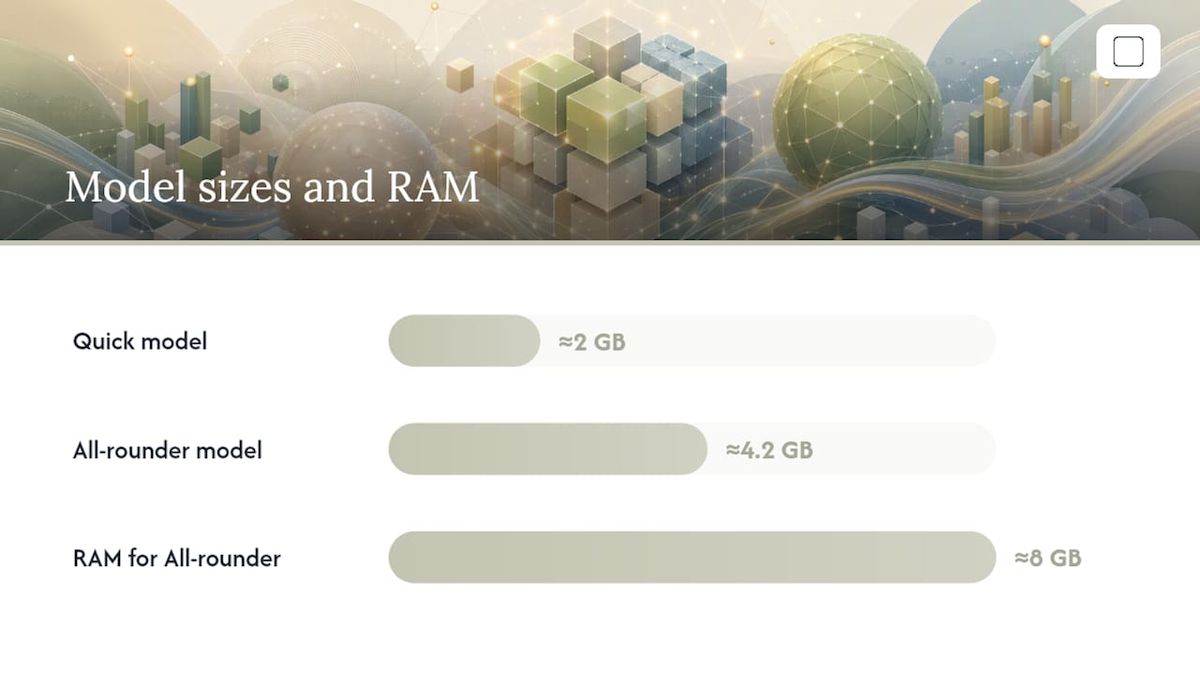
- Match the model to your hardware. GreenCube's smaller model (about 2GB) runs on lighter machines; the bigger model (about 4.2GB) needs roughly 8GB of RAM as a floor, not a comfort zone.
- Check document and image support. If you need to analyze scanned PDFs or photos, confirm the model actually reads images. GreenCube's smaller model is ; only the bigger model handles images.
- Understand the license mechanics. GreenCube requires a one-time Google or Microsoft sign-in solely to verify your purchase, with checkout processed through Stripe. It's a refund window, not a subscription.
- Test the setup experience. A non-technical user should be able to install, sign in, and start chatting within one sitting, no command-line steps required.
Pro Tip: If you're not sure which model your laptop can handle, check your available RAM before buying. Under 8GB, stick with the smaller model. At 8GB or above, the bigger model opens up image reading and document study guides, though it will run slower than Quick on modest hardware.
GreenCube backs this with a 15-day refund policy if the model you picked doesn't fit your needs.
What Do You Need to Set Up an Offline AI on Windows?
Setup is quick, but a few real numbers help you plan around it rather than get surprised by it.

You'll need Windows 10 or 11 and enough free disk space for whichever model you choose. The smaller model needs about 2.6 GB, the bigger model about 4.2GB. Leave extra headroom beyond that for temporary files during download. On RAM, 8GB is the practical floor for the bigger model. Below that, expect noticeably slower responses, especially on older hardware with a mechanical hard drive instead of an SSD.
The setup sequence looks like this: install the app, sign in once with Google or Microsoft to verify your license, pick the smaller or bigger model, download the model, and then use it fully offline from that point forward.
Quick fact: Hands-on testing of local LLM runners found that modern tools have made offline setup genuinely accessible to non-technical users on ordinary consumer laptops, not just developer machines.
Common snags: antivirus software occasionally flags the model download and needs a one-time exception, slow disks stretch download time well past the size alone would suggest, and insufficient RAM shows up as sluggish replies rather than crashes.
What Does Local AI Actually Protect You From?
Running GreenCube locally removes an entire category of exposure that cloud AI can't avoid: your chats and documents never sit on someone else's server, so there's nothing there to be logged, breached, or subpoenaed. The one exception is the sign-in step, where Google or Microsoft verifies your license, no chat content or document data is part of that exchange.
That said, local doesn't mean invulnerable. Security research on data sovereignty points out that once you remove the third party, your own device becomes the main line of defense. A few habits close that gap:
- Turn on full-disk encryption (BitLocker on Windows) so a lost or stolen laptop doesn't expose your files.
- Keep Windows updated; unpatched systems are the most common entry point for compromise.
- Use a strong, unique password and enable multi-factor authentication on your Google or Microsoft account.
- Avoid syncing sensitive chat exports or documents to consumer cloud backup services, which quietly undoes the privacy benefit.
Pro Tip: If you're working with truly sensitive material, download and test your chosen model while still connected, then disconnect entirely. Guidance on air-gapped document pipelines stresses provisioning everything you need before going offline, since missing a dependency after disconnecting means reconnecting just to fix it.
For a deeper walkthrough of device hardening specific to offline AI, see GreenCube's practical security guide.
What Are the Concrete Facts Behind GreenCube?
GreenCube's claims hold up because they're specific, not aspirational. Here's what you're actually buying:
- Price: a one-time, tax-inclusive payment with a 15-day refund window.
- Technical stack: built on Tauri, Rust, and React, with llama.cpp handling local inference.
- Model choice: the smaller model (Gemma 4 E2B, about 2.6 GB) or the bigger model (Gemma 4 E4B, about 4.2GB, reads images and can build study guides, needs roughly 8GB RAM and runs slower).
- License flow: one Google or Microsoft sign-in to verify your purchase; chat and document processing stay local and offline.
- Usage: no rate limits, no per-message cost, and no cap on how many documents you process.
- Platform: Windows 10 and 11 today, with a Mac version in development.
A fully local retrieval architecture using FAISS and local language models shows this approach isn't a compromise version of document analysis. It's a legitimate way to get grounded, auditable answers from your own PDFs without sending them anywhere. That's the same principle behind how GreenCube's bigger model reads and summarizes documents on your machine.
Own Your AI Instead of Renting It: Get Started With GreenCube
Renting AI access means paying every month for something you never actually keep. GreenCube flips that: pay once, own the app, and use it as long as you want with no recurring charge and no usage ceiling.

Checkout runs through Stripe, and you'll sign in once with Google or Microsoft strictly to verify your license, no chat or document data is involved in that step. Your purchase includes the app itself plus your choice of one model to download. If you're on a laptop with limited RAM, start with the smaller model since it's lighter and faster. If you have 8GB of RAM or more and need to read scanned documents or photos, the bigger model is the better starting point.
Not sure which fits your machine? Head to GreenCube's landing page to check system requirements, pick your model, and start your first offline chat today, backed by a 15-day refund if it's not the right fit.
Who Actually Benefits Most From GreenCube?
Students get the clearest win here: private study sessions, PDF analysis, and flashcard generation without a subscription or cloud exposure. Professionals handling sensitive contracts or client files get the same offline guarantee for document review. Our honest advice: start with the model that matches your hardware, and keep a cloud tool on hand for the rare task that truly needs frontier-level reasoning.
— GreenCube
Sources
- Empirical study on local LLM deployment (Ollama) for developers — 2025
- RAGStack: a fully local RAG architecture for document intelligence — 2026
- Microsoft security discussion on sovereignty and device-level risks — 2026
- Air-gapped document analysis with Ollama — practical architecture notes
FAQ
Is GreenCube Really Free From Cloud Servers?
Chat and document processing run entirely offline on your device once the model is downloaded. The only online step is a one-time Google or Microsoft sign-in to verify your license through Stripe checkout.
Which GreenCube Model Should I Pick, the smaller or bigger model?
Pick the smaller model (about 2.6 GB) if you want fast, text-only chat on lighter hardware; pick the bigger model (about 4.2GB) if you need image reading or study guide generation and have at least 8GB of RAM.
Does GreenCube Cost More Than ChatGPT Over Time?
GreenCube costs €9.99 / $9.99 once with no recurring charge, while ChatGPT's paid tiers bill monthly, so the cost comparison depends entirely on how long you keep using it.
Can GreenCube Read Images or Only Text?
Only the bigger model reads images; the smaller model is and cannot process photos or scanned pages.
What Happens if GreenCube Doesn't Work on My Laptop?
GreenCube offers a 15-day refund window, so if your hardware struggles with the model you chose or the app doesn't fit your workflow, you can request a refund within that period.
Recommended
- The Best Local AI Chatbot for Windows: Private, Simple, Yours
- Best Offline AI Chatbot Apps in 2026: Full Comparison
- Top 3 Offline AI Solutions: Ollama Alternatives 2026
- Does ChatGPT train on your data? (2026) — the honest answer
Your own AI, on your own PC
GreenCube runs on your computer: no usage limits, no subscription, works without internet. €9.99, paid once.
Get GreenCube