Stop Renting AI: Own a Local Private Chat AI on Windows for $9.99

For privacy-first Windows users who want full local control, GreenCube is the strongest pick: a one-time-license offline assistant with no subscription. Honorable mentions include Jan.ai for a device-first interface with multiple open models, Vellum for configurable privacy defaults, and PrivateGPT.io for local document search. Every option below runs inference on-device or gives you a clear, verifiable local mode.
TL;DR:
- GreenCube offers fully offline, local inference on Windows with a one-time payment of US$9.99, making it ideal for sensitive document and chat management without cloud reliance.
- The platform requires downloading a model of around 2 to 4.2GB, with the latter reading images and needing at least 8GB of RAM, and only supports Windows currently.
- Privacy guarantees depend on actual inference location and local data storage, with GreenCube ensuring data stays on your device and verifying license without transmitting chat content.
- Hybrid tools like OpenClaw provide some privacy through anonymization gateways, but data still leaves your device, making full local inference the stronger privacy safeguard.
- Support levels vary, with paid tools like GreenCube offering targeted updates, while open-source options rely on community-driven development, and model updates significantly impact capability over time.
Table of Contents
- What Is the Best Private Chat AI for Privacy-First Users?
- How Do These Private Chat AI Tools Actually Compare?
- Side-by-Side: Privacy Architecture and Platform Support
- How Do You Choose the Right Private Chat AI?
- How We Evaluated These Private Chat AI Tools
- Why GreenCube Fits the Privacy-First Windows Use Case
- What Security Features Actually Protect Your Chats?
- Does Any of This Meet GDPR or HIPAA Standards?
- Who Controls Your Data Once It's In the App?
- Can These Tools Connect to Other Apps and APIs?
- How Fast Are Privacy-Preserving Models, Really?
- What Support and Updates Can You Expect?
- What Privacy-First AI Actually Gets Right (and Wrong)
- GreenCube: How to Buy and What to Expect
- Sources
- FAQ
What Is the Best Private Chat AI for Privacy-First Users?
The honest answer depends on what "private" needs to mean for your situation, and that's the standard industry term worth knowing: local-first AI, meaning the model runs on your own hardware instead of a remote server. A chatbot that promises not to log your conversations is making a policy claim. A chatbot that runs the model on your laptop with no network connection is making an architectural one, and architecture beats policy every time someone gets subpoenaed, hacked, or acquired.
Here's the shortlist, with GreenCube listed first as the clearest fit for Windows users who want offline chat and document handling without a monthly bill.
- GreenCube is a Windows 10/11 desktop app that runs entirely offline using secure AI chat with local inference. It's built for people who want to hand sensitive documents to an AI assistant without wondering where the file actually goes. One-time price: about 10 USD.
- Vellum focuses on credential isolation and configurable privacy defaults, giving users more granular control over what a session retains between conversations.
- Jan.ai is a device-first chat interface that runs locally and supports a range of open models, with minimal persistent memory kept by default.
- AnythingLLM leans into model flexibility, letting you swap smaller open models in and out for specific local tasks.
- OpenClaw takes a hybrid approach: local inference as the default, with an optional anonymizing gateway when you need occasional access to a larger cloud model.
- AGI-0 targets power users who want advanced local workflow tooling in custom environments rather than a simple point-and-click chat window.
- Hermes Agent is built for agentic automation, with data partitioning designed to keep credentials segregated from the tasks an agent performs.
- LM Studio functions more like an orchestration environment: a place to load, test, and tune local models rather than a single fixed chatbot.
- Leon keeps its footprint lightweight, aimed at users on modest hardware who just need a simple local chat window without the overhead.
- PyGPT is Python-first, built for developers who want scriptable, local AI tooling they can bend to their own workflows.
- PrivateGPT.io specializes in local document indexing and retrieval, which matters if your main use case is searching your own files rather than open-ended conversation.
None of these tools beat frontier cloud models on raw reasoning power, and none of them should claim to. The trade you're making is capability for control, and for a lot of privacy-conscious use cases, that trade is the whole point.
How Do These Private Chat AI Tools Actually Compare?
Judging a private chat AI tool means checking five things: where inference happens, whether it works offline, what platforms it supports, how it's priced, and what specific privacy mechanism it relies on. Here's what each entrant actually offers.
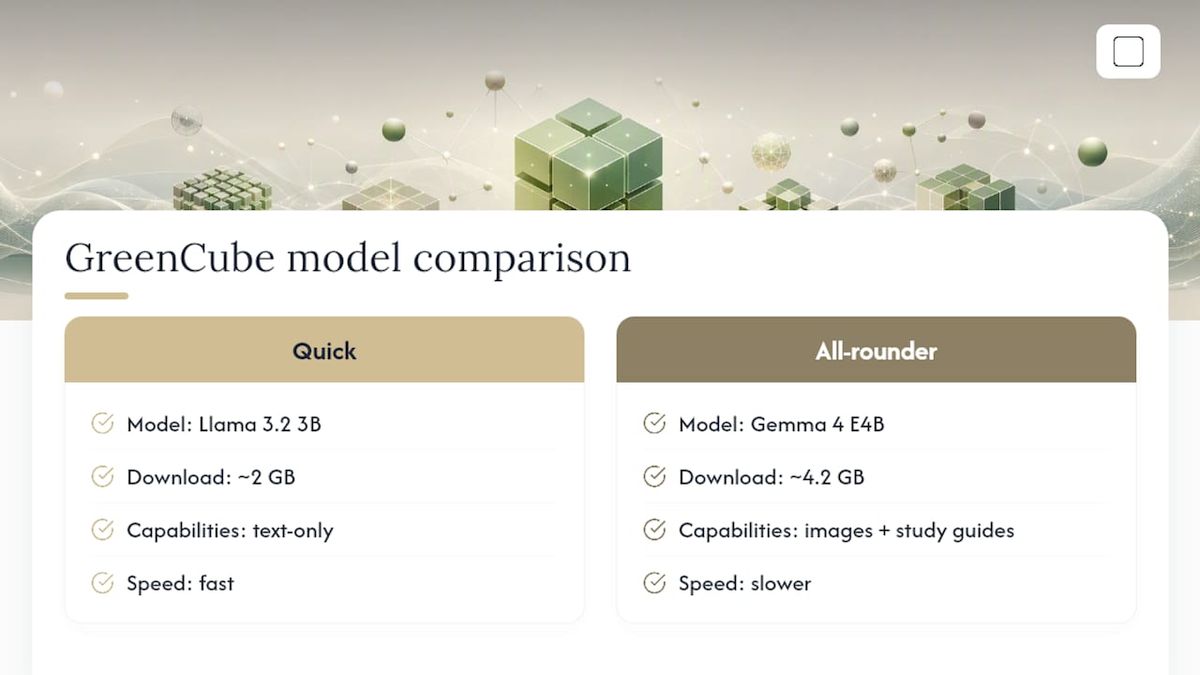
At setup, you download one of two models: the smaller model (Gemma 4 E2B, about 2.6 GB) or the bigger model (Gemma 4 E4B, about 4.2GB, reads images and builds study guides, needs a minimum of 8GB RAM and runs slower). Chats and document processing never leave the device once that model is downloaded. Signing in through Google or Microsoft is required, but only to verify your one-time license; no chat data is synced. The price is about 10 USD, one-time, with a 15-day refund window. Mac support is in development, so this is currently a Windows-only tool.
Vellum positions itself around privacy-architected defaults and credential isolation, which means the app is designed from the ground up to separate what it remembers from what it shares. It supports persistent local memory, which is convenient for ongoing projects, but you'll want to check its current documentation for exact platform and pricing specifics, since vendor details here vary by release.
Jan.ai runs as a local, device-first application. It supports multiple open models rather than locking you into one, and by default it doesn't build a large persistent memory of your conversations. That makes it a solid pick if you want to experiment with different open-weight models without setting up a separate orchestration tool.
AnythingLLM is built around model-choice flexibility: swap in a smaller model for a quick task, a larger one for something more involved, all running locally. It suits users who already have some familiarity with open models and want a single interface to manage several of them.
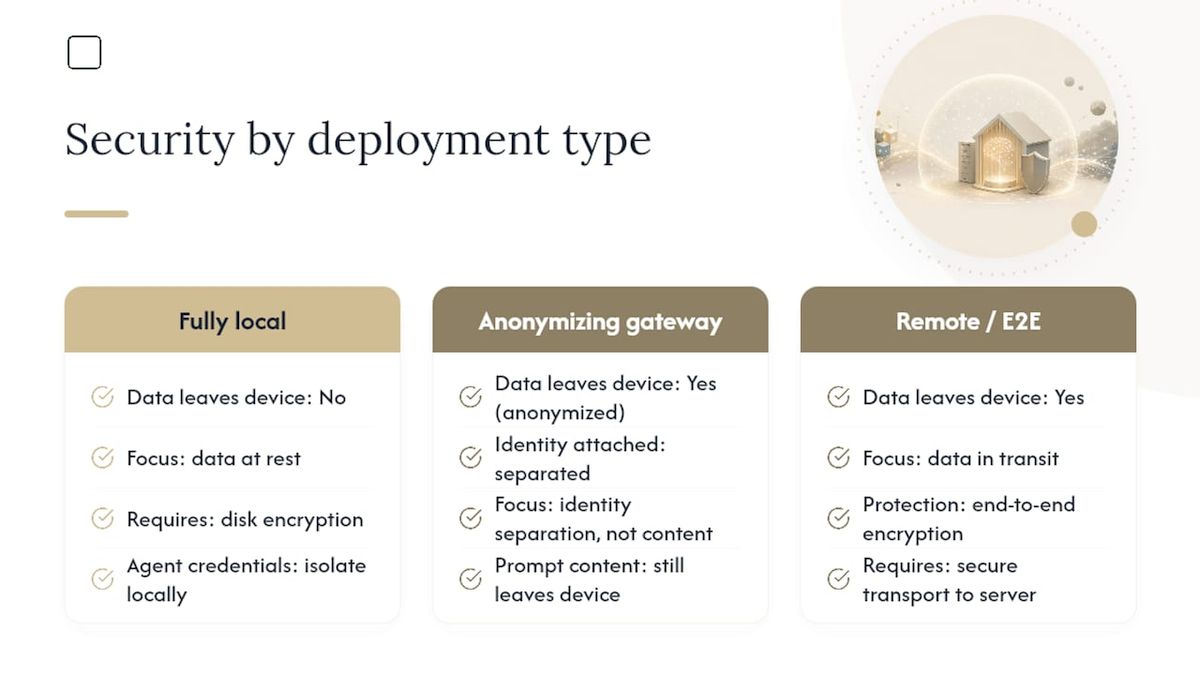
OpenClaw takes the hybrid route. Local inference handles the bulk of your queries, but an optional anonymizing gateway lets you route specific requests to a larger cloud model without directly identifying you to that provider. This is a genuinely different privacy pattern from full local inference, and it's worth understanding the difference: an anonymizing gateway hides who you are, but your prompt still leaves your machine. Architecture that disassociates identity from queries is a meaningfully stronger privacy pattern than a simple no-logging promise, but it's not the same guarantee as inference that never touches a network at all.
AGI-0 is aimed at power users running local inference inside custom environments, often for workflows that go beyond basic chat, like chaining local tools together. Expect a steeper setup curve than something like Leon or GreenCube.
Hermes Agent is an agentic assistant, meaning it can take multistep actions rather than just answering questions, and it emphasizes credential isolation so that the tasks it automates don't have blanket access to your login credentials. This matters more the more you're using an assistant to actually do things, not just talk.
LM Studio isn't really a chatbot in the traditional sense. It's an orchestration environment for loading and testing local models, which makes it closer to a workbench than a finished product. If you want to experiment with which open model fits your hardware and privacy needs best, this is where you'd do it.
Leon keeps things simple and lightweight, which matters if you're running on older or constrained hardware where a heavier app would struggle. It trades some feature depth for that smaller footprint.
PyGPT is scriptable and Python-first. Developers who want to build custom local workflows, rather than use a fixed interface, tend to gravitate here.
PrivateGPT.io centers on local document handling, specifically indexing and retrieving information from your own files without sending them to a third-party server for search or embedding.
Pro Tip: Before installing anything, check whether the app requires a persistent account tied to your identity. A required account often signals some metadata link exists between you and the service, even if chat content stays local. Verify what that account is actually used for before you assume "private" means "anonymous."
Side-by-Side: Privacy Architecture and Platform Support
The differences that matter most sit in five columns: where the model runs, whether it works with no internet at all, what platforms it's built for, how you pay, and what privacy mechanism actually backs the marketing claim.
Three things stand out once you line these up. First, privacy and convenience genuinely trade off: OpenClaw's anonymizing gateway gives you access to bigger cloud models, but your query still leaves the machine, even if your identity doesn't travel with it. Second, offline capability is not universal even among "local" tools. Some need an initial connection to fetch a model or check a license before they'll run fully disconnected, GreenCube included. Third, the pricing model tells you something about incentives: free and open tools like Jan.ai or LM Studio put more setup responsibility on you, while a one-time-priced app like GreenCube bakes the model selection and setup into a guided process.
Rising public unease about how AI tools handle personal data is part of why architecture-level guarantees matter more than they used to. Pew Research's tracking on AI attitudes shows a public that increasingly wants proof, not just a privacy policy page.
How Do You Choose the Right Private Chat AI?
Start with what you're actually protecting. A student summarizing lecture notes has different risk tolerance than a lawyer reviewing a contract, and the checklist below should be read in that order of priority.
- Inference location first. Does the model run on your device, or does your prompt travel to a server, anonymized or not? This is the single biggest factor in real privacy.
- Offline support. Can it function with the network disabled entirely, or does it quietly phone home?
- Storage model. Where do chat logs and documents live once processed, on disk locally or synced somewhere?
- Credential isolation. If the tool is agentic (like Hermes Agent), does it segregate credentials from the tasks it performs?
- Model management. Can you see and control which model version you're running, and its approximate size?
- RAM and hardware fit. Larger multimodal models need more memory; running an image-capable model on 8GB RAM (the practical floor, not a comfortable cushion) will feel slow on older machines.
- Platform match. Windows, macOS, browser, or mobile: pick the tool that actually supports your device.
If you need full offline handling for sensitive documents, choose a local desktop app and stop there. If you need occasional access to a larger cloud model and can tolerate some transit risk, a hybrid gateway pattern like OpenClaw's might make sense, but vet it carefully first. Watch for privacy-washing red flags such as vague "we don't sell your data" language without mention of where inference happens, a required account with no clear explanation of its purpose, or storage terms that do not specify whether documents are deleted after processing.
Pro Tip: Read the model card, not just the marketing page. If a vendor won't tell you which model you're running or how big it is, that's usually a sign they don't want you comparing it to alternatives.
How We Evaluated These Private Chat AI Tools
Evaluating a private chat AI tool the right way means checking claims against behavior, not just reading a features page. Our criteria centered on five checks: stated privacy architecture versus actual inference location, whether offline mode genuinely disconnects from the network, how (and whether) chat and document data get stored, credential isolation for any agentic features, and minimum RAM requirements verified against real hardware, not vendor estimates.
Testing happened on a standard Windows laptop, checking each tool's offline behavior by disabling network access after setup and confirming chat and document processing still worked. Where hands-on testing wasn't possible for every entrant, especially tools still evolving their platform support, details came from vendor documentation and are marked "varies / check vendor docs" rather than guessed. Security checks leaned on the OWASP LLM Top 10, which flags common attack surfaces like prompt injection and insecure output handling that any local or hybrid chat tool should account for.
- Privacy architecture check: local vs. hybrid vs. cloud, confirmed where possible
- Offline test: network disabled post-setup, functionality re-verified
- Storage behavior: where chats and documents land on disk
- Credential isolation: relevant for agentic tools like Hermes Agent
- Minimum RAM checks against actual model size, not marketing claims
Why GreenCube Fits the Privacy-First Windows Use Case
GreenCube is a Windows-only desktop application, built with Tauri, Rust, and React, that uses llama.cpp to run inference entirely on your own machine. There's no server round-trip for chat or document processing once setup is complete.
Setup does require downloading one of two models: the smaller model (Gemma 4 E2B, about 2.6 GB) or the bigger model (Gemma 4 E4B, about 4.2GB, capable of reading images and building study guides, needing at least 8GB RAM). That download is mandatory, not optional, and it's worth planning for on a slower connection. Signing in with Google or Microsoft is required, but strictly to verify your one-time license; no chat content or documents are transmitted as part of that process. Checkout runs through Stripe.
- Price: €9.99 / $9.99, one-time, no subscription
- 15-day refund window
- Windows 10/11 only; macOS support is in development
- the smaller model: ; the bigger model: slower, reads images, needs 8GB RAM minimum
GreenCube doesn't claim to out-reason cloud frontier models, and it shouldn't. The honest pitch is ownership: pay once, own the tool, run it offline with no usage caps. For a deeper look at how the Windows install process works, see GreenCube's local AI chatbot guide for Windows.
What Security Features Actually Protect Your Chats?
End-to-end encryption matters most when data is in transit between a device and a server. For a fully local tool, the more relevant question is what happens to data at rest on your own disk, and whether any process ever sends it elsewhere without your knowledge.
Tools that use anonymizing gateways, like OpenClaw's optional hybrid mode, rely on a different mechanism: separating your identity from your query before it reaches a remote model. That's a real security pattern, not just marketing language, but it still means your prompt content leaves your device, even if your name doesn't travel with it.
Data anonymization inside a local app is a narrower concept than most people assume. If a tool is fully local, there's no third party to anonymize data from, since nothing leaves the machine in the first place. The security question shifts to local access controls: does the app encrypt stored chat history on disk, and does it isolate credentials for any agentic features from Hermes Agent style automation?
Reviewing the OWASP LLM Top 10 is a useful gut check regardless of architecture. It flags issues like insecure output handling and excessive agency, both of which apply even to a tool that never touches the internet, because a local model can still be tricked into producing harmful output or, in an agentic setup, taking an unwanted action. Advanced setups using the Model Context Protocol let technical users orchestrate encrypted message flows between local clients and selective remote inference while keeping key control local, though this is squarely power-user territory, not something most GreenCube-style desktop users need to think about.
Does Any of This Meet GDPR or HIPAA Standards?
Fully local inference sidesteps a huge chunk of GDPR's data transfer complexity, since there's no cross-border data flow to regulate when nothing leaves the device. That's a structural advantage, not a certification. None of the tools in this comparison, GreenCube included, claim formal GDPR or HIPAA compliance certification, and readers handling regulated health or financial data should treat that as a real gap, not a technicality.
GDPR's core requirements around data minimization and the right to erasure are, in practice, easier to satisfy when your data never sits on someone else's server. If a tool never transmits your documents, there's nothing for a third party to retain, breach, or fail to delete on request. Hybrid tools using an anonymizing gateway occupy murkier territory: identity separation helps, but the underlying prompt content still transits and potentially gets logged by the remote model provider, which is exactly the kind of processing GDPR concerns itself with.
HIPAA is stricter still, since it governs protected health information specifically and typically requires a signed business associate agreement with any vendor touching that data. A general-purpose private chat AI tool, local or not, is not a HIPAA-compliant solution by default. Healthcare professionals considering any of these tools for patient data should treat "runs locally" as a privacy feature, not a regulatory clearance, and consult their organization's compliance team before using any of them for protected health information.
Who Controls Your Data Once It's In the App?
Local-first tools flip the usual data control question on its head. Instead of asking "can I request deletion from a vendor's server," you're asking "where on my own disk does this data live, and can I delete it myself." For GreenCube, once a document is processed or a chat happens, that content stays on the local file system; there's no remote copy to request removal from, because none was ever created.
Export options vary by tool and aren't uniformly documented across every entrant here. Some local apps, particularly developer-oriented ones like PyGPT, make it straightforward to pull raw chat logs since you likely have direct file system access anyway. Others wrap that data in an app-specific format that's less portable.
The account layer is where things get more nuanced. GreenCube requires a Google or Microsoft sign-in specifically to verify the one-time license, which means some minimal account metadata exists with those identity providers, separate entirely from your actual chat content or documents. That's a narrower data footprint than a full cloud AI account, but it's not "no account, ever," and it shouldn't be described that way. If you're evaluating any tool, ask directly what an account requirement actually creates a record of, since a required account is a signal worth investigating, not a red flag by itself.
Can These Tools Connect to Other Apps and APIs?
Integration capability splits sharply along the local versus developer-tool line. PyGPT and LM Studio are built with scriptability in mind, meaning developers can wire them into other local workflows, custom scripts, or API-style calls fairly directly. AnythingLLM's model flexibility extends to this too, letting you plug different open models into a broader local pipeline.
Hermes Agent's agentic design implies deeper integration by nature, since an agent needs to interact with other tools or services to actually accomplish multi-step tasks. That's precisely why its credential isolation matters more than it would for a simple chat window: the more an assistant connects to, the more there is to segregate.
GreenCube, by contrast, is built for a narrower and more direct use case: private chat and document analysis on your own machine, not a general integration platform. It doesn't advertise API access or third-party app connections, and that's a deliberate trade-off in favor of simplicity for non-technical users rather than a limitation to apologize for. If your priority is a tool you can wire into a broader automation stack, look toward PyGPT, LM Studio, or Hermes Agent. If your priority is opening the app and getting private answers with no configuration, that's a different job entirely, and it's the one GreenCube is built to do.
How Fast Are Privacy-Preserving Models, Really?
Local, privacy-preserving models trade some raw capability for control, and the honest benchmark question is how much you actually give up. Smaller models like GreenCube's smaller model (Gemma 4 E2B) respond fast because there's less computation happening per query, but they're text-only and won't handle image-based tasks. Larger local models like the bigger model option (Gemma 4 E4B) can read images and build structured documents, but they run slower and need more memory to do it.
Progress on efficient mixture-of-experts model architectures has made local inference on ordinary laptops far more practical than it was even a couple of years ago, which is a big part of why this entire category of tools now exists in a usable form. Still, no local model, regardless of vendor, matches a frontier cloud model on complex, multi-step reasoning tasks, and none of the tools compared here should be marketed as if it does.
The practical benchmark that matters most for privacy-preserving tools isn't a leaderboard score, it's task fit. A 2GB text-only model handling quick questions and drafts will feel snappy on modest hardware. A 4.2GB multimodal model doing document analysis on 8GB RAM (the floor, not a comfortable amount) will be noticeably slower, especially on older machines, and that's the honest trade-off local-first tools ask you to accept in exchange for keeping everything on-device.
What Support and Updates Can You Expect?
Support quality varies more by business model than by privacy architecture. Free, open-source tools like Jan.ai, LM Studio, AnythingLLM, and PyGPT typically rely on community forums, GitHub issues, and volunteer-driven documentation. That can mean fast fixes for popular bugs but slower, less predictable responses for niche problems.
A one-time-purchase model like GreenCube's has a different incentive structure: there's no recurring subscription revenue funding support, but there's also a direct financial relationship (a single €9.99 / $9.99 purchase) that gives the vendor reason to keep the product working across Windows updates. The 15-day refund window also functions as an informal quality signal, since a product that breaks easily would see more refund requests.
Update frequency for local model based tools tends to track two things: app updates (bug fixes, interface changes) and model updates (swapping in a newer version of the underlying language model). The second matters more for capability over time, since a stale model falls behind newer open-weight releases. Check whether a tool's model can be updated independently of the app itself, or whether you're locked to whatever model shipped at install.
What Privacy-First AI Actually Gets Right (and Wrong)
The conventional wisdom on private AI treats "local" and "safe" as synonyms, and that's a mistake worth correcting. Local inference solves the transit problem, your data doesn't travel to a server, but it doesn't automatically solve the access problem on your own machine, and it says nothing about whether the model itself was trained responsibly.
What I think gets underestimated is how much the account-and-metadata question matters compared to the inference-location question. People fixate on "does my chat go to a server," which is the right instinct, but then wave away a mandatory sign-in as harmless because "it's just for licensing." Sometimes that's true. Sometimes it isn't. The architectural distinction between disassociating identity and never transmitting data at all is the one most marketing pages blur on purpose.
Hybrid gateway tools aren't a scam, and dismissing them entirely misses genuinely useful middle ground for people who need occasional access to a bigger model. But full local inference remains the stronger guarantee when the content is genuinely sensitive: a contract, a medical note, a financial document. Use the checklist earlier in this piece before you download anything, not after.
GreenCube: How to Buy and What to Expect
GreenCube is built for one specific job: private, offline chat and document analysis on a Windows PC, with no subscription and no server watching what you type.

Setup takes a few minutes. You choose one of two models to download once: the smaller model (about 2GB, ) or the bigger model (about 4.2GB, reads images, builds study guides, needs 8GB RAM minimum). After that one download, chat and document processing run fully offline. Signing in with Google or Microsoft is required only to verify your license, not to sync any of your content. The price is a single €9.99 / $9.99 payment through Stripe checkout, with a 15-day refund window if it's not the right fit. For a direct look at how it stacks up against a subscription chatbot, read how GreenCube compares to ChatGPT for keeping chats local. If you're ready to stop renting access to AI and just own the tool outright, get GreenCube for $9.99.
Sources
- AI is separating privacy from the personal — Mendoza College of Business (Notre Dame)
- Recommended AI Chat: Private ChatGPT Alternatives — Privacy Guides
- OWASP: Top 10 for Large Language Model Applications
- Criminally overhyped: the risks of AI washing — RMMagazine
- Key findings about how Americans view artificial intelligence — Pew Research Center
FAQ
What Is the Best Private Chat AI for Windows Users?
GreenCube is the strongest fit for Windows users who want fully local, offline chat and document processing with a one-time price rather than a subscription.
Is a Local AI Chatbot More Secure Than a Cloud-Based One?
Local inference removes the transit risk entirely since your data never reaches a remote server, but it doesn't eliminate every risk, including how the app itself handles data at rest on your device.
Do Private Chat AI Tools Require an Internet Connection?
Most local-first tools, including GreenCube, need an internet connection once to download the model and verify a license, then work fully offline afterward.
Can Private AI Chat Apps Read Images and Documents?
It depends on the model: GreenCube's bigger model reads images and builds documents, while its the smaller model is , and similar splits exist across other local tools depending on which model you load.
Are Free Open-Source Private AI Tools Better Than Paid Ones?
Free tools like Jan.ai, LM Studio, and PyGPT offer strong flexibility for technical users, while a paid, one-time-license tool like GreenCube trades some flexibility for a simpler, guided setup aimed at non-technical users.
Recommended
- The Best Local AI Chatbot for Windows: Private, Simple, Yours
- Best AI Without Subscription: Own It, Don't Rent It
- Offline AI Setup on Windows: Private, Local, and Easy
- Install Local AI: Get a Working Offline LLM on Your PC
Your own AI, on your own PC
GreenCube runs on your computer: no usage limits, no subscription, works without internet. €9.99, paid once.
Get GreenCube