Best AI for Computer Science Students: Tools by Task
The best AI for computer science students isn't one app. It's a stack: an LLM-based coding assistant for writing and debugging, a pair-programming tool wired into your editor, an ML framework for coursework projects, and a structured study helper for exam prep. Demand for AI-capable computer science graduates keeps climbing, with the Bureau of Labor Statistics tracking strong growth in computer and information science roles, so the tools you pick now shape the habits you carry into a job search.
For students who need privacy, offline access, or a fixed budget, GreenCube fills a specific gap: a local Windows assistant that processes chat and documents entirely on your own machine, for a one-time cost rather than a subscription.
Here's the quick breakdown:
- LLM coding assistants for immediate drafting, debugging, and explaining error messages.
- AI pair-programming tools built into your IDE for real-time suggestions during longer coding sessions.
- ML frameworks and cloud notebooks for coursework projects that need GPU access and reproducibility.
- Structured STEM helpers for building actual understanding of algorithms and proofs, not just copying answers.
- GreenCube as the local, offline option when your work is sensitive, your internet is unreliable, or you just don't want another subscription.
Cloud models still win on raw reasoning power for heavy training runs. Local tools trade some of that ceiling for control over your own data and zero recurring cost.
TL;DR:
- Students should match AI tools to specific tasks, using cloud services for heavy training and local options like GreenCube for sensitive or offline work.
- Building core algorithms manually before relying on frameworks enhances understanding and helps identify potential failure points.
- Proper project workflow involves exploring on cloud notebooks, prototyping small models, and only moving to local setups when offline access or privacy is necessary.
- Structuring AI output with step-by-step reasoning improves learning and ensures students internalize concepts, not just copy answers.
- GreenCube provides a private, offline AI option with a one-time purchase, ideal for coursework involving sensitive data or untrusted internet connections.
Table of Contents
- Which AI Tools Handle Which Computer Science Tasks?
- How Should You Structure an ML Project Workflow?
- Why Do You Need Structured AI Output to Actually Learn?
- Cloud or Local: Which Fits Your Situation?
- How Do You Choose the Right AI Setup for Your Course?
- What's the Right Order to Learn AI as a Computer Science Student?
- What Does GreenCube Actually Offer Computer Science Students?
- How Do You Combine Multiple AI Tools Without the Chaos?
- What Do These Tools Look Like in an Actual Student Project?
- What Ethical Lines Should Computer Science Students Watch?
- Key Takeaways
- What This Article Actually Argues About Student AI Tools
- Get GreenCube for Private, Offline Study Work
- Sources
- FAQ
Which AI Tools Handle Which Computer Science Tasks?
Most students waste time hunting for "the best AI" instead of matching the tool to the job in front of them. A lab assignment due in three hours needs something different than a semester-long capstone project.
Here's how the common jobs break down:
- Writing new code — an LLM assistant like ChatGPT, Claude, or a local model can scaffold a function or class in seconds, but it won't teach you why a recursive solution beats an iterative one. You still need to read what it generates.
- Debugging — pasting a stack trace into an LLM chat is often faster than scrolling Stack Overflow, and OpenAI's own prompt-engineering guidance recommends giving the model the exact error, the relevant code block, and what you already tried, rather than a vague "this doesn't work."
- Generating test cases — AI is genuinely strong here. It can produce edge cases you wouldn't think of on your own, though you still have to write tests that actually check the right behavior.
- Designing algorithms — this is where AI helps least and understanding matters most. An assistant can describe Dijkstra's algorithm, but it can't hand you the intuition for why a greedy approach fails on negative weights. That comes from working through it yourself.
- Prototyping models — cloud notebooks and lightweight frameworks let you test an idea in an afternoon instead of setting up a full environment.
- Running experiments and documenting results — this is less about generation and more about organization, where structured logging tools and version control matter as much as the model you chose.
Pro Tip: Before you open any AI tool, write one sentence describing exactly what you're stuck on. A vague prompt gets a vague answer; a specific one gets you unstuck in one exchange instead of five.
The pattern across all six: AI accelerates the mechanical parts of the job. It doesn't replace the thinking part, and treating it like it does is how students end up unable to explain their own code during office hours.
How Should You Structure an ML Project Workflow?
A working ML project workflow follows a specific order, and skipping steps is exactly how students end up with a model that trains fine on their laptop and breaks the moment a professor runs it.
Start in a cloud notebook environment. Platforms like Google Colab or Kaggle Notebooks give you free GPU access for exploring a dataset, which matters because most student laptops don't have the graphics memory to iterate quickly on anything beyond a toy dataset. Use this stage to explore distributions, check for missing values, and sketch a baseline model.
Once you have a direction, prototype a small version of your model in the same notebook. Only after the small version works should you move into PyTorch or TensorFlow for the full experiment. This sequence matters because building small first catches bugs before they're buried under hours of training time.
From there:
- Log everything — hyperparameters, random seeds, and metrics per run, so you can reproduce a result six weeks later when your professor asks how you got it.
- Use version control for both code and, where feasible, model checkpoints.
- Move to a local setup only when you need offline access, have sensitive data, or your cloud GPU quota runs out mid-semester.
Pro Tip is not needed here, but a hardware reality check is: a local model that fits in 8GB of RAM can run inference reasonably well, but training anything beyond a small model on a laptop CPU is painfully slow, often hours for what a cloud GPU handles in minutes. Plan your route accordingly: cloud for training, local for the parts of your workflow that touch private data or need to work without Wi-Fi.
Why Do You Need Structured AI Output to Actually Learn?
An AI that hands you a finished proof or a working function without showing its steps teaches you nothing you can reproduce on an exam. This is the single biggest trap in how computer science students use AI, and it's also the easiest to fix.
The fix is demanding structure. Ask for step-by-step derivations, not final answers. Tools that force stepwise, curriculum-aligned output, like stemLM's approach to structuring STEM answers, exist specifically because raw LLM output tends to skip the reasoning a student actually needs to internalize.
Turn every AI-generated explanation into something you'll actually use again:
- Worked examples — take the AI's step-by-step solution and rewrite it in your own words, catching gaps in your understanding as you go.
- Flashcards — convert definitions and proof techniques into spaced-repetition cards using Anki or a similar tool.
- Practice quizzes — ask the AI to generate five new problems in the same style, then solve them without looking at the original.
- Annotated notes — paste the explanation into your notes, then add your own margin comments explaining why each step follows from the last.
Pro Tip: If you can't re-derive the answer from memory five minutes later, you didn't learn it. You memorized it for exactly as long as the tab stayed open.
This matters most during exam prep, when it's tempting to paste practice problems and copy the output verbatim. That gets you through one problem set. It doesn't get you through a closed-book final.
Cloud or Local: Which Fits Your Situation?
The trade-off comes down to four factors: privacy, offline access, cost, and raw capability. Cloud models generally win on capability, running larger parameter counts with more compute behind them than anything that fits on a student laptop. Local models win on the other three.
- Privacy: coursework involving personal data, unpublished research, or anything under an NDA belongs on a local model, not a cloud chat window.
- Offline access: if your dorm Wi-Fi drops during finals week or you're working on a flight home, a local model still runs.
- Cost: cloud subscriptions add up over four years; a one-time local purchase doesn't.
- System requirements: local models on a Windows machine typically need a one-time download in the 2GB to 4GB range and at least 8GB of RAM as a floor, not a comfort zone. Older laptops will run noticeably slower.
Choose local when your course explicitly bars cloud AI, your data is sensitive, or your internet is unreliable. Choose cloud when you're training anything computationally heavy or need access to the newest frontier models for a research project. Most students end up using both, switching based on the task rather than picking one permanently. For a deeper breakdown of the privacy and offline trade-offs, see how offline setups compare in practice.
How Do You Choose the Right AI Setup for Your Course?
Before you commit to a tool for a whole semester, run it through a short checklist. This takes ten minutes and saves you from discovering a dealbreaker halfway through a project.
- Task fit — does it actually handle the work you're assigning it: code generation, debugging, proof-writing, or document analysis?
- Privacy and data handling — where does your input go, and does the provider state a clear data retention policy?
- Offline capability — does it work without an internet connection, or does a dropped connection mean a stalled assignment?
- Hardware requirements — does your laptop meet the RAM and storage minimums without turning every session into a waiting game?
- Cost model — subscription, one-time purchase, or free with limits that might vanish mid-semester?
- Integration — does it fit into your existing editor, notebook, or note-taking system, or does it demand a separate workflow?
- Exportability — can you get your chat history and generated content out in a usable format?
- Reproducibility — if a professor asks how you got a result, can you show your work?
Ask any tool you're evaluating three direct questions: Where does my data go? What happens if I lose internet access mid-session? What does this cost me over four years, not just this month?
Pro Tip: Treat "no clarity on data upload policy" as an automatic red flag, especially for coursework involving real datasets. If a product's own site can't tell you where your files go, don't upload them.
What's the Right Order to Learn AI as a Computer Science Student?
Skipping straight to frameworks without understanding the fundamentals underneath them is how students end up able to call a library function but unable to explain what it's actually doing, a gap that shows up fast in technical interviews.
A workable progression looks like this:
- Fundamentals first: algorithms, data structures, and enough linear algebra to understand what a gradient actually is.
- Project-based coursework: CS50's Introduction to Artificial Intelligence with Python pairs search algorithms, reinforcement learning, and applied ML libraries with real projects rather than pure lecture.
- Build-from-scratch modules: implementing components like backpropagation and tokenizers by hand, the approach behind the open ai-engineering-from-scratch curriculum, which forces you to understand failure modes that high-level libraries hide from you.
- Applied portfolio projects: a small transformer built from scratch, a reproducible experiment with logged results, or a data pipeline for a public dataset.
For theory depth beyond any single course, AIMA remains the standard reference across search, probabilistic reasoning, and machine learning. Students who build core algorithms by hand before leaning on frameworks tend to retain deeper competence than those who start with the library call.
What Does GreenCube Actually Offer Computer Science Students?
GreenCube is a desktop app for Windows 10 and 11 that runs chat and document analysis entirely on your own machine, no cloud round-trip for the actual AI work. GreenCube picks one of two local models for your PC:
- the smaller model (Gemma 4 E2B, about 2.6 GB) — fast, text-only, no image reading.
- the bigger model (Gemma 4 E4B, about 4.2GB) — slower, but reads images and builds study guides and documents, and needs at least 8GB of RAM to run without dragging.
A few setup realities worth knowing before you install it: you'll sign in with Google or Microsoft once, solely to verify your one-time license, not to sync your chat data anywhere. Checkout runs through Stripe. The chat and document processing themselves stay local and offline. The 8GB RAM figure is a floor, not a comfort zone; older laptops will feel it.
Price is a one-time cost, with a 15-day refund window. No subscription.
For a student, that maps to specific use cases: reviewing lecture PDFs before an exam without uploading them anywhere, drafting notes on a flight with no Wi-Fi, or working through sensitive project data your course explicitly won't let you put in a cloud chatbot. It won't out-reason a frontier cloud model on a hard research problem. It will do private, offline work for a fixed price with no recurring bill.
How Do You Combine Multiple AI Tools Without the Chaos?
Running three or four AI tools at once only works if you assign each one a lane. Without that, you end up bouncing between apps, losing track of which one gave you which answer, and duplicating work.
A workable split looks like this: use your IDE-integrated pair-programming tool for line-by-line suggestions while you're actually typing code. Reserve a standalone LLM chat, cloud or local, for the bigger conversations: architecture decisions, debugging a stack trace, or explaining a concept you're stuck on. Keep your ML framework and notebook environment separate from both, since that's compute-heavy work that doesn't belong mixed into a chat window.
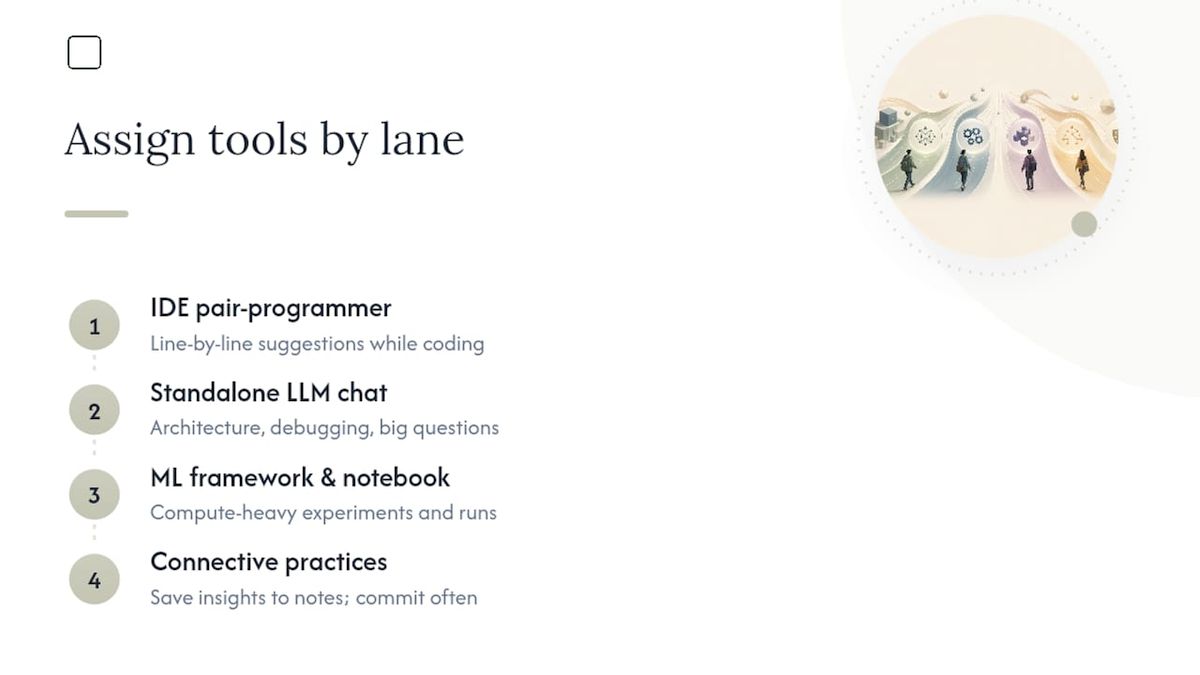
The connective tissue is your own notes, not another AI tool. When an assistant gives you a useful explanation, copy the core insight into your own note-taking system immediately, rather than trusting you'll find that chat thread again in three weeks. Version control does the same job for code: commit early and often so you have a record of what you wrote versus what a tool suggested.
One practical rule that saves real time: don't ask two different AI tools the same question expecting a better answer. You'll usually get two plausible-sounding but slightly different explanations, and now you have to figure out which one is right instead of just learning the material. Pick one tool per task type and trust it for that task, and switch only when it demonstrably fails you.
What Do These Tools Look Like in an Actual Student Project?
Consider a typical undergraduate systems assignment: build a small key-value store with basic persistence. A student working through this might open a cloud notebook to sketch the data structure logic first, testing a hash table implementation against edge cases an LLM helped generate. That's the prototyping phase, fast, disposable, low stakes.
Once the core logic works, the student moves the code into a proper local repository, using an IDE-integrated assistant for autocomplete on boilerplate like file I/O handling, the part of the job that's mechanical rather than conceptual. When a segmentation fault shows up during testing, pasting the exact error and the relevant function into an LLM chat, following prompt-engineering basics like providing full context rather than a vague description, usually resolves it faster than an hour of manual tracing.

For the write-up, a different pattern applies. Instead of asking an AI to draft the report, the student asks it to generate three practice questions a grader might ask about design trade-offs, then answers them cold to check for gaps before submission.
A graduate research example looks different: a student analyzing sensitive interview transcripts for a qualitative NLP project can't ethically upload that data to a cloud service under most institutional review board rules. Running the analysis through a local model instead means the transcripts never leave the laptop, which is precisely the scenario where offline tools stop being a preference and become a requirement.
What Ethical Lines Should Computer Science Students Watch?
The most common ethical failure in student AI use isn't malicious. It's submitting AI-generated code or proofs as your own understanding without disclosing how you got there, then discovering you can't explain it when asked. Most academic integrity policies now distinguish between using AI as a tool and submitting AI output as original work, and that line depends entirely on your course's specific policy, which varies enough between departments that you need to read yours directly rather than assume.
Data privacy is the second major concern. Uploading a professor's proprietary dataset, a lab partner's personal information, or unpublished research findings into a cloud chatbot means that data now sits on someone else's servers, subject to whatever retention policy that provider states, if it states one at all. This is a real reason students choose local processing for coursework touching sensitive material, not a theoretical concern.
Bias is worth naming directly rather than glossing over: models trained on internet-scale data reproduce the patterns in that data, including skewed representation in code examples, and a debugging suggestion that works for one edge case doesn't guarantee correctness for all of them. Treat AI output as a draft that needs verification, not a finished answer, especially in coursework where correctness is graded.
The honest baseline: disclose AI use when your course requires it, verify anything AI generates before submitting it, and keep sensitive data off tools that don't clearly account for where that data goes.
Key Takeaways
The best AI setup for computer science students pairs task-specific tools, LLM assistants, pair programming, ML frameworks, and structured study helpers, with a privacy-first local option like GreenCube for sensitive or offline work.
| Point | Details |
|---|---|
| Match tool to task | Use LLM chat for drafting and debugging, cloud notebooks for ML prototyping, and structured helpers for exam prep. |
| Build before you automate | Implement core algorithms by hand before relying on frameworks so you understand failure modes. |
| Cloud handles heavy compute | Reserve cloud GPUs and frontier models for training runs and research needing maximum capability. |
| Local handles sensitive work | Choose offline tools for private datasets, unreliable internet, or coursework barring cloud AI. |
| GreenCube covers the local gap | Runs on Windows 10/11 with an AI model picked for your PC, 8GB RAM minimum, for a one-time €9.99 / $9.99. |
What This Article Actually Argues About Student AI Tools
Most "best AI tools" lists rank chatbots against each other as if computer science students have one job to do. They don't. A student debugging a segmentation fault at midnight needs something completely different from one designing a distributed systems project for a thesis, and treating those as the same decision is where most advice goes wrong.
The overlooked point is that tool choice should follow your data sensitivity, not just your budget. A free cloud chatbot feels like the obvious default until you're handling a professor's unpublished dataset or your own research notes, and the "free" tool suddenly costs you a policy violation. That's the gap conventional advice skips.
Prioritize building real understanding first, through courses like CS50 and hands-on projects, before leaning on any assistant to move faster. Then pick tools by task and data type: cloud for heavy compute and the newest models, something local and offline, GreenCube included, for the sensitive and private work cloud tools were never built to handle.
— GreenCube
Get GreenCube for Private, Offline Study Work
GreenCube is the option for coursework that a cloud chatbot was never the right home for: lecture PDFs you don't want uploaded anywhere, private research notes, or study sessions on a train with no signal. Instead of a subscription you forget to cancel, you pay once and own it.

Setup takes one model download, either the smaller model at roughly 2GB for fast chat, or the bigger model at roughly 4.2GB if you need it to read images and build study guides, plus a one-time sign-in through Google or Microsoft to verify your license. After that, your chats and documents process locally, with no internet required and no data uploaded to analyze your files. It runs on Windows 10 and 11, with 8GB of RAM as the working minimum.
At €9.99 / $9.99 with a 15-day refund window, it's built for students who want a private study tool without another monthly line item. Check the full feature breakdown or get GreenCube now and have it running before your next study session.
Sources
- rohitg00/ai-engineering-from-scratch
- CS50's Introduction to Artificial Intelligence with Python | Harvard University
- OpenAI Platform — Prompt engineering guide
- Artificial Intelligence: A Modern Approach — AIMA
FAQ
Which AI Is Better Than ChatGPT?
No single tool beats ChatGPT across every task. Specialized alternatives often win for specific jobs, like structured STEM tutoring for exam prep or local, offline tools like GreenCube when privacy matters more than raw model size.
Is ChatGPT Still the Best AI for Coding?
ChatGPT remains a strong general-purpose coding assistant, but IDE-integrated pair-programming tools often win for real-time suggestions while you type, and neither replaces understanding the algorithm you're implementing.
What's the Best AI App for Science Students?
Structured STEM helpers that force step-by-step, curriculum-aligned answers tend to serve science and computer science students better than general chat tools, since they build reasoning skills instead of just handing over final answers.
What Are the Top AI Tools Right Now?
The strongest setups combine categories rather than one app: an LLM coding assistant, an ML framework with cloud notebook access, and a structured study helper, with a local option like GreenCube covering offline and privacy needs.
Should Computer Science Students Use Local or Cloud AI?
It depends on the task: cloud models handle heavy training and the newest capabilities better, while local tools like GreenCube fit sensitive coursework, unreliable internet, and fixed budgets where a one-time cost beats a subscription.
Recommended
- The Best AI for Researchers: A Workflow-Based Guide
- Best AI for Teachers: Teacher-Tested Picks by Priority
- Offline AI for Students: Study Privately on Your Laptop
- Best Perplexity Alternatives in 2026 for Research and Work
Your own AI, on your own PC
GreenCube runs on your computer: no usage limits, no subscription, works without internet. €9.99, paid once.
Get GreenCube