The Best AI for Researchers: A Workflow-Based Guide
The best AI for researchers isn't one tool. It's a matched set: an agentic, database-connected research assistant for literature work, paired with a local offline assistant for anything sensitive or unpublished. Platforms like the Web of Science Research Assistant now connect natural-language queries directly to licensed citation databases rather than the open web, which is the single biggest quality difference between research-grade AI and a general chatbot.
Match the tool to the task:
- Discovery: agentic, database-connected assistants (semantic search across licensed corpora)
- Literature mapping: citation-network and topic-visualization tools
- Evidence extraction: retrieval-augmented generation (RAG) tools with structured output
- Drafting and review: generative writing assistants plus citation verification
The tools that actually hold up under scrutiny are the ones that show their work: a clickable citation trail back to the original sentence, not just a confident paragraph.
Pro Tip: Run your literature search through a database-connected assistant first, then move anything containing unpublished data or draft findings into a local, offline assistant before you keep working on it.
Key Takeaways
The most reliable research AI workflow pairs a database-connected agentic assistant for discovery and mapping with a local offline tool for sensitive drafting and unpublished data.
| Point | Details |
|---|---|
| Match tool to task | Use agentic, database-connected assistants for discovery and mapping, RAG tools for extraction. |
| Verify every citation | Follow clickable citations back to source and cross-check across two databases before citing. |
| Extraction needs oversight | Spot-check AI-extracted data against original PDFs and run inter-model validation for accuracy. |
| Build a capabilities matrix | Score tools 0 to 3 across discovery, mapping, extraction, privacy, and integration before committing. |
| Route sensitive work locally | GreenCube offers offline, one-time-purchase AI (€9.99 / $9.99) for drafts and data that shouldn't reach the cloud. |
Table of Contents
- What Makes an AI Tool Useful for Academic Research
- How Does AI Map to Each Stage of the Research Workflow?
- Which AI Tools Are Best for Discovery and Paper Retrieval?
- How Do Citation Mapping Tools Help With Literature Reviews?
- Can AI Reliably Extract Data From Research Papers?
- Where Does AI Actually Help With Writing and Pre-Submission Review?
- How We Assessed AI Tools for This Comparison
- How Should You Choose the Right Research AI Tool?
- GreenCube: An Offline, Privacy-First Option for Sensitive Research Work
- Data Privacy and Ethical Considerations in AI-Assisted Research
- How Is AI Used Across Different Research Disciplines?
- Is AI for Research Easy to Learn, or Is There a Learning Curve?
- What Actually Matters When Choosing AI for Research
- Get a Private, Offline Assistant for the Work That Can't Leave Your Laptop
- Sources
- FAQ
What Makes an AI Tool Useful for Academic Research
Traceability separates research-grade tools from consumer chatbots. If a tool can't show you the exact sentence or page a claim came from, treat its output as a lead, not a fact. The strongest tools link every claim to a source you can open and check yourself, a practice practitioner guidance on source-grounded assistants identifies as the defining feature separating usable research tools from generic chat interfaces.
A handful of criteria matter more than the rest:
- Source traceability — clickable citations that resolve to the actual passage, not just a bibliography entry
- Database access — direct connections to Web of Science, PubMed, Scopus, or OpenAlex rather than generic web search
- RAG or retrieval architecture — answers built from retrieved passages, not just model memory
- Reference manager compatibility — clean export to Zotero or Mendeley without reformatting
- Offline or local deployment options — for unpublished data, grant drafts, or IRB-sensitive material
Some specialized research search engines report dramatically better retrieval quality than generic search when queries are run against a curated academic index rather than the open web. That gap comes down to one thing: pairing AI with trusted, licensed data rather than whatever a crawler happened to index. A Clarivate product overview frames this trusted-data pairing as the core distinction between research AI and consumer AI, and it's the right lens to evaluate anything you're considering.
How Does AI Map to Each Stage of the Research Workflow?
Different stages need different capabilities, and using the wrong tool for a stage wastes more time than it saves.
- Discovery: semantic search across databases, not keyword matching
- Literature mapping: citation networks and cluster visualization
- Extraction: RAG-based structured pulls (variables, methods, outcomes)
- Analysis: reproducible extraction paired with your existing stats software
- Drafting: summarization, outlining, and citation-checked editing
Every stage should feed cleanly into your reference manager and analysis pipeline, not create a separate silo of unlinked notes.
Which AI Tools Are Best for Discovery and Paper Retrieval?
Discovery tools exist to compress the first two weeks of a project into an afternoon. The best ones run semantic similarity search across multiple databases at once, build advanced queries from a plain-language question, and increasingly use agentic workflows that gather candidate papers, rank them, and hand you a prioritized shortlist instead of a raw list of 400 hits.
That said, discovery tools have real blind spots. Paywalled content is often invisible to them, which means a shortlist can look complete while quietly missing the most relevant paper in the field. Many also default to surface-level summaries that flatten nuance, and some blend peer-reviewed work with preprints or gray literature without flagging the difference clearly. Research on generative AI in literature reviews is blunt about this: GenAI accelerates search and summarization, but hallucination risk and incomplete paywall access mean the tool should function as a co-pilot, not an autopilot.
Three checks catch most of these problems before they cost you time:
- Open the original abstract for anything you plan to cite, don't trust the AI's paraphrase
- Follow every clickable citation back to its source rather than accepting the summary at face value
- Cross-validate key results across at least two databases or search tools
Pro Tip: If a discovery tool cannot show you which database a result came from, run the same query manually in that database before you build an argument on top of it.
How Do Citation Mapping Tools Help With Literature Reviews?
Mapping tools turn a pile of citations into a picture. Co-citation networks show which papers get cited together, topic maps cluster work by subject rather than keyword overlap, trend graphs show how a field's attention has shifted over time, and author-influence analysis surfaces who's actually driving a subfield versus who just publishes often in it.

Used well, mapping output does three concrete things: it identifies the seminal papers your review has to cite, it shows you which clusters deserve close screening versus a skim, and it tells you where your search strategy has gaps, usually a cluster you haven't queried for yet.
Timing matters here. Early in an exploratory review, mapping helps you scope the field and avoid missing a whole strand of research. Later, during synthesis, the same maps help you argue for a gap in the literature with actual structural evidence instead of a hand-wavy claim that "few studies have examined X."
A citation map won't write your gap statement for you, but it will show you, visually, where the gap actually sits instead of where you assumed it did.
Can AI Reliably Extract Data From Research Papers?
Extraction tools handle the grind: pulling metadata, populating structured tables, isolating variables like PICO elements in clinical papers, and generating clean citation metadata for your reference manager. Done well, this is where AI saves the most hours in a systematic review.
Done carelessly, it's also where errors hide best. Extraction tools generally can't reach paywalled full text, so they may quietly extract from an abstract when you needed the methods section. Hallucinated facts, numbers or claims that sound plausible but appear nowhere in the source, show up more often in extraction tasks than in simple summarization. Accuracy also varies by domain; a hybrid framework for AI-augmented systematic reviews found that domain-specific models, like PubMedBERT for biomedical literature, outperform general-purpose models on extraction accuracy.
Three practices reduce the risk substantially:
- Keep a human in the loop for every extracted data point that feeds a conclusion
- Run cyclical validation, checking one model's extraction against a second model's output on the same passage
- Spot-check a random sample of extractions against the original PDF, not just the tool's summary
Pro Tip: Treat any AI-extracted number the way you'd treat a number from a research assistant on their first week, verify it before it goes in a table.
Where Does AI Actually Help With Writing and Pre-Submission Review?
Generative AI earns its keep at specific points in the writing process: outlining a section before you draft it, summarizing a batch of ten papers into a paragraph you'll rewrite anyway, copyediting for clarity, and running a checklist-driven pass before submission (missing subheadings, inconsistent terminology, incomplete citation lists).
It earns distrust just as fast when used carelessly. Hallucinated references, citations to papers that don't exist or don't say what's claimed, remain a documented problem across generative tools, as ongoing reporting on AI fact-checking failures has repeatedly shown. Unattributed paraphrasing of a source's argument is another quiet risk. And most journals now require some form of AI-use disclosure, so check your target publisher's policy before you submit.
Every citation an AI hands you is a claim, not a fact, until you've opened the source and confirmed it says what the AI says it says.
A workable routine: draft with AI assistance, extract citations with a RAG-based tool, verify each one against the original source, and keep a log of what AI touched and how you checked it. That log is worth more than it looks the first time an editor asks.
How We Assessed AI Tools for This Comparison
Judging these tools consistently means testing the same axes every time: traceability, database access, PDF handling, extraction accuracy, RAG implementation quality, privacy and local-deployment options, exportability to reference managers, and update cadence.
The test setup that produces reliable comparisons runs a fixed set of sample queries against each tool, compares results to a gold-standard reference set assembled manually, spot-checks extracted claims against original PDFs, and runs inter-model comparison, checking whether two different tools extract the same fact the same way from the same source.
A useful threshold: a tool is "work-ready" when its citations resolve correctly on a spot-check more than roughly 9 times out of 10 and it exports cleanly to your reference manager without manual cleanup. Anything below that is still "experimental," fine for brainstorming, risky for anything that ends up in a manuscript.
The gap between a tool that's fun to try and a tool you can build a literature review on almost always comes down to this test, not to how impressive its answers sound.
This mirrors the methodological approach outlined for AI-augmented systematic reviews, which stresses human-in-the-loop validation over trusting output at face value.
How Should You Choose the Right Research AI Tool?
Build a simple capabilities matrix before you commit to any tool. List rows for discovery, mapping, extraction, drafting, privacy, integration, and update cadence, then score each column 0 to 3 for any tool you're evaluating. A tool that scores a 3 on drafting and a 0 on privacy might be fine for a public literature review and wrong for a grant application built on unpublished pilot data.
During any trial, ask direct questions:
- Does every claim link to a clickable, verifiable source?
- Which specific databases or corpora does it connect to?
- Is there an offline or local-processing option for sensitive material?
- Does it export cleanly to Zotero, Mendeley, or your citation manager of choice?
- How often is the underlying model or database connection updated?
Watch for red flags: no source provenance, no export function, a vague or unpublished update schedule, or an inability to integrate with the reference manager you already use. Any one of these means added manual work later, not saved time now.
Pro Tip: Score the matrix before your trial period ends, not after, it forces you to test the boxes you'd otherwise skip because the tool "felt" good.
GreenCube: An Offline, Privacy-First Option for Sensitive Research Work
For work that can't touch a server, unpublished pilot data, grant drafts, IRB-restricted material, GreenCube runs entirely on your own Windows PC. Built with Rust and llama.cpp for local inference, it processes documents and chat without sending anything to the cloud.
GreenCube picks one of two local models for your PC: the smaller model (Gemma 4 E2B, about 2.6 GB) or the bigger model (Gemma 4 E4B, about 4.2GB, reads images and builds study guides, slower, and needs at least 8GB of RAM as a floor, not a comfort zone on older machines).
- One-time price: €9.99 / $9.99, no subscription, 15-day refund
- Sign-in via Google or Microsoft verifies your license only; it doesn't transmit chat content
- Checkout runs through Stripe
- Windows 10/11 only; Mac support is in development
GreenCube won't outreason a frontier cloud model on large-scale synthesis. What it offers instead is ownership: your drafts and documents never leave your machine, you pay once, and you're not rationed by a subscription tier while writing up sensitive findings.
Data Privacy and Ethical Considerations in AI-Assisted Research
Most cloud AI tools process your queries on external servers, and some retain that data to improve their models. For a literature search on published papers, that's a minor concern. For a draft containing unpublished results, patient data summaries, or pre-registration text, it's a real one, and it's also where institutional review boards and funders increasingly ask pointed questions.
Security researchers have flagged broader risks too: deployed AI systems face documented hacking and manipulation vulnerabilities, which matters more once you're feeding a tool anything proprietary or embargoed.
Three practical rules keep most researchers out of trouble. First, know what your institution's data-handling policy actually says about third-party AI tools, many have specific carve-outs for cloud AI and sensitive data categories. Second, separate your workflow by sensitivity: public literature review work in a cloud tool, sensitive drafts in a local, offline assistant. Third, disclose AI use per your target journal's policy, disclosure requirements vary and are becoming stricter, not looser.
None of this means avoiding AI. It means routing the right work to the right tool, and treating "where does this data go" as a real question rather than an afterthought.
How Is AI Used Across Different Research Disciplines?
The specific capability that matters shifts by field. In biomedical research, domain-tuned models like PubMedBERT improve extraction accuracy on clinical variables and outcomes, a gap model-selection research for systematic reviews documents clearly against general-purpose models.
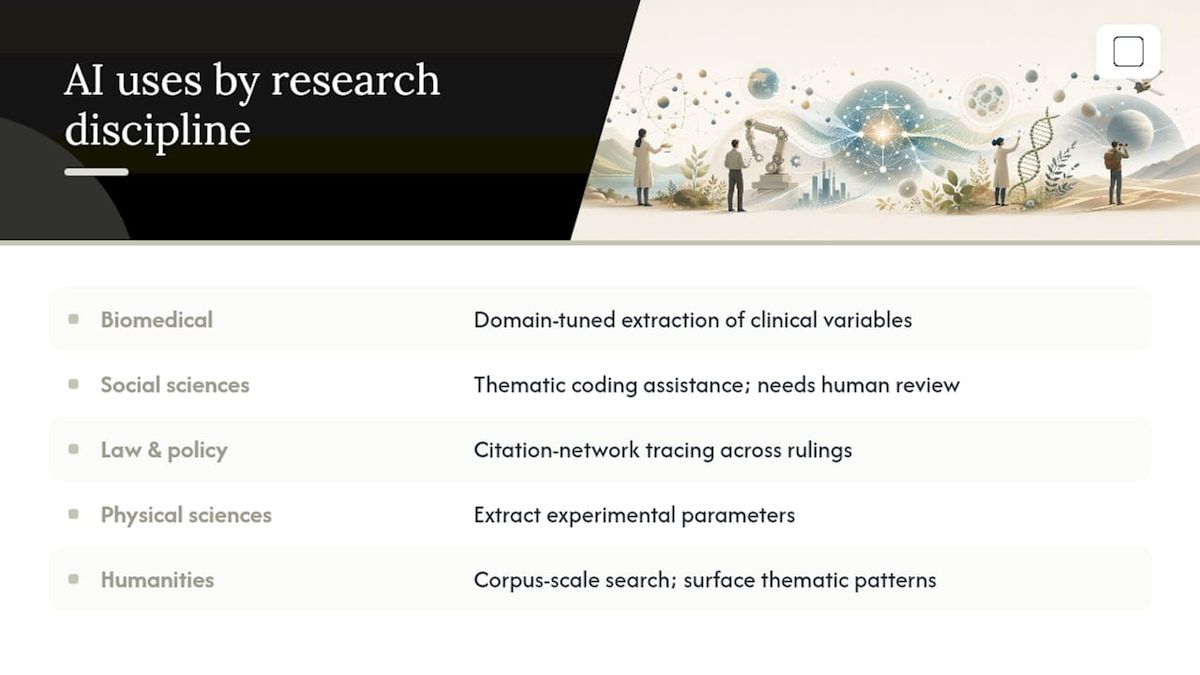
In the social sciences, qualitative researchers increasingly use AI for thematic coding assistance on interview transcripts, though it still requires close human review since context and tone drive meaning as much as keywords. In law and policy research, citation networks help trace how a legal argument or regulation has propagated across jurisdictions and rulings. In the physical sciences, structured data extraction pulls experimental parameters from methods sections into comparable tables across dozens of papers at once, cutting weeks off a meta-analysis.
Humanities researchers tend to use AI differently again: for corpus-scale text search across archives, or for surfacing thematic patterns across large document collections that would take a human years to read manually. The common thread across every discipline is the same one this guide keeps returning to: the tool is only as trustworthy as its ability to show you the source behind its claim.
Is AI for Research Easy to Learn, or Is There a Learning Curve?
The learning curve varies more by tool category than by researcher skill level. Simple chat-based tools have almost no onboarding, you type a question and get an answer, but that ease is deceptive because the risk of an unverified or hallucinated answer is highest exactly where the interface feels simplest.
Database-connected agentic assistants ask more of you upfront: understanding how to structure a query, knowing which corpora to select, learning to read a confidence or provenance indicator. That investment pays off in results you can actually trust without a second verification pass.
Extraction and mapping tools sit in the middle. They're usually built around a workflow that mirrors what researchers already do (search, screen, extract, synthesize), so the interface logic feels familiar even when the underlying technology is new. Local, offline tools add one more step that's unfamiliar to most researchers: a one-time setup that includes picking a model and downloading it, rather than opening a browser tab. That setup step is a genuine barrier for non-technical users, but it's a single barrier crossed once, not an ongoing tax on every session afterward.
What Actually Matters When Choosing AI for Research
Most comparisons of AI research tools focus on which one writes the most fluent summary. That's the wrong axis. Fluency is cheap; every modern language model produces confident, readable prose. What separates a genuinely useful research tool from an entertaining one is whether it shows you where its claims came from and lets you check them in under a minute.
The conventional advice, "just try a few tools and see what feels right", undersells how much the trust question depends on the task, not the tool. A database-connected agentic assistant is the right call for a systematic search. It's the wrong call for a draft built on unpublished pilot data that shouldn't touch a third-party server at all.
If you take one thing from this guide, prioritize traceability over polish, and prioritize data sensitivity over convenience when deciding what runs in the cloud versus what stays on your own machine. Everything else, speed, interface design, summary quality, is secondary to those two questions.
Get a Private, Offline Assistant for the Work That Can't Leave Your Laptop
The tools covered above (agentic literature assistants, citation mapping platforms, RAG-based extraction tools) all send your queries to someone else's server. That's fine for a public literature search. It's the wrong choice the moment you're drafting from unpublished data, a grant application, or notes you're not ready to share with a cloud provider.

GreenCube handles that gap: an offline desktop assistant that reads your documents, drafts sections, and answers questions entirely on your own Windows PC. Pick the smaller model for work, or the bigger model if you need image reading and study-guide generation (it needs at least 8GB of RAM and runs slower). Sign in once with Google or Microsoft to verify your license, and everything after that runs locally, no ongoing subscription, no per-query cost. At €9.99 / $9.99 one-time, backed by a 15-day refund, it costs less than a month of most cloud AI subscriptions and keeps working long after. If your next project involves anything you can't put on someone else's server, download GreenCube and start with the model that matches your hardware and workload.
Sources
For deeper methodological grounding, consult these resources directly:
- Trusted AI enhances topic and journal discovery in the Web of Science Research Assistant
- A hybrid framework for creating artificial intelligence-augmented systematic literature reviews | Management Review Quarterly
FAQ
Is ChatGPT Good for Research?
ChatGPT works well for brainstorming, outlining, and summarizing concepts you already understand, but it lacks direct connections to licensed academic databases and can produce citations that don't exist. Treat it as a drafting aid, not a literature search tool.
What AI Is Better Than ChatGPT for Academic Work?
For literature discovery specifically, database-connected agentic assistants like the Web of Science Research Assistant outperform general chatbots because they retrieve from licensed scholarly corpora rather than open web text.
Which AI Tool Is Best for PhD Research?
The best setup for a dissertation combines a trusted-data discovery assistant for the literature review with a private, offline assistant like GreenCube for drafting chapters that include unpublished results or committee-sensitive material.
Which GPT Model Is Best for Research Tasks?
No single general-purpose model is "best" for research since accuracy depends heavily on whether the tool connects to verified databases and shows clickable sources. Domain-specific models, such as PubMedBERT for biomedical extraction, often outperform general models on accuracy within their specialty.
Can AI Replace a Systematic Literature Review Process?
No. AI can accelerate search, screening, and extraction, but human oversight, source verification, and methodological rigor remain necessary for a defensible systematic review.
Recommended
- Offline AI for Students: Study Privately on Your Laptop
- Offline AI Security: A Practical Hardening Guide
- GDPR Compliant AI: Your 2026 Compliance Roadmap
- Local AI Models Explained: Privacy, Use Cases, How to Start
Your own AI, on your own PC
GreenCube runs on your computer: no usage limits, no subscription, works without internet. €9.99, paid once.
Get GreenCube