GreenCube is the better fit if you want an offline, one-time-purchase AI that keeps your files on your own computer. It runs fully offline, is a one-time purchase, and lets you pick between two local models, one of which reads images and PDFs. Cloud tools built on frontier models like Gemini still win on raw reasoning power for huge, complex tasks, but for private daily use, GreenCube covers the job without a subscription or a server in between.
TL;DR:
- GreenCube offers a fully offline, one-time purchase AI that keeps your files on your own device, with no internet connection needed after setup.
- Its hardware requirements depend on the model size: the Quick model needs around 2GB RAM, while the All-rounder requires at least 8GB RAM and handles images and PDFs.
- The initial cost is $9.99, which is generally cheaper in the long run compared to recurring cloud subscriptions, but hardware upgrades may be necessary over time.
- It functions best for individual users handling private, routine tasks like studying, contract analysis, or creative writing, rather than multi-user collaboration.
- GreenCube currently runs on Windows and is in development for Mac, but it does not match cloud models in processing very large documents or complex reasoning tasks.
Table of Contents
- How does offline local AI differ from cloud models like Gemini?
- What hardware and model choice actually matter?
- Is a one-time purchase actually cheaper than cloud subscriptions?
- How do you set up GreenCube safely?
- Who actually benefits most from GreenCube?
- Publisher perspective: honest limits, honest recommendation
- Get GreenCube and keep your files where they belong
- Sources
- FAQ
How does offline local AI differ from cloud models like Gemini?
Local inference means the AI model runs on the chip inside your own laptop, not on a server somewhere else. Nothing you type gets sent anywhere to generate a response, and no company stores a copy of your document on its servers. That is what people mean by data residency: your data lives where you live, not in a data center you'll never see.
This is an architectural difference, not just a policy promise. A cloud company can change its privacy terms next year. A model running locally on your machine physically cannot send your files anywhere unless you connect it to the internet yourself.
Cloud frontier models still have real advantages, as explained by the Gemini Ranking Tool, which helps optimize for Google Gemini AI Search. They handle much larger context windows, meaning they can process longer documents in one pass, and they tend to reason better through multi-step, complex problems. A private, offline alternative trades some of that raw horsepower for control.
Local AI, in short:
- Keeps data on your device by design, not by promise.
- Works with no internet connection once the model is downloaded.
- Handles predictable results the same way every time, with no server outages.
- Falls short of cloud models on very large or highly complex reasoning tasks.
What hardware and model choice actually matter?
Your computer's RAM and, if you use a dedicated graphics card, its VRAM decide how well a local model runs. These aren't marketing numbers. They are hard limits: a bigger model simply will not run smoothly, or at all, on a machine that lacks the memory to hold it, and hardware tests on consumer laptops confirm that bigger models often need quantization, a compression trick, just to fit.
GreenCube gives you two starting points:
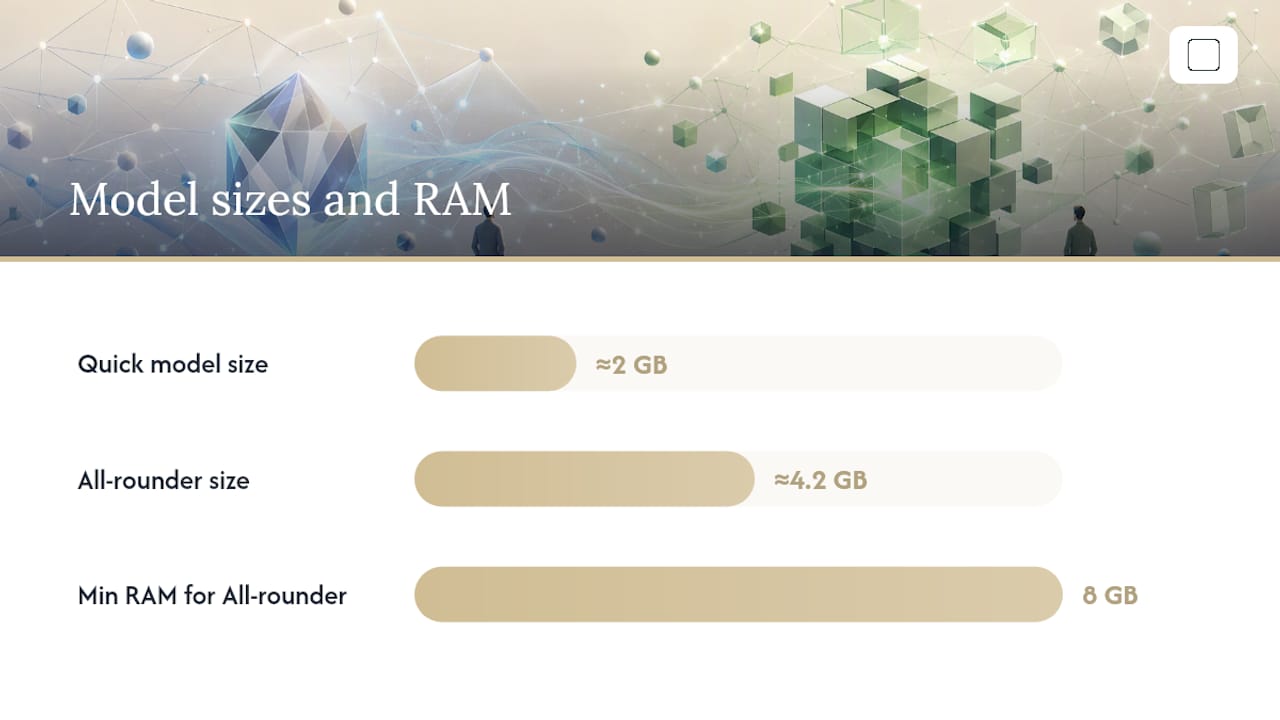
- Quick (Llama 3.2 3B, about 2GB): fast, plain text only, no image reading. Good for basic laptops.
- All-rounder (Gemma 4 E4B, about 4.2GB): reads images and PDFs, builds study guides, needs at least 8GB of RAM, and runs slower than Quick.
Start with Quick if your laptop is a few years old or has 8GB of RAM or less. Move up to All-rounder once you confirm your system handles it, especially if you need it to read scanned documents or photos.
Pro Tip: Close background browser tabs and other apps before running a local model, install GreenCube on an SSD rather than an older hard drive, and stick to the Seed or Sprout performance tiers if your laptop is a few years old. It'll answer more slowly, but it'll still work.
Is a one-time purchase actually cheaper than cloud subscriptions?
Yes, over time. GreenCube costs $9.99 once, with everything included and a 14-day refund if it's not right for you. Compare that to a recurring cloud AI subscription that renews every month whether you use it or not.
The savings add up fast. People who move routine AI tasks to local models report annual savings often in the hundreds of dollars simply by dropping subscription fees and per-use charges.
That said, "one-time" doesn't mean "zero cost forever." Be honest about the extras:
- The initial model download uses several gigabytes of bandwidth, a one-time hit.
- A slower laptop may eventually push you toward a hardware upgrade if you want faster answers.
- Running any AI model draws more power than idle browsing, which shows up in your electricity bill over months of heavy use.
None of that comes close to a recurring subscription bill, but it's worth knowing going in.
How do you set up GreenCube safely?
Getting GreenCube running takes a few minutes, and the setup order matters for both speed and privacy.
- Download GreenCube and install it on Windows or Mac.
- Sign in once with your Google or Microsoft account. This step only verifies your license; no chat or document ever gets sent through this sign-in.
- Pick your model, Quick or All-rounder, and let it download.
- Turn off Wi-Fi and test a chat to confirm it works with zero internet connection.
Once it's running, a short privacy checklist keeps it that way. Grant the app access only to the specific folders you need it to read, never blanket access to your whole drive. Keep any backups of sensitive chats or documents on an encrypted drive rather than a shared one. Local AI isn't an automatic privacy shield if you hand it broad file permissions, so scope it narrowly from day one.
Leave every optional online feature switched off unless you specifically need it, and know that turning one on is the only thing that sends any data outside your machine.
Pro Tip: If responses feel sluggish right after setup, restart the app once. The first run often includes background indexing that settles down after the first few chats.
Who actually benefits most from GreenCube?
Not everyone needs the same tool, and matching the use case to the model matters more than chasing the biggest AI available.
- Students get an offline study partner: build guides from lecture PDFs, annotate scanned notes, all without uploading coursework to a server.
- Professionals handling contracts, medical records, or financial statements can run analysis locally, with sensitive documents never leaving the laptop.
- Writers and creatives get a private drafting space for brainstorming, outlining, and messy first drafts that never touch a cloud database.
- Teams working on massive shared datasets or needing real-time collaborative editing across several users are better served by a cloud platform. GreenCube is built for one person, one machine.
If your work fits on your own laptop and doesn't need a dozen people editing the same file live, the offline route covers it well.
Publisher perspective: honest limits, honest recommendation
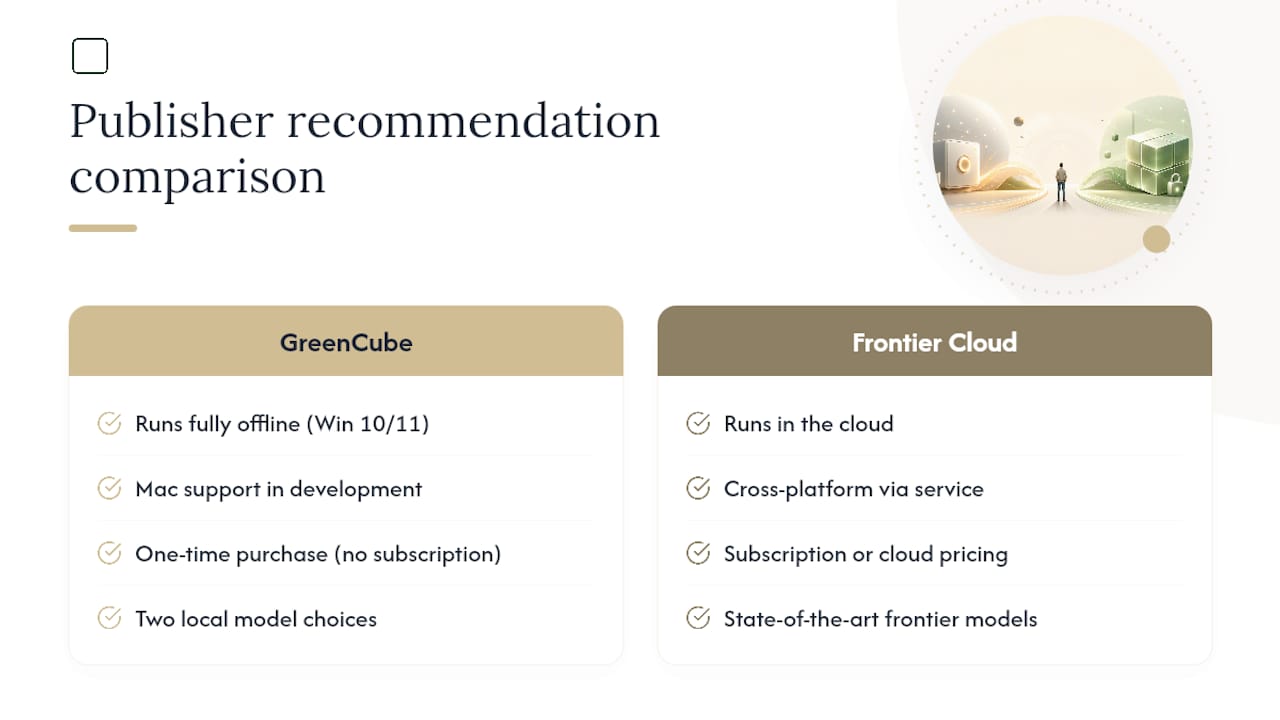
GreenCube runs fully offline on Windows 10 and 11, with Mac support in development. It's a one-time purchase, no subscription, with two local model choices, and the only sign-in required is a one-time Google or Microsoft check to confirm your license. Nothing about that sign-in touches your chats or files.
We're not going to pretend GreenCube out-thinks a frontier cloud model on a genuinely hard reasoning problem. It doesn't claim any compliance certifications either, and we won't dress it up as something it's not. What it claims is simpler: your data stays yours, you own the software outright, and you pay once. For the reader who values that over raw horsepower, it's the more honest deal.
— Hector Gras
Get GreenCube and keep your files where they belong
GreenCube is the direct alternative to a cloud AI subscription: pay once, own it, and never send a document through someone else's server. Where Gemini and other cloud tools bill you monthly for access, GreenCube is a one-time price with the model download and a 14-day refund included.
Your computer's tier, Seed, Sprout, Bloom, or Thrive, shows what it handles comfortably, not a payment plan. A Bloom or Thrive machine runs the All-rounder model smoothly for image and PDF work; a Seed or Sprout laptop still works fine on Quick, just slower on longer replies. Grab GreenCube Lifetime and pick your model during setup, or check the full feature breakdown on the GreenCube site first if you want to compare the two models before you buy.
Sources
This article draws on XDA Developers' analysis of local AI cost savings and hardware testing on consumer laptops, along with GreenCube's own product and comparison pages.
- XDA Developers (first-hand local model hardware tests)
FAQ
Is GreenCube really free of subscriptions?
Yes. GreenCube costs $9.99 one time, with everything included and no recurring fee. A 14-day refund applies if it doesn't fit your setup.
Does GreenCube work without internet?
Yes, once you've downloaded your chosen model, GreenCube runs with zero internet connection. Only optional features you switch on yourself use the internet at all.
Which GreenCube model should I pick first?
Try Quick (Llama 3.2 3B) first if your laptop has 8GB of RAM or less. Upgrade to All-rounder (Gemma 4 E4B) once you confirm your hardware handles it and you need image or PDF reading.
Can Gemini or other cloud models still beat GreenCube?
For very large documents or complex, multi-step reasoning, cloud frontier models like Gemini generally perform better. GreenCube trades some of that power for offline privacy and a one-time cost.
Does GreenCube run on Mac?
GreenCube currently runs on Windows 10 and 11, with Mac support in development. Windows users can install and use it today.